


Dark Candlelight Cinematic Photo Editing Prompts (Boy & Girl)
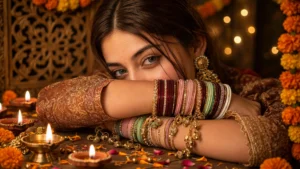
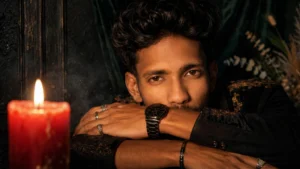
If the song “Teri Nazron Ke Sadke” from Ruposh has been stuck in your head lately, you’ve probably seen the photos that came with it: a face emerging from total darkness, lit by a single red candle, forearms crossed in front so only the eyes show. Girls in sarees with stacks of glass bangles. Boys in black kurtas with watches and rings catching the candlelight. It’s dramatic, it’s moody, and it looks like it was shot for a film poster.
It wasn’t. It’s one prompt. Below are both versions — Prompt 1 for girls, Prompt 2 for boys — each built around the same candle, the same darkness, and the same crossed-arms composition, with the styling tuned for its subject.
About This Editing Style
The candlelight edit is pure chiaroscuro: one light source, deep black shadows, and a face half-hidden so the eyes do all the work. The crossed forearms aren’t just a pose — they create the horizontal frame that makes the portrait feel composed rather than accidental, and they give the styling somewhere to live: bangles and ghungroo charms for the girl version, a watch and rings for the boy version. Everything else falls away into darkness. That’s why an ordinary selfie, which would look flat in normal light, turns cinematic here.
How to Create This Edit
- Open ChatGPT (app or website) and sign in.
- Tap the + icon and upload a clear selfie — front camera works best, face fully visible.
- Click Copy Prompt on Prompt 1 or Prompt 2 above and paste it into the chat.
- Send it and wait a minute or two.
- Open the result full-screen. Check the eyes first (they carry the portrait), then the hands and jewelry.
- If the face drifted or the bangles/rings look duplicated, regenerate — candlelight portraits usually settle by the second attempt.
- Download the version you like.
Tips for Better Results
Use an unfiltered selfie. This is the mistake that ruins most candlelight edits. A beauty-filtered photo has already altered your face, so the AI keeps “correcting” it and you never get an exact match. A fresh front-camera shot, no filter, gives the cleanest likeness.
Take the photo for the prompt, not from your gallery. A quick fresh selfie in decent light beats a compressed, cropped group photo every time. The AI needs real facial detail to rebuild in candlelight.
Check the arms carefully. Crossed forearms sit right across the face, so any extra finger or doubled bangle is immediately visible. Zoom in on the arms before posting.
Keep the candle on the left. Both prompts place the red candle in the left foreground — that position is what creates the signature light direction. If a result moves it, regenerate rather than accepting a flatter image.
16:9 is the trend’s frame, but crop freely. The wide ratio suits the cinematic feel and YouTube thumbnails. For a story, generate in 16:9 and crop the center, or add “vertical 9:16” to the prompt — just know the crossed-arms composition gets tighter.
If dark, dramatic portraits are your thing, our SMTG bandage cinematic prompts push the same moody editorial style even further, and the music aesthetic photo editing prompts use darkness and glow in a completely different way.
FAQs
Which photo gives the best candlelight result?
A fresh front-camera selfie with your face clearly visible and no filters applied. Filtered photos are the main reason faces come out slightly “off” in this edit.
ChatGPT or Gemini — which is better for this edit?
Both can generate it. ChatGPT tends to follow detailed prompts like these most precisely, which matters here because the composition is specific. If you hit a generation limit, Gemini produces a close variation of the same look.
Why is the aspect ratio 16:9 and not 9:16?
The trend’s signature frame is wide and cinematic — the candle on one side, the face on the other. 16:9 fits that layout. You can crop to vertical afterward for stories.
Will my face change in the candlelight version?
It shouldn’t — both prompts lock your face from the reference photo. Face drift almost always traces back to a blurry or filtered input photo, not the prompt.
Can I swap the styling between the two prompts?
Yes. The composition works for anyone. If you want the boy version with different jewelry, or the girl version with a different saree color, just edit those lines in the prompt before generating — keep the candle and crossed-arms instructions untouched.
Final Thoughts
Some trends need ten props and a location. This one needs a candle and darkness. Pick your version, feed it a clean selfie, and you’ve got a portrait that looks like a film still — which is exactly why the whole internet is making them right now.
