


Movie-poster style AI photo editing has become a popular way to turn an ordinary portrait into a cinematic social media image. The Mirzapur movie poster editing prompt in this guide is designed around that idea, placing your own photo inside a realistic cinema lobby alongside a large Mirzapur: The Movie promotional poster.
The concept focuses on keeping the person recognizable while changing the surrounding scene. Instead of generating a completely different character, the prompts instruct the AI to preserve the uploaded person’s face, clothing, hairstyle, body proportions, and pose while building a realistic Indian cinema environment around them.
Two versions are included below. Both use a 4:5 vertical composition, but they provide slightly different reference and environment instructions.
What Is the Mirzapur Movie Poster AI Edit?
The edit recreates the appearance of someone visiting a cinema where a large Mirzapur: The Movie promotional poster is displayed nearby.
The main composition includes:
- Your uploaded photo as the identity reference
- A modern Indian cinema lobby
- A large freestanding Mirzapur: The Movie poster
- Dark crime-thriller visual styling
- Three intense male characters within the poster artwork
- An ornate circular decorative background
- Dramatic fiery city imagery
- A throne near the bottom of the poster
- Distressed red title typography
- Cinema lighting and reflections
- Vertical 4:5 framing
The important part of this edit is the separation between your photo and the generated movie artwork. The person should remain consistent with the uploaded reference while the cinema and promotional poster become part of the new composition.
What You Need for This AI Movie Poster Edit
You only need a clear photo of yourself and one of the prompts below.
For the best identity reference, choose a photo where:
- Your face is clearly visible.
- Your hairstyle can be seen.
- Your clothing is not heavily obscured.
- Your full body or most of your body is visible if you want a full-body composition.
- The image is not extremely blurry or heavily filtered.
A front-camera selfie can work, but a clear portrait with good lighting generally gives the AI more useful information about your appearance.
Mirzapur Movie Poster Prompt for Girls
This version is designed around a girl standing on the left side of a modern PVR cinema lobby while a large promotional poster appears on the right.
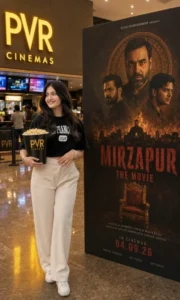
Use the uploaded image as the exact identity and appearance reference for the girl. Preserve her recognizable face, facial structure, facial features, hairstyle, hair texture, skin tone, expression, body shape, height, proportions, clothing, footwear, hand position, pose and overall appearance.
Do not beautify, feminize, reshape, slim, retouch or redesign the person. Keep her appearance faithful to the uploaded reference.
Create an ultra-realistic vertical 4:5 photograph of the girl standing naturally on the left side of a modern Indian PVR cinema lobby.
Keep her in a full-body composition with natural perspective, realistic proportions and an authentic camera angle.
She is holding a large black cinema popcorn bucket filled with popcorn.
On the right side, place a large realistic freestanding promotional poster for “MIRZAPUR THE MOVIE”.
Give the poster a dark brown and black cinematic crime-thriller appearance with three intense male characters, an ornate circular decorative background, dramatic fiery city imagery and a powerful throne positioned near the lower portion of the artwork.
Add prominent distressed red title typography reading “MIRZAPUR THE MOVIE” and include the poster detail “IN CINEMAS 04.09.26”.
Make the poster appear physically present in the cinema lobby with realistic proportions, perspective, illumination and shadows.
Build a believable premium cinema environment around the subject: illuminated cinema signage, ticket counters, digital screens, showtime displays, people in the background, queue barriers, polished reflective flooring, glass surfaces, dark wood details and warm architectural lighting.
Keep all environmental elements naturally integrated instead of making the scene look like a digital collage.
Use balanced cinematic indoor lighting that keeps the girl’s face, clothing, hands and full body clearly visible. Add soft overhead illumination, natural highlights, realistic contact shadows and subtle illumination around the movie poster.
Create realistic reflections on the polished floor and maintain accurate perspective, natural colors, realistic skin texture, detailed hair, realistic fabric and professional DSLR photography characteristics.
Photorealistic, highly detailed, cinematic warm tones, realistic depth of field, natural lens characteristics and balanced HDR without an artificial HDR appearance.
Avoid CGI styling, cartoon effects, plastic skin, excessive beauty filters, distorted anatomy, extra fingers, duplicated people, cropped feet, altered clothing, unnecessary accessories, random objects or watermarks.
Final aspect ratio: 4:5 vertical.
Mirzapur Movie Poster Prompt for Boys
The second version is intended for a male subject and keeps the uploaded person’s clothing and appearance unchanged while placing him beside the promotional movie poster.
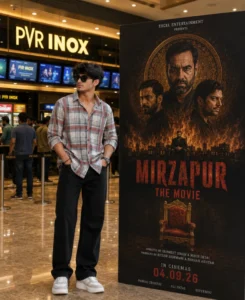
Use the uploaded image as the primary and exact reference for the person. Preserve his recognizable identity, facial structure, facial features, hairstyle, hair texture, skin tone, sunglasses, expression, body shape, height, proportions, pose, hand position, clothing, accessories and overall appearance.
Preserve the white T-shirt, dark green overshirt, loose dark jeans, white sneakers and necklace exactly as shown in the uploaded reference.
Do not beautify, retouch, slim, reshape, redesign or otherwise modify the person.
Recreate the scene as an ultra-realistic vertical 4:5 photograph. Place the person naturally on the left side of a modern Indian PVR INOX cinema lobby.
Show the person at full body with his feet completely visible. Keep the original body proportions, natural perspective and realistic camera scale.
On the right side, place a tall freestanding promotional poster titled “MIRZAPUR: THE MOVIE”.
Design the poster with a dark crime-thriller atmosphere containing three intense male characters, an ornate circular decorative backdrop, dramatic fiery city imagery and a prominent throne.
Use distressed red “MIRZAPUR” title typography followed by “THE MOVIE”, with “IN CINEMAS 04.09.26” positioned near the bottom.
Make the poster physically believable, with correct perspective, realistic scale, natural illumination and contact shadows.
Create an authentic modern Indian cinema interior with PVR INOX branding, ticket counters, digital screens, showtime boards, people waiting in queues, queue barriers, polished marble flooring, glass surfaces, dark wood details and warm architectural lighting.
Maintain realistic reflections and natural environmental depth throughout the lobby.
Use balanced cinematic indoor lighting that clearly illuminates the person’s face, clothing, hands and full body while preserving the warm atmosphere of a real cinema lobby.
Add soft overhead light, natural facial highlights, realistic contact shadows, subtle poster illumination and accurate floor reflections.
Create photorealistic DSLR-quality photography with natural skin texture, realistic hair detail, detailed clothing, accurate perspective, subtle depth of field, cinematic warm tones and balanced HDR.
Avoid CGI appearance, artificial beauty filters, excessive HDR, plastic skin, distorted anatomy, extra fingers, duplicated people, cropped feet, changed clothing, unnecessary accessories, random objects and watermarks.
Do not add popcorn or food to the scene. Do not change the person’s identity, outfit, pose or body proportions.
Final aspect ratio: 4:5 vertical.
How to Create the Mirzapur Movie Poster
Step 1: Choose Your Photo
Start with a clear photo of yourself. For the first prompt, choose a photo of the girl you want to place in the cinema scene. For the second prompt, use the male reference image.
The clearer the face and clothing are, the easier it is for the image model to preserve the person’s appearance.
Step 2: Open Your AI Image Tool
Open the image-generation or image-editing feature in the AI tool you want to use.
Upload your personal image before submitting the prompt.
Step 3: Copy the Appropriate Prompt
Use the first prompt for the girl version and the second prompt for the boy version.
Do not combine both prompts into one request. Each prompt already contains the instructions required for its intended composition.
Step 4: Generate the Image
Paste the selected prompt and submit it with your uploaded photo.
The AI should use your image as the person reference while constructing the cinema lobby and movie-poster environment around you.
Step 5: Inspect the Result
Before saving the image, check:
- Face identity
- Hairstyle
- Clothing
- Body proportions
- Hands and fingers
- Full-body framing
- Poster placement
- Poster text
- Cinema perspective
- Floor reflections
- Background people
- Lighting consistency
If one part is incorrect, make a targeted correction instead of changing the entire prompt.
How to Get a Better Face Match
The quality of the identity reference has a major effect on the final result.
Use a Clear Face Reference
Avoid photos where your face is:
- Very small
- Extremely blurry
- Covered by hair
- Hidden behind a heavy filter
- Obscured by another person
- Poorly exposed
A clean, recognizable reference gives the model more useful visual information.
Tell the AI What Must Stay the Same
The prompts specifically protect the person’s:
- Face
- Facial structure
- Skin tone
- Hair
- Body proportions
- Clothing
- Pose
- Hands
- Accessories
This is particularly important when the requested scene is very different from the original photograph.
Correct One Problem at a Time
If the face looks correct but the poster text is wrong, ask for a poster-text correction.
If the poster looks good but the clothing changed, request that only the clothing be restored to the uploaded reference.
This keeps the successful parts of the generated image intact.
How to Make the Cinema Scene More Realistic
Keep the Person and Poster at the Same Perspective
The person and poster should appear to exist in the same physical space. Their scale, floor position and camera perspective should agree.
Use Realistic Reflections
A polished cinema floor can reflect overhead lighting and nearby objects, but the reflection should remain subtle.
Balance the Lighting
The cinema should be bright enough to show the person clearly while retaining the warm atmosphere of an indoor theatre.
Avoid Excessive HDR
High dynamic range can help retain detail, but too much HDR can make skin, floors and poster artwork look artificial.
Keep Background People Secondary
People in the lobby should support the environment rather than becoming the main focus.
Tips for Better Mirzapur Movie Poster AI Edits
Use 4:5 for the Intended Composition
Both prompts are written for a 4:5 vertical image, which keeps enough room for the full-body person and the tall promotional poster.
Keep the Poster on One Side
The left-person/right-poster arrangement creates a clear visual hierarchy and prevents the poster from covering the subject.
Give the Poster Enough Space
A large poster needs enough empty area around it to look like a freestanding promotional display rather than a graphic floating behind the person.
Check Generated Typography
Movie-poster typography can sometimes contain spelling or layout errors. Inspect the title and date before publishing.
Use a High-Quality Original Photo
A heavily compressed screenshot may give the AI less useful detail than the original camera image.
FAQs
Can I use my own photo with these Mirzapur prompts?
Yes. Both prompts are designed to use an uploaded personal image as the main person reference.
What aspect ratio should I use?
The prompts are designed for a 4:5 vertical composition.
Are there separate prompts for girls and boys?
Yes. The article contains two prompts: one built around the girl reference scene and another designed for the male reference scene.
Can I change my clothes in the generated poster?
The prompts are specifically designed to preserve the clothing from the uploaded reference. If you want a different outfit, that should be stated as a deliberate modification rather than allowing the AI to change it unintentionally.
Why does the movie poster text sometimes look incorrect?
AI-generated images can have difficulty rendering detailed typography consistently. If the scene is otherwise correct, request a targeted correction to the poster text.
What should I do if the face changes?
Use a clearer reference photo and explicitly prioritize the original identity, facial structure, hairstyle and skin tone. You can also ask the image tool to correct only the face while leaving the cinema scene unchanged.
Can I use these prompts for social media posts?
Yes. The 4:5 composition is suitable for many portrait-style social media posts. Before publishing, check the generated image for incorrect text, unintended objects and other AI artifacts.
Conclusion
The Mirzapur movie poster editing prompt concept turns an ordinary personal photograph into a cinematic cinema-lobby scene. The key is not simply adding a movie poster; the person, poster, floor, lighting and surrounding cinema environment all need to look as though they were photographed together.
Choose the prompt that matches your reference image, upload a clear photo, generate the 4:5 composition and carefully inspect the final result. If the first generation has an identity or poster-text issue, use a targeted correction instead of rebuilding the entire scene.
