


Navratri 2026: Turn Your Photo Into a Devotional Masterpiece
Navratri is here — October 11 to 19, with Dussehra on the 20th — and my feed is already full of friends posting AI-generated photos of themselves beside Goddess Durga. Some look genuinely stunning. Others? The face doesn’t match, the hands look wrong, or the whole thing screams “filter.”
The difference is almost always the prompt. A vague one-liner gives you a generic goddess poster with your face pasted on. A well-built prompt controls the lighting, the outfit, the composition, even how your facial features carry over. Below are six prompts I wrote from scratch for this Navratri season — two for boys, three for girls, and one for couples. Each is built for ChatGPT’s image generation, keeps your face intact, and is tuned for the vertical formats Instagram and WhatsApp love.
Pick the one that fits your style, copy it, upload your photo, and you’re two minutes away from a story-worthy image.
Choosing the Right Photo (This Decides Everything)
Before touching any prompt, get this part right — it’s the single biggest factor in whether your face actually looks like you.
Use a front-camera selfie taken in daylight. Rear-camera shots usually keep you too small in the frame, and the AI ends up guessing your features. Your face should fill a good portion of the frame: sharp, no blur, no heavy filters, no sunglasses.
A plain background helps but isn’t mandatory. What matters is that the AI gets a clear read of your face shape, eyes, nose, lips, and skin tone. If the first result doesn’t resemble you, don’t settle — hit regenerate. The second or third attempt is very often the keeper. This works the same for everyone, boys and girls alike.
The 6 Navratri AI Photo Editing Prompts
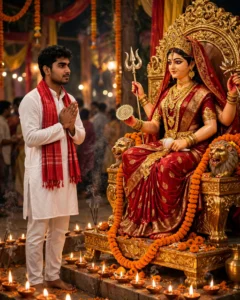
Prompt 1: Boy’s Namaste Before the Durga Idol (Night Pandal)
The classic. You, barefoot in a kurta, hands folded before a towering Durga idol — shot as a festival photographer framed it, not like a sticker slapped on.
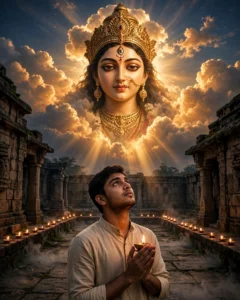
Prompt 2: Boy Under the Divine Durga Sky
For something more dramatic — you in a temple courtyard at dusk, looking up as Maa Durga’s glowing face forms in the clouds. Spiritual, cinematic, and very shareable.
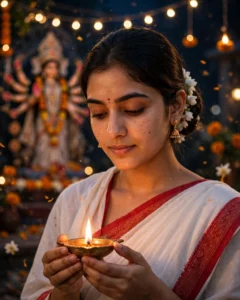
Prompt 3: Girl’s Laal-Paar Saree Diya Offering
The timeless Bengali Durga Puja look — white saree with red border, a brass diya in hand, evening aarti glow. Elegant without trying too hard.
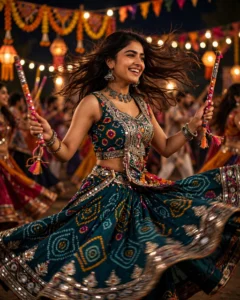
Prompt 4: Girl’s Garba Night Twirl
Navratri in Gujarat means one thing — garba nights. This one freezes you mid-twirl on a lit-up garba ground, skirt flaring, dandiya in hand.
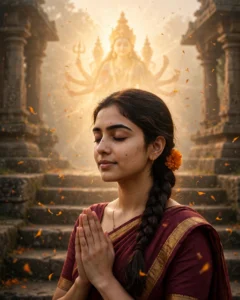
Prompt 5: Girl Receiving Maa Durga’s Blessing
A quieter, more emotional frame — you with folded hands and closed eyes as marigold petals shower down and a warm divine glow rises behind you. This one does beautifully as a Dussehra morning post.
How to Use These Prompts in ChatGPT (Step by Step)
Many articles floating around mix up ChatGPT and Gemini steps. Here is the correct flow for ChatGPT specifically:
Step 1: Open ChatGPT — app or website — on the model with image generation (works by default).
Step 2: Tap the + / attachment icon in the chat box and upload your clear front-camera selfie.
Step 3: Hit “Copy Prompt” on any box above.
Step 4: Paste the prompt into the chat and send it. Your image will be ready in a minute or two.
Step 5: Click the image to download it. If the face doesn’t match well, regenerate — the first attempt is rarely the best one.
Tips for Realistic Results
Face match is everything. The clearer your reference photo, the more accurate your face. A blurry or distant photo gives you a stranger’s face.
Check the hands. AI still mangles fingers sometimes. If the hands look off, regenerate — the third or fourth attempt usually fixes it.
One prompt, one concept. Don’t cram three scenes into one prompt (“pandal plus sky-face plus couple”). The AI gets confused and the result suffers.
Keep the reference simple. Whatever you’re wearing in the selfie doesn’t matter — the prompt’s outfit takes over. But remove caps and sunglasses first, or the AI may carry them into the final image.
If you enjoy devotional edits, check out our Maa Parvati AI photo & video prompts for more goddess-themed ideas, and our Radha Rani getup prompts for traditional festive looks.
FAQs
Which photo works best for Navratri AI photo editing?
A clear front-camera selfie taken in natural daylight, face filling most of the frame, no sunglasses, no heavy filters. Rear-camera group shots almost always produce a mismatched face.
Can I use these prompts in Gemini or other AI tools too?
Yes. They are written for ChatGPT but work in Gemini, Meta AI, and other image generators as well. Just don’t add Midjourney-style parameters like –ar — those only work in Midjourney.
Why does my face look different in the generated image?
Two reasons: either the reference photo wasn’t clear, or the AI “beautified” you. The face-preservation lines are already written into every prompt above, and if there’s still a mismatch, regenerate — the second or third attempt usually nails it.
What aspect ratio should I use for Instagram stories and WhatsApp status?
9:16 is best for stories and status. These prompts are optimized for 4:5, which suits feed posts and profile pictures — if you want 9:16, just add “vertical 9:16” to the prompt before generating.
Are these Navratri prompts free to use?
Completely. Copy them, use them with your photo in ChatGPT’s free tier — no cost, no tricks.
Can I make a family Navratri photo with these prompts?
Prompt 6 is built for two people. For a family, describe the members the same way — but keep it to 2–3 faces max, since face matching gets harder with every added person.
Final Thoughts
Navratri lasts just nine days — October 11 to 19, then Dussehra. Devotional AI photos peak in this exact window and cool off until next year. So if you’re going to try it, try it now: grab a good selfie, copy one prompt from above, and your story is two minutes away.
And if the devotional theme clicks for you, our Ganesh Ji & Krishna devotional video prompts are worth a look — video edits are the next wave after photos. Want to experiment with backgrounds? Our viral background prompts will help.
