Three People, One Frame, Zero Dancing Skills Needed
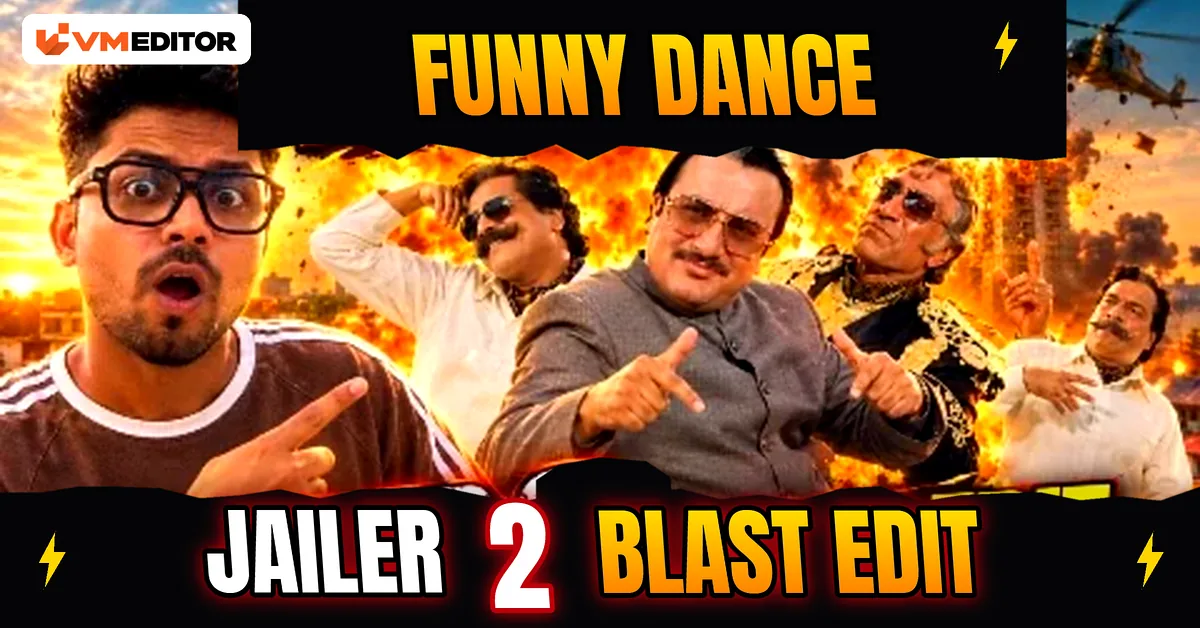
Scroll Instagram for two minutes and you will see it: three people in a single frame, each dancing in a completely different direction, the video sitting on millions of views. The funny part? Most of those “dancers” never danced. The videos are built with AI — a viral dance clip provides the moves, ordinary photos provide the faces, and Google Flow rebuilds the video with real people inside it.
You can do the same with your own photo, your friends’ photos, or a favourite creator’s picture. Below are the 4 prompts behind this trend, in the order everyone is using them: the wedding dance entry, the glasses video and its missile version, and the three-person dance swap — plus the photo rules and Flow steps that make them work.
Details of the Viral Funny Dance Reels Edit
New editing trends land on social media every week, but this one has a specific advantage: the song, the steps and the comic timing are already proven. The reference video did the hard work of going viral — you are simply recasting it. And because Flow rebuilds the scene around your photo, the result does not look like a cheap face-swap filter. It looks like the person was actually standing there, in that hall, doing those steps.
Everything here is free to try. All you need is a reference video, the right photos, and the prompts below.
How to Find the Perfect Picture for Your Dance Video
The photo decides the result more than the prompt does. For yourself, use a front or back camera photo where your face is clearly visible and the shot is not taken from too far away — the AI needs real facial detail to hold your identity through fast dance movement. The same rule applies to photos of friends.
For the glasses prompts (Prompts 2 and 3), the photo has one extra requirement: you should be wearing black rectangular eyeglasses, outdoors or easy to place outdoors, since the whole video is built around them.
Prompt 1: Wedding Dance Floor Video (Reference Video + Your Photo)
Upload the reference dance video first, then your photo. Flow replaces the main dancer with you — same walk, same bite, same turn back into the crowd.
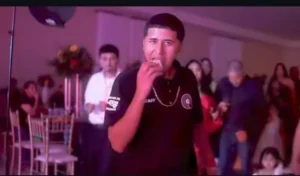
Use @video1 as the master reference for the action, setting, camera movement, timing and audio, and @image1 as the identity reference for the main character. Recreate the reference video as closely as possible with the person from @image1 in the lead role, face recognisable and consistent in every frame. Keep the main character’s outfit from @video1: the oversized dark T-shirt, silver chain, loose dark pants and black-and-white sneakers, with all details intact. Setting: the same indoor wedding reception hall — decorated tables, gold chairs, flower arrangements, curtains, formally dressed guests, and colourful pink, purple, green and blue party lighting. Action: 0–2 seconds, the character walks out of the wedding crowd towards the camera with the same relaxed, rhythmic walk and subtle dance steps as @video1, guests dancing behind him. 2–3 seconds, he comes closer, confident expression, camera holding the same frontal angle as his upper body fills more of the frame. 3–5 seconds, he raises a small piece of food to his mouth, takes a bite and chews naturally while looking at the camera, matching the original hand movements. 5–7 seconds, he moves forward a little more, then starts turning away from the camera, smooth and natural. 7–10 seconds, he turns back into the crowd and rejoins the dance floor with relaxed gestures, the back of his T-shirt design visible as he moves off under the coloured lights. Camera: follow @video1’s angles, framing and handheld feel exactly, including the front-to-back transition as he turns. Audio: keep the original music, beat and timing from @video1 wherever supported — no replacement track, no narration, no added sound effects. Photorealistic, natural movement and expressions, accurate clothing, realistic shadows. Strict rules: follow the original action sequence; use @image1 only for the main character’s identity; no text, captions, subtitles or overlays; no invented actions or new scenes. Duration 10 seconds, vertical 9:16.
Prompt 2: The Glasses Video (Rooftop Close-Up)
This is the cinematic one-half of the glasses trend: a calm rooftop shot, the glasses come off, and the video ends on a close-up of the lenses with the whole neighbourhood visible through them. Prompt 3 below continues from this exact video, so make this one first.
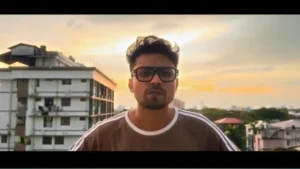
Create an ultra-realistic 10-second cinematic video using my uploaded photo as the exact identity reference, recreating the reference video’s sequence, movements, camera framing, glasses removal and final close-up as accurately as possible. Identity and clothing: preserve my exact face, facial structure, skin tone, hairstyle and body proportions, and keep exactly the clothes I wear in my photo — do not change, recolour or add any clothing or accessories. 0–2 seconds: medium close-up from the front, outdoors on a rooftop or balcony, residential buildings, distant greenery and a warm sunset sky behind me. Head slightly lowered, black rectangular eyeglasses on, shoulders relaxed, still for a moment — then I slowly raise my head and look at the camera, calm and confident. 2–3.5 seconds: eye-level camera, I look straight ahead, glasses still on, expression natural, no exaggerated gestures. 3.5–5 seconds: I raise one hand, grip the glasses frame and remove them in one smooth, anatomically correct movement, head turning slightly, face fully recognisable. 5–6 seconds: I hold the glasses between my fingers and move them towards the SIDE of the frame — not in front of my face as if presenting them — held horizontally at a slight natural angle, frame and lenses visible up close. 6–8 seconds: the camera transitions to the glasses as the main subject, slightly off-centre, with real buildings, rooftops, greenery and evening sky visible THROUGH and AROUND the lenses, realistic reflections on the glass without hiding the background, shallow depth of field and subtle cinematic movement. 8–10 seconds: hold the side-positioned glasses close-up, buildings and sunset behind them, fingers natural, glasses unchanged in shape and size. Style: realistic smartphone or DSLR footage, golden-hour light, natural skin texture, authentic hand movement, smooth transitions. Strict rules: my photo is the only identity source; glasses worn at the start and removed exactly once, then staying in my hand; keep the outdoor location; no new outfits, no different glasses, no dialogue, text, subtitles, logos or watermarks; no face distortion, extra fingers, deformed hands, duplicated glasses or flicker. Output: exactly 10 seconds, horizontal 16:9, ultra-realistic, ending on the side-positioned glasses close-up with buildings behind.
Prompt 3: The Missile Version (Part 2 of the Glasses Video)
Same photo, same first frame — completely different ending. This prompt takes the calm glasses shot and turns the background into a missile-strike scene, with the focus pull timed so the building sharpens before the impact, not after it. Use your Prompt 2 photo as the first frame.
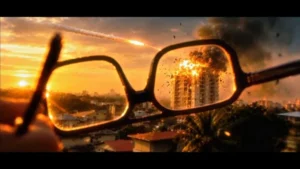
Use the uploaded photo as the exact first frame and the reference video as the guide for missile entry direction, flight paths, timing, scale, explosion placement and the focus-pulling effect. Preserve the photo’s composition, hand, eyeglasses, building, trees, sky and environment. Scene and timing: 1) Opening — start on the exact photo: a hand holds black-framed eyeglasses in the foreground, sharp, with the distant building softly blurred behind; camera completely locked. 2) Several small, fast missiles enter from the LEFT and RIGHT EDGES of the frame, travelling inward through the distant environment towards the background building, small at this distance, with realistic speed, subtle propulsion flames and thin smoke trails. They must not come from behind the camera, approach the viewer, or fly towards the glasses. 3) Focus transition — the most important part: as soon as the missiles are in flight, begin a smooth, gradual rack focus from the foreground glasses to the distant background WHILE the missiles are still travelling. The building, sky and landscape sharpen progressively, the glasses soften, and the background reaches full sharpness BEFORE impact. Never hold the focus shift until after the explosion. 4) Only once the background is sharp do the missiles strike the building: convincing impacts, bright fiery explosions, expanding fireballs, sparks, fragments and thick smoke rising from the hit points, clearly visible in the focused background, glasses remaining blurred in front. 5) Final frame: camera still locked, fire and smoke developing around the struck building, background sharp, glasses out of focus, original hand position and framing preserved. Camera: completely static, no movement, zoom, pan, tilt or cuts — one continuous shot with natural lens optics. Negative prompt: missiles from behind the camera or towards the viewer or glasses, missiles entering from the centre foreground, oversized missiles, sudden explosions with no visible approach, focus shifting only after impact, abrupt focus jumps, any camera movement or shake, changed composition, distorted glasses, moving fingers, replaced background, cartoon-style VFX, unrealistic flight paths, smoke hiding the whole building, flicker. Output: 7–8 seconds, static locked camera, missiles entering from both sides, focus travelling from sharp foreground glasses to sharp background, focus completed before impact, explosion after focus, photorealistic cinematic VFX.
Prompt 4: Three-Person Character Swap
The group format from the intro: three characters in the original video are replaced by the three people in your reference photos — moves, expressions, camera and background stay exactly as they were. Upload the video first, then the three photos in left-to-right order.
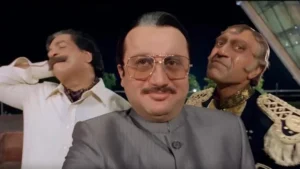
Replace Character 1, Character 2 and Character 3 in the original video with the people from Reference Image 1, Reference Image 2 and Reference Image 3 respectively, matching each person’s position in the frame. Preserve every person’s identity and physical appearance as accurately as possible — facial features, hairstyle, skin tone, body proportions and distinctive characteristics. Replace each character’s original costume entirely with the clothing and accessories from their own reference image, matching colours, fabric textures, fit and styling. Change nothing else: keep the original video’s facial expressions, dance movements, gestures, poses, camera angles, lighting, timing, background and scene composition exactly as they are — only the identities and outfits change. Remove all text, watermarks, logos, subtitles and graphic overlays so the final video is completely clean. Maintain consistent identity for all three characters in every frame, with realistic face tracking, natural motion and seamless compositing, no visual glitches and no faces blending into each other.
Download the Reference Video
Prompts 1 and 4 both need the original dance clip as their reference. Download it from the button below and keep it in your gallery — you will reuse the same clip for both prompts.
How to Create the Viral AI Dance Video in Google Flow
Step 1: Open Google Flow, click Create Your Video and start a New Project.
Step 2: Click the Plus icon → Upload and add your reference video and photo(s). Upload order sets the names — the video becomes @video1, the photos become @image1, @image2 and so on — so upload in exactly the order the prompt expects.
Step 3: Select the uploaded video and image, then paste the copied prompt.
Step 4: Open Adjust and set the ratio — 9:16 for the dance prompts, 16:9 for the two glasses prompts — and the duration the prompt asks for (10 seconds for Prompts 1 and 2).
Step 5: Click Send. The video generates in a few minutes; preview it, check the face stays consistent, and save it to your device.
What Is Google Flow AI?
Google Flow is Google’s AI filmmaking tool. Give it a text prompt and it generates a video; give it a reference image or reference video as well and it builds the video around them — which is exactly why this whole trend runs on it. The same project can produce cinematic scenes, photo animations and viral-style edits for Instagram, YouTube and Facebook. The free plan lets you generate a handful of videos, and using more than one Google account is how most creators stretch their daily output while a trend is hot.
Which prompt makes the three-person funny dance video?
Prompt 4. Upload the original dance video first, then one clear photo of each person in left-to-right order, and Flow replaces all three characters while keeping the original moves, expressions and background.
Do Prompts 2 and 3 need the same photo?
Yes. Prompt 3 is part two of the glasses video and uses the exact same photo as its first frame — you wearing black rectangular eyeglasses outdoors. Make Prompt 2 first, then run Prompt 3 on the same image.
Is Google Flow free to use?
Flow has a free plan with limited credits, enough to test these prompts. Video generation spends credits quickly, so start with your clearest photo instead of testing all four prompts on weak images.
Why does the face change in the middle of the dance?
The photo is almost always the reason: faces that are small, side-facing, filtered or partly covered give the AI too little detail. Use a clear front-facing photo, not taken from far away, and the identity holds through the whole clip.
Which aspect ratio should I select in Flow?
9:16 vertical for the dance prompts (1 and 4) since they are made for Reels, and 16:9 horizontal for the glasses prompts (2 and 3), which are framed as cinematic wide shots.
Conclusion
That is the complete method — four prompts, one free tool, and photos you already have. The wedding entry and the three-person swap are the ones travelling fastest right now, so start there, post while the trend is warm, and let the algorithm do the rest.
If dance edits are your thing, the Shah Rukh Khan dance prompts take the same idea into full Bollywood territory, and the Chini attitude video prompt covers the attitude-Reels side of the trend.




1 Comment
Pingback: Viral Bahubali Funny Comedy AI Reels Edit Prompt (Flow)