
Close Menu
Vm Editor

    Subscribe to Updates

    Get the latest creative news from FooBar about art, design and business.

    What's Hot

    ChatGPT All Viral Photo Editing Prompts 2026 – Trending AI Photo Editing Prompts

    November 6, 2026

    Viral AI Girl Diwali Video Editing – Stunning Fireworks Video with Google Flow (2026)

    November 6, 2026

    Viral AI Night Walking Text Video Edit Prompt – Google Flow & CapCut (2026)

    November 6, 2026
    Facebook X (Twitter) Instagram
    Vm EditorVm Editor
    • Home
    • AI Video Editing
    • AI Photo Editing
    • About Us
    • Contact Us
    Vm Editor
    Home»AI Video Editing»AI Character Replacement in Any Video Editing Prompt Using Google Flow AI (2026)
    AI Video Editing

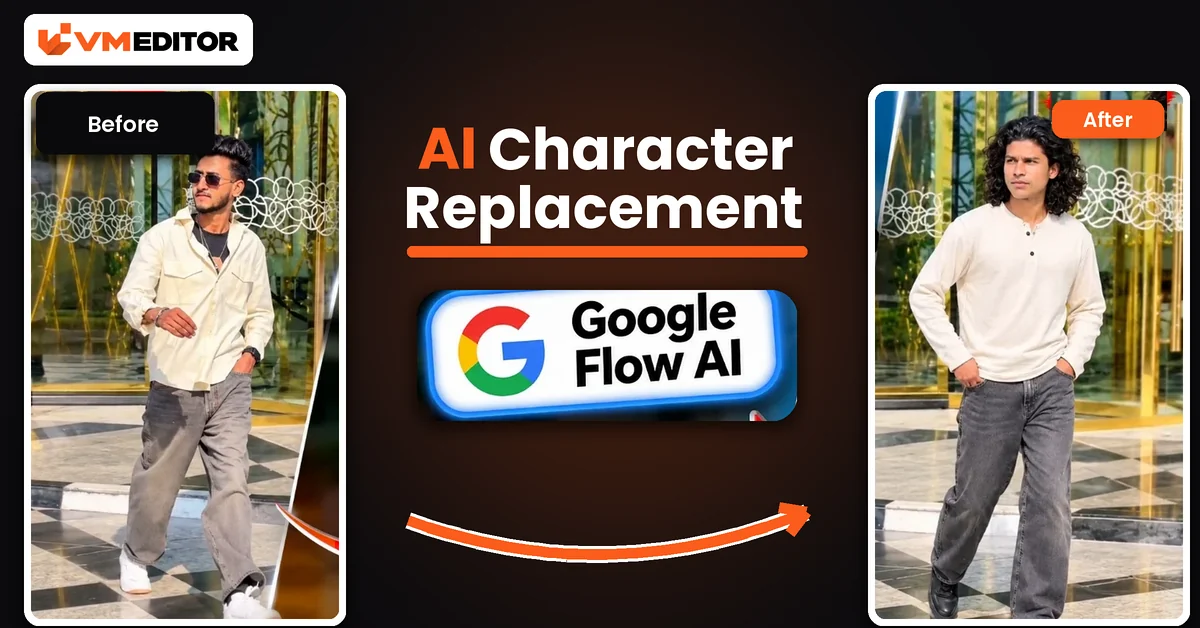
    AI Character Replacement in Any Video Editing Prompt Using Google Flow AI (2026)

    Arjun MehtaBy Arjun MehtaNovember 6, 2026No Comments9 Mins Read
    Facebook Twitter Pinterest LinkedIn Tumblr Email
    Share
    Facebook Twitter LinkedIn Pinterest Email

    Step Into Almost Any Video — Without Recording a Frame

    There is a technique quietly sitting underneath half the AI video trends on Instagram: character replacement. Take a video that already exists — a dance, a walk, a cinematic scene, a comedy sketch — and replace the person in it with a character built from your own photo. The scene, the camera and the performance stay; the face and identity become yours. No reshoot, no green screen, no frame-by-frame editing.

    The method uses two tools. ChatGPT turns your photo into a character sheet — a clean visual reference of your character. Google Flow then combines that sheet, the reference video and one master prompt to rebuild the video around your character. This article gives you the process and the prompt.

    Details of AI Character Replacement

    Think of the three ingredients by the job each one does. The reference video provides the scene, movement, timing and camera work. The character sheet provides the person — face, hair, outfit and build, laid out clearly enough for the AI to hold onto. The prompt is the contract between them: it tells Flow that the sheet is the absolute truth for appearance, the video is the absolute truth for motion, and neither is allowed to contaminate the other.

    That separation is why this works better than casually uploading a selfie next to a video. A character sheet shows your character more completely than one photo can, and the prompt’s priority order resolves every conflict in favour of identity first, motion second, camera third.

    What You Need to Create an AI Character Replacement Video

    ChatGPT — to generate the character sheet from your photo. Google Flow AI — to generate the final video. A suitable reference video — download the sample from the button below this article’s prompt, or use your own: clear, well-lit videos with one main character and visible movement transfer the most cleanly. One clear photo of yourself — face sharp and uncovered, since the sheet (and therefore the whole video) is built from it.

    How to Create the Video Using ChatGPT and Google Flow

    Part A — make the character sheet. Open ChatGPT, type /character sheet in the chat box, upload your photo and send. ChatGPT generates a character sheet based on your appearance — download it to your device. (If the command does not respond on your account, simply ask in plain words: “Create a character sheet from my photo showing my face, hairstyle and outfit clearly” — the goal is the reference image, not the command.)

    Part B — generate the video in Flow. Open Google Flow AI, click New Project, and upload in this order: your character sheet, then the reference video. Paste the prompt below, set the ratio to 9:16, and press Send. Flow processes the references and renders the video with your character performing the scene. Preview it, check the face in the moving shots, and download.

    Prompt 1: Universal AI Character Replacement Prompt (Google Flow)

    This is the master prompt — it works with any suitable reference video and any character sheet. Paste it exactly; the section order inside it (identity, motion, camera, realism) is deliberate.
    Use the provided reference video ONLY as the reference for motion, camera, timing and performance, and use the provided target image (character sheet) as the absolute reference for visual identity. CORE INSTRUCTION: recreate the video using the person/character from the target image, accurately transferring the movement and camera behaviour of the reference video onto them. The target image must remain the source of truth for the character’s appearance. CHARACTER PRESERVATION — ABSOLUTE PRIORITY: keep the character from the target image exactly consistent throughout the entire video — same face, same facial structure and proportions, same eyes, eyebrows, nose, lips and jawline, same skin tone and realistic skin texture, same hairstyle, same hair length, shape, texture and hairline, same body shape and proportions, same clothing with the same colour, fabric, design and details, same accessories, same overall identity and appearance. Do NOT redesign, beautify, replace, modify, age, de-age or reinterpret the person. Do not change the outfit or the hairstyle, even when the body moves. MOTION TRANSFER: analyse the reference video frame by frame and reproduce its movement as accurately as possible — head movement, facial expressions, eye direction and gaze, eyebrow movement, mouth movement, blinking, neck movement, shoulder movement, arm and hand movement, upper-body movement, walking and body movement, body posture, natural weight shifting, the timing and rhythm of the movements, and the start and end positions of movements. The target character performs the same actions and movements as the person in the reference video while remaining visually identical to the target image. CAMERA MOTION TRANSFER: copy the camera behaviour of the reference video — camera position, camera angle, camera distance, camera height, camera movement, handheld movement, camera shake, push-in / pull-out, pan / tilt, tracking movement, framing, subject positioning, perspective changes and movement speed. Do not introduce any camera movement that is not present in the reference video. FACIAL PERFORMANCE: transfer the facial performance naturally and accurately, matching the reference video’s expression intensity, smile or neutral expression, eye movement, eyebrow movement, head tilt, lip movement and emotional timing — but never alter the target person’s facial identity; the face must remain recognisable as the exact same person from the target image in every frame. REALISM: create highly realistic motion with natural human biomechanics. Avoid face morphing, identity drift, facial distortion, melting features, unnatural eye movement, extra fingers, missing fingers, deformed hands, body warping, clothing changes, hair changes, artificial facial expressions, rubber-like movement, flickering and frame-to-frame inconsistency. Hands, arms, face, hair and clothing must remain anatomically and visually consistent throughout the video. TEMPORAL CONSISTENCY: maintain strong frame-to-frame consistency — the character’s face, hair, body, clothing, accessories and skin texture stay stable through the entire sequence, with no random changes between frames. COMPOSITION: maintain the same composition and subject framing as the reference video wherever possible; if the person in the reference moves closer to or farther from the camera, reproduce the same relative movement with the target character. OUTPUT: aspect ratio 9:16 vertical — a cinematic but natural-looking vertical video suitable for TikTok, Instagram Reels and YouTube Shorts, which looks like the exact person from the target image naturally performing the exact movement and camera performance of the reference video. PRIORITY ORDER: whenever anything conflicts, follow this order — 1. Target image identity and appearance. 2. Reference video motion and performance. 3. Reference video camera movement. 4. Natural physics and realism. 5. Visual style.

    Best For: Replacing the character in almost any suitable reference video with your own character

    Recommended Aspect Ratio: 9:16 (Vertical)

    Customizable Elements: Your character sheet (the identity) and your choice of reference video (the scene and performance)

    ⬇ Download Reference Video
    ▶ Create Your Video

    What Is a Character Sheet, and Why Does It Matter?

    A character sheet is a visual reference that lays out a character’s appearance and details — face, hairstyle, clothing and overall look — in one clean image. Making one in ChatGPT from your own photo gives Flow a far stronger identity anchor than a single casual selfie: the AI can see exactly who the character is before it starts moving them. For character replacement this matters more than anywhere else, because your character has to stay recognisably themselves through somebody else’s movements, angles and expressions. Results still vary with photo quality and settings, but a clear sheet is the single biggest upgrade this method has over plain photo uploads.

    What Is Google Flow AI, and How Does It Help in Character Replacement?

    Flow is Google’s AI video tool: it generates cinematic video from visual references and text prompts. In this technique the division of labour is clean — your character sheet tells it who, the reference video tells it what happens and how the camera behaves, and the prompt tells it the rules when those two disagree. Combine the three with suitable settings and you can produce scene after scene with the same personal character, without manually editing a single frame.

    Why Is AI Character Replacement Becoming Popular?

    Because it inverts how trend content gets made. Instead of filming your own version of a trending scene — costumes, location, rehearsal — you borrow the finished scene and recast it. Creators use it for cinematic Reels, recreated movie-style moments, comedy formats and personalised videos for friends and family. For beginners it is also the friendliest entry point into AI video: one photo of yourself and any video you admire are genuinely all you need to start experimenting.

    FAQs 

    Can I skip ChatGPT and upload my photo directly into Flow?

    You can, and for short, gentle clips it often works. But the character sheet is the point of this method — it gives Flow a much stronger identity reference, so faces survive fast movement and angle changes noticeably better. For any video you actually plan to post, make the sheet.

    Which reference videos work best for character replacement?

    Clear, well-lit videos with one main character whose full body and face stay visible. Very dark scenes, heavy crowds, extreme close-ups and videos where the person is mostly turned away transfer poorly no matter how good the prompt is.

    Does the prompt work for landscape videos too?

    The prompt is written for 9:16 vertical output, aimed at Reels, TikTok and Shorts. If your reference video is landscape, the transfer rules still apply, but set Flow’s output to match the reference’s format instead of forcing vertical.

    Why does my character’s outfit change mid-video?

    Usually the character sheet is unclear about the outfit, or the reference video’s own costume is visually loud. Regenerate the sheet making sure the full outfit is visible and clearly drawn, and prefer reference videos where the original clothing is simple.

    Conclusion

    Character sheet, reference video, master prompt — learn this one technique and a large share of the AI video trends on this site become variations of it. Make the sheet carefully, pick a clean reference video, and let the priority order in the prompt do the discipline for you.

    See it in action with a specific trend: the Shah Rukh Khan dance prompts put your photo’s person into full Bollywood-style dance performances using the same identity-first idea.

    Share. Facebook Twitter Pinterest LinkedIn Tumblr Email
    Arjun Mehta
    • Website

    Arjun Mehta is a contributing writer at VM Editor, covering AI video prompts, generative media workflows, and practical creator tools.

    Related Posts

    Viral AI Girl Diwali Video Editing – Stunning Fireworks Video with Google Flow (2026)

    November 6, 2026

    Viral AI Night Walking Text Video Edit Prompt – Google Flow & CapCut (2026)

    November 6, 2026

    Viral Bahubali Funny Comedy AI Reels Edit Prompt – 3 Character Replacement (2026)

    November 6, 2026
    Add A Comment
    Leave A Reply Cancel Reply

    Editors Picks

    Viral AI Girl Diwali Video Editing – Stunning Fireworks Video with Google Flow (2026)

    November 6, 2026

    Viral AI Night Walking Text Video Edit Prompt – Google Flow & CapCut (2026)

    November 6, 2026

    Viral Bahubali Funny Comedy AI Reels Edit Prompt – 3 Character Replacement (2026)

    November 6, 2026

    AI Character Replacement in Any Video Editing Prompt Using Google Flow AI (2026)

    November 6, 2026
    Vm Editor
    Facebook X (Twitter) Instagram YouTube
    • Home
    • About Us
    • Privacy Policy
    • Contact Us
    • Disclaimer
    • Terms and Conditions
    • Sitemap
    • APK Hijau
    © 2026 VM Editor. All Rights Reserved

    Type above and press Enter to search. Press Esc to cancel.