
Close Menu
Vm Editor

    Subscribe to Updates

    Get the latest creative news from FooBar about art, design and business.

    What's Hot

    ChatGPT All Viral Photo Editing Prompts 2026 – Trending AI Photo Editing Prompts

    November 6, 2026

    Viral AI Girl Diwali Video Editing – Stunning Fireworks Video with Google Flow (2026)

    November 6, 2026

    Viral AI Night Walking Text Video Edit Prompt – Google Flow & CapCut (2026)

    November 6, 2026
    Facebook X (Twitter) Instagram
    Vm EditorVm Editor
    • Home
    • AI Video Editing
    • AI Photo Editing
    • About Us
    • Contact Us
    Vm Editor
    Home»AI Video Editing»Viral Bahubali Funny Comedy AI Reels Edit Prompt – 3 Character Replacement (2026)
    AI Video Editing

    Viral Bahubali Funny Comedy AI Reels Edit Prompt – 3 Character Replacement (2026)

    Arjun MehtaBy Arjun MehtaNovember 6, 2026No Comments8 Mins Read
    Facebook Twitter Pinterest LinkedIn Tumblr Email
    Share
    Facebook Twitter LinkedIn Pinterest Email

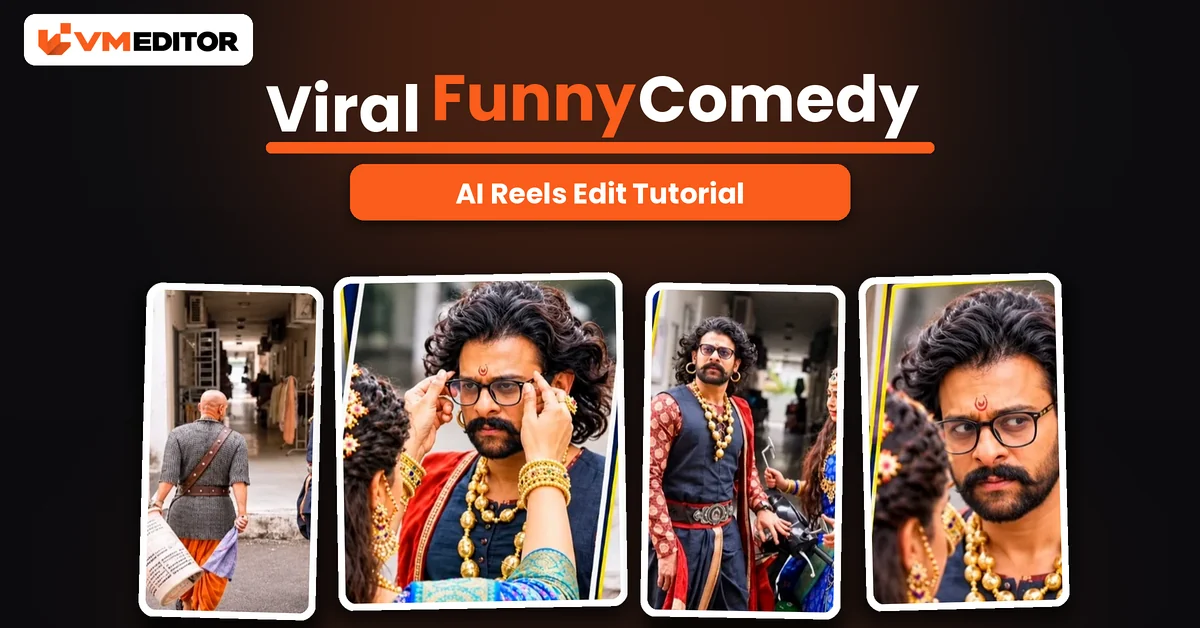
    The Baahubali Comedy Scene Everyone Is Recasting With Their Own Faces

    Some comedy scenes never die — they just get recast. The latest one travelling across Instagram pairs the world of Baahubali with a motorcycle, a basket-carrying elder and a hero who cannot catch a break, and the joke lands even harder when the three characters are played by people you know. Creators are dropping in their friends, their favourite celebrities, or themselves, and the AI rebuilds the entire scene around the new cast.

    Making one needs no editing knowledge and no camera: a reference video, three photos and one precise prompt. Google Flow (the Gemini app works too) does the rest — same building, same motorcycle, same comic timing, three brand-new faces.

    Details of the Viral Bahubali Comedy Edit

    Comedy is the most-shared genre on the phone, and this format has a built-in advantage: the script and the scene are already proven funny. You are not hoping a new joke lands — you are casting one that already does. That is also why celebrity versions travel furthest (recognisable faces in a famous scene get shared on sight), while friends versions clean up inside group chats and family circles. Either way, the production is identical: the reference video keeps its locations, costumes, camera work and six-scene structure; only the three identities change.

    What You Need to Create This Viral Funny Reel

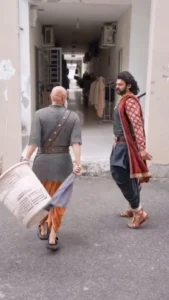
    The reference video — download it from the button below; it contains the full comedy scene with all three characters. Three photos, one per character, and the mapping is fixed by the prompt: @Image1 replaces the main male character (the one in the red outfit), @Image2 replaces the older bald character (grey clothes, orange pants, carrying the basket), and @Image3 replaces the female character (blue traditional outfit, beside the motorcycle). Each photo should be clear and front-facing — the prompt holds each identity through side angles and close-ups, so give it a face it can actually recognise. Upload in exactly that order, or the cast ends up in the wrong roles.
    ⬇ Download Reference Video
    ▶ Create Your Video

    Prompt 1: Bahubali Comedy Scene — 3 Character Replacement Prompt

    Upload the reference video (@Video1) first, then the three photos in mapping order, and paste this prompt exactly.

    Use @Video1 as the ONLY source video and @Image1, @Image2 and @Image3 as the ONLY character identity references. Recreate the entire video exactly like @Video1, replacing ONLY the three original characters with the three people from the uploaded reference images. CHARACTER MAPPING: replace the main male character wearing the red outfit with the exact person from @Image1. Replace the older bald male character wearing grey clothes and orange pants with the exact person from @Image2. Replace the female character wearing the blue traditional outfit with the exact person from @Image3. IDENTITY PRESERVATION: each character must look exactly like their respective reference image — preserve the original facial identity, face shape, hairstyle, skin tone, age and recognisable features. Never mix identities between the three characters. Do not change anyone’s gender, age or facial appearance. Maintain consistent identity through every frame, including side angles, close-ups and partially visible shots, and make all three characters look photorealistic and naturally integrated into the original video. SCENE AND ACTION RECREATION: follow the exact scene progression of @Video1. Scene 1: the older male character approaches the main male character while carrying the same basket; the main character stands in the entrance area. Scene 2: the older character walks past the main character with the basket; the main character reacts and moves naturally, following the original body movements. Scene 3: the main character walks forward toward the camera, maintaining the same expressions and walking style. Scene 4: the female character appears beside the motorcycle; the main character approaches her and interacts with her exactly as shown in the reference video. Scene 5: recreate the close-up shots of the main male character and the female character with their replaced identities. Scene 6: preserve the original shot of the older character walking back into the building with the same basket and background. Final scene: recreate the final interaction between the main male character and the female character beside the motorcycle, following the exact original movements and ending position. ENVIRONMENT AND VISUAL DETAILS: keep the exact original building entrance, corridor, walls, floor, motorcycle, basket, background objects, lighting, shadows and environment from @Video1. Preserve the original costumes and overall styling of each character where appropriate, while keeping their faces and identities identical to the uploaded reference images. CAMERA AND MOTION: preserve the original camera angles and framing; maintain the exact camera movements, zooms, close-ups and scene transitions. Match the original walking speed, gestures, facial expressions, body language and character positions. Preserve the original scene timing and sequence — no additional scenes and no creative changes. VIDEO QUALITY: ultra-realistic cinematic live-action footage, natural human movements, realistic facial expressions, accurate body proportions, natural lighting, detailed skin textures and seamless character replacement. OUTPUT SETTINGS: aspect ratio 9:16, duration matching the original reference video, style photorealistic live-action, quality high detail. STRICT NEGATIVE INSTRUCTIONS: do not recreate the original characters’ faces. Do not add extra people. Do not remove any of the three characters. Do not swap identities. Do not change the original location, background, motorcycle, basket, scene order or camera angles. No cartoon effects, no artificial-looking faces, no face morphing, no flickering, no identity drift and no unnecessary changes. FINAL REQUIREMENT: the finished video must look like the exact same original video @Video1, with only the three characters replaced by @Image1, @Image2 and @Image3 — everything else remains as close to the original reference video as possible.

    Best For: Comedy scene recreations starring you, your friends or your favourite celebrities

    Recommended Aspect Ratio: 9:16 (Vertical)

    Customizable Elements: The three photos — @Image1 is the main male, @Image2 the older character, @Image3 the female character; scenes, costumes and camera come from the reference video

    How to Create the Viral Funny Comedy AI Reel

    Step 1: Copy the prompt above and download the reference video from the download button.

    Step 2: Open Google Flow from the Create Your Video button (the Gemini app also accepts the same uploads and prompt) and start a New Project.

    Step 3: Click the Plus icon → Upload and add the files in mapping order: reference video first, then @Image1 (main male), @Image2 (older character), @Image3 (female character).

    Step 4: Paste the prompt, set the ratio to 9:16, and click Send.

    Step 5: When the video is ready, preview the close-ups (Scene 5) to confirm all three identities held, then download and post.

    What Is Google Flow AI?

    Flow is Google’s AI-powered video tool: it generates video from images and prompts, animates still photos into realistic footage, and — the feature this trend depends on — rebuilds an existing reference video around new people taken from your uploaded images. You describe the rules in a prompt; Flow renders the scene. It is free to use within your account’s credit limits, which is enough to cast this comedy scene a few times while you get the three identities right.

    FAQs 

    Why three photos, and does the upload order really matter?

    Yes — the prompt casts by number. @Image1 always becomes the main male character in red, @Image2 the older basket-carrying character, and @Image3 the female character by the motorcycle. Upload in a different order and your cast plays each other’s roles.

    Do the replaced characters keep the original costumes?

    Yes. The prompt preserves the original costumes and styling from the reference video — the red outfit, the grey-and-orange clothes, the blue traditional outfit — and takes only the faces and identities from your photos.

    Can I cast my friends instead of celebrities?

    Absolutely — the process is identical, and friends versions often do better in shares among people who know them. Celebrity casts ride on recognition; friend casts ride on the joke being personal. Both use the same three-photo mapping.

    How long is the generated video?

    The prompt sets the duration to match the reference video exactly, so your recreation runs the same length and scene timing as the original — do not trim the reference before uploading, or the scene recreation will compress.

    Conclusion

    One reference video, three photos in the right order, one strict prompt — the Baahubali comedy scene, recast with your own people. Respect the character mapping, check the close-ups before you post, and let a proven scene do the heavy lifting.

    Same technique, different stage: the viral funny dance prompts also replace three performers in a reference video — with choreography instead of comedy.

    Share. Facebook Twitter Pinterest LinkedIn Tumblr Email
    Arjun Mehta
    • Website

    Arjun Mehta is a contributing writer at VM Editor, covering AI video prompts, generative media workflows, and practical creator tools.

    Related Posts

    Viral AI Girl Diwali Video Editing – Stunning Fireworks Video with Google Flow (2026)

    November 6, 2026

    Viral AI Night Walking Text Video Edit Prompt – Google Flow & CapCut (2026)

    November 6, 2026

    AI Character Replacement in Any Video Editing Prompt Using Google Flow AI (2026)

    November 6, 2026
    Add A Comment
    Leave A Reply Cancel Reply

    Editors Picks

    Viral AI Girl Diwali Video Editing – Stunning Fireworks Video with Google Flow (2026)

    November 6, 2026

    Viral AI Night Walking Text Video Edit Prompt – Google Flow & CapCut (2026)

    November 6, 2026

    Viral Bahubali Funny Comedy AI Reels Edit Prompt – 3 Character Replacement (2026)

    November 6, 2026

    AI Character Replacement in Any Video Editing Prompt Using Google Flow AI (2026)

    November 6, 2026
    Vm Editor
    Facebook X (Twitter) Instagram YouTube
    • Home
    • About Us
    • Privacy Policy
    • Contact Us
    • Disclaimer
    • Terms and Conditions
    • Sitemap
    • APK Hijau
    © 2026 VM Editor. All Rights Reserved

    Type above and press Enter to search. Press Esc to cancel.