


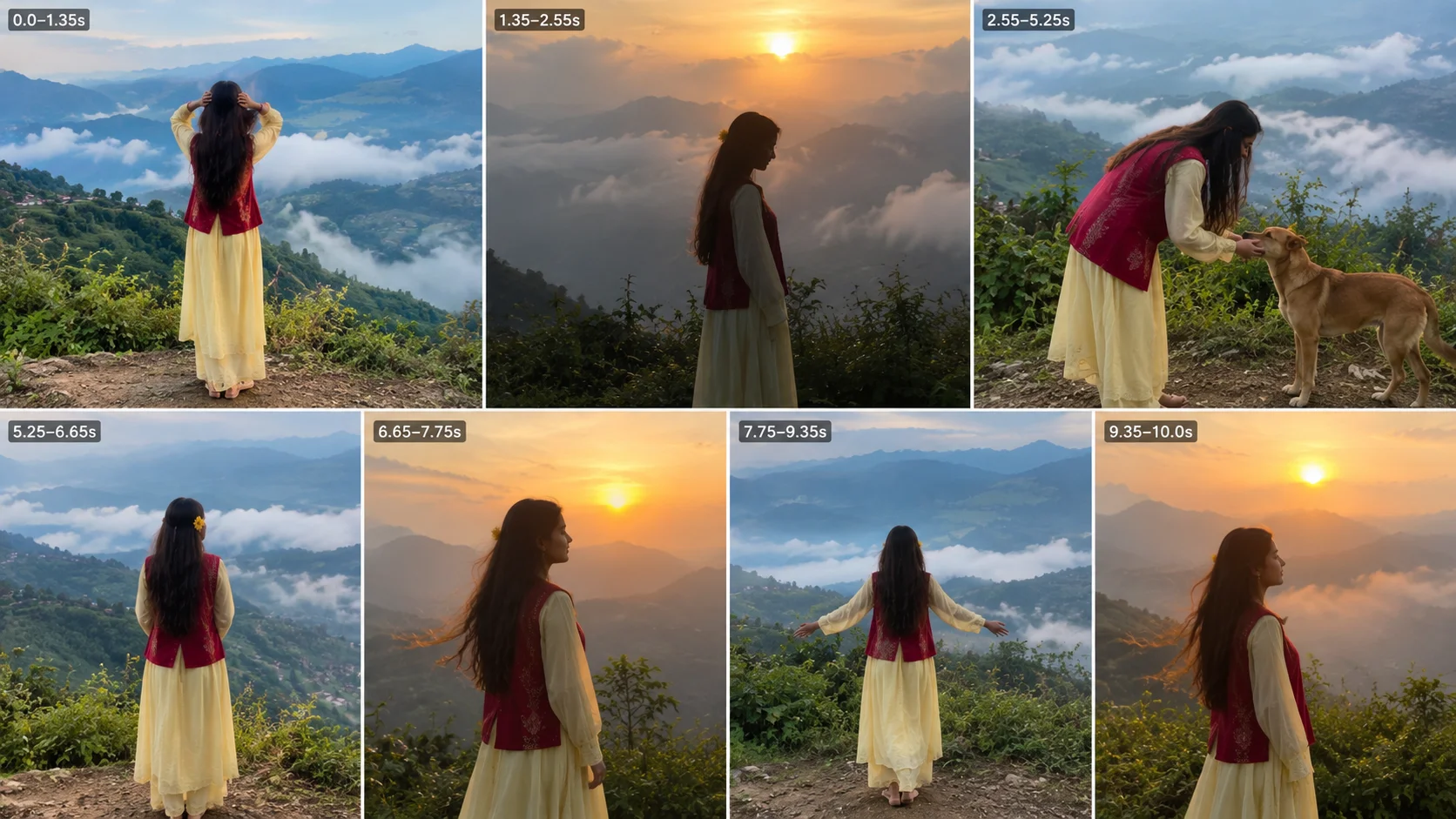
A peaceful mountain landscape can work especially well for AI video editing because the environment already provides natural depth, movement, and atmosphere. In this style, a young woman appears at a misty mountain viewpoint, adjusts her hair, looks across the valley, and gently interacts with a dog.
The visual approach is intentionally calm. Instead of dramatic action or complicated transitions, the sequence relies on wind moving through long hair and loose clothing, realistic mountain fog, subtle poses, and carefully controlled camera framing.
This concept is closely related to our cinematic mountain travel AI video prompt, but this version focuses specifically on a female character, traditional clothing, a misty viewpoint, and a natural dog interaction.
Details About This Cinematic Girl Mountain Video
The main character wears a flowing pale-yellow traditional-style dress or kurta with long loose sleeves and a deep-red sleeveless vest layered over it. Her long dark hair remains open throughout the sequence.
The environment is a high mountain viewpoint filled with steep green hills, distant ridges, thick white mist, natural vegetation, and changing daylight.
The ten-second video uses seven separate shots. Some show the woman from behind as she looks toward the valley, while others use side-profile compositions with warm golden-hour backlighting.
One of the most important moments is the dog interaction. A single tan-brown dog stands directly in front of the woman while she bends slightly and interacts gently with its head or muzzle.
The reference’s detailed prompt specifically preserves a 10-second, 16:9 landscape, seven-shot sequence with normal real-time motion rather than slow motion or invented camera effects. Pasted text
What Do You Need to Create This Video?
Start with a clear photo of the woman whose identity you want to preserve.
The face should be visible enough for the AI model to understand her facial structure, skin tone, and other recognizable features. A clean image with natural lighting usually gives the model a stronger identity reference than a heavily filtered or blurry picture.
You will also need an AI image-to-video workflow capable of accepting the character reference and detailed motion instructions.
For this exact sequence, keep the final format at 16:9 landscape, because the mountain compositions and character positioning are designed around that framing. The source workflow also specifies 16:9 when generating this particular video. Pasted text
Cinematic Girl Mountain AI Video Prompt
There is only one prompt in this article, matching the single explicit prompt in the reference.
Create an exact 10-second ultra-photorealistic live-action cinematic mountain video in 16:9 landscape, with a natural 30fps-style appearance and normal real-time 1x movement.
Use the uploaded reference video as the primary guide for the complete shot order, character positioning, physical movement, poses, environment, lighting, framing and camera behavior.
Preserve the woman’s recognizable face, facial structure, skin tone, natural appearance, hairstyle and body proportions throughout every shot.
Avoid face morphing, facial redesign, beautification, age changes or identity drift between cuts.
Keep the same flowing pale or light-yellow traditional-style dress or kurta with long loose sleeves and the same deep-red sleeveless vest layered over it.
Keep her long dark hair open throughout the sequence and let it react naturally to the mountain wind.
Do not redesign the outfit or change its colors between shots.
Begin with a wide rear three-quarter landscape view at a high mountain viewpoint.
The woman stands near the foreground edge with her back toward the camera while an enormous green mountain valley, layered distant hills and dense white mist fill the background.
At the start, both hands are raised toward the back and top of her head as she gently touches or gathers her long hair.
She gradually releases the hair and lowers both arms outward into a loose, relaxed open position while continuing to face the valley.
Keep her full body visible. Let her hair move naturally in the wind.
Hard cut to a darker back-and-side silhouette composition facing another mountain direction.
Place the low golden sun behind the mountain haze and clouds.
Position the woman near natural vegetation with her body slightly oriented toward screen-right.
Her head remains gently lowered as though she is quietly looking toward the plants or ground.
Allow her hair and loose clothing to respond subtly to the breeze.
Preserve the natural backlighting and silhouette rather than introducing artificial fill light.
Hard cut back to the mountain viewpoint using a wide side composition.
Include exactly one medium-sized tan or brown dog standing directly in front of the woman.
The woman bends slightly forward toward the dog and extends her hands naturally toward its head or muzzle area.
Keep the interaction gentle and simple. Do not invent additional petting movements or complicated gestures.
Her long hair falls slightly forward and continues moving naturally in the breeze while the deep-red vest remains clearly visible over the pale-yellow outfit.
The dog may make only small natural head and body adjustments.
Hard cut to a wide rear view of the woman standing alone at the mountain overlook.
Her face should remain intentionally hidden from this rear angle.
Include the small yellow flower or flower-like visual around the side or back of her head as seen in the reference setup.
She remains upright and looks across the fog-filled valley with her hands relaxed near her body.
Allow only a small natural posture adjustment and subtle wind movement in the hair.
Keep the camera fixed in a wide composition with the woman near the center.
Hard cut to a warm golden-hour side-profile composition.
Position the woman toward screen-right with the glowing hazy sun behind the mountain ridge.
She stands in profile facing screen-right with her head slightly lowered at first.
She then subtly raises or turns her face toward the surrounding scenery.
Let the long hair catch the warm natural sunlight and move gently in the mountain breeze.
Keep the camera at a medium-wide distance without an invented zoom, orbit or tracking move.
Hard cut to a rear medium-wide view overlooking the mountain valley.
The woman slowly walks forward a short distance toward the viewpoint while seen completely from behind.
After the short walk, she gradually opens both arms outward from her sides in a peaceful and relaxed gesture while continuing to face the mountains.
Her long hair moves backward and sideways with the wind. The loose sleeves also respond naturally while the red vest stays clearly visible from behind.
Use only the restrained camera following movement needed to preserve the reference composition.
Hard cut back to the warm sunset side-profile composition near the foreground vegetation.
Keep the woman’s body facing screen-right with the sunlit misty mountains behind her.
Her hair moves gently across her back and shoulder as she holds a calm, reflective posture and looks toward the landscape.
End exactly on this quiet profile moment with the same natural warm backlight, haze and mountain silhouettes.
Maintain steep green Himalayan-style mountains, multiple distant ridges, a deep valley filled with white mist and clouds, natural foreground vegetation and the rocky or earthy mountain viewpoint.
Preserve distant structures only where they naturally belong in the reference composition.
Keep the daylight physically believable as the sequence moves between the cooler misty mountain atmosphere and warm golden-hour backlighting.
Preserve the wide landscape framing, medium-wide rear views, side-profile compositions, camera height, subject scale and restrained real-camera behavior.
Do not add random pans, artificial zooms, orbiting camera movement or drone-style shots unless such motion is explicitly required by the corresponding scene.
Animate only the actions required by the seven-shot sequence: touching and releasing the hair, subtle head movement, bending toward the dog, gentle dog interaction, standing at the viewpoint, a short forward walk, gradually opening both arms and quiet side-profile posing.
Keep all human movement, dog movement, hair movement and clothing movement at believable normal real-time speed.
Do not use slow motion, speed ramps, freeze frames, artificial motion blur, decorative transitions, artificial camera shake, text overlays, captions, lyrics, emojis, logos, watermarks or music-video effects.
Do not add extra people, additional animals, new props, different clothing, hairstyle changes, extra scenes, dialogue, narration, dancing, spinning, running, jumping or invented actions.
Avoid face morphing, identity drift, cartoon styling, anime styling and physically impossible body movement.
Shot 1: 0.00–1.35 seconds.
Shot 2: 1.35–2.55 seconds.
Shot 3: 2.55–5.25 seconds.
Shot 4: 5.25–6.65 seconds.
Shot 5: 6.65–7.75 seconds.
Shot 6: 7.75–9.35 seconds.
Shot 7: 9.35–10.00 seconds.
How to Create This Cinematic Mountain Video
Start by choosing a clear reference image of the woman. The face, hairstyle, and general proportions should be easy to recognize.
Upload the character reference along with the source/reference video where your AI video tool supports both types of input.
Copy the complete prompt above and paste it into the generation field.
Select 16:9 landscape and use a high-quality generation setting where available.
The source workflow follows the same basic sequence: copy the prompt, open the video generator, paste it, select 16:9, and generate the clip. Pasted text
After generation, inspect the full ten seconds. Check that the shot order has not changed and that the model has not invented new poses or camera movements.
Tips for Better Results
Protect the Outfit
The pale-yellow traditional outfit and deep-red sleeveless vest should remain unchanged through all seven shots.
Keep the Hair Open
Long dark open hair is part of the visual identity of this sequence. Avoid unexpected buns, ponytails, or short-hair transformations.
Check the Dog Interaction
There should be exactly one tan-brown dog. Pay attention to the woman’s hands when they approach the dog’s head because hand-to-animal contact can easily create anatomy errors.
Preserve the Misty Landscape
Do not let the model replace the mountain valley with generic hills, a forest, a lake,e or an urban background.
Avoid Artificial Slow Motion
The reference may visually feel cinematic, but the rewritten prompt intentionally requests normal 1x movement. Hair, walking, ng and hand movement should look physically natural.
Do Not Overmove the Camera
Most shots rely on stable wide or medium-wide framing. Extra drone motion, orbiting, and fast zooming would change the intended result.
What Is Google Flow AI?
Google Flow is an AI filmmaking environment that can work with text instructions and visual references for supported generation workflows.
For this edit, the character reference helps control the woman’s identity while the detailed video instructions define her outfit, seven-shot movement sequence, dog interaction, mountain environment,t and camera framing.
Available models, credits, durations, n,s and aspect-ratio controls can vary by account and current service configuration. Use the settings actually available in your account rather than relying on fixed claims about free generations.
FAQs
How many prompts are used in this mountain girl video tutorial?
Only one copyable prompt is used. The earlier description of the mountain-video concept is explanatory content rather than a second prompt.
What aspect ratio should I select?
Use 16:9 landscape for this exact sequence because the wide mountain compositions are designed around landscape framing.
How long should the generated video be?
The prompt is structured for exactly 10 seconds, divided into seven timed shots.
Can I remove the dog scene?
You can create a customized variation, but removing the dog changes the intended visual sequence. For the article’s corresponding result, keep one tan-brown dog in Shot 3.
Why does the prompt prohibit slow motion?
The intended version uses believable normal real-time movement. This helps preserve natural walking, hair motion, clothing physics and dog movement.
Can I change the woman’s clothes?
You can make a separate customized version, but this prompt specifically uses a pale-yellow traditional outfit with a deep-red sleeveless vest. Changing the outfit moves the result away from the reference concept.
Conclusion
This cinematic girl mountain edit works best when the landscape remains visually dominant, and the character’s movement stays restrained.
The seven shots rely on simple actions: adjusting the hair, looking across the valley, interacting gently with one dog, walking a short distance, and opening both arms toward the mountains.
Preserving the same female identity, outfit, misty mountain environment, and camera language is more important than adding additional effects.
