


Devotional AI videos can combine spiritual storytelling with cinematic visuals in very different ways. One concept may show a realistic human character interacting with Lord Krishna in an emotional rescue scene. At the same time, another may use a soft 3D animated style in which a cute Mushak performs aarti before Lord Ganesha.
The reference article contains both of these distinct concepts, so this VMEditor.org version keeps them as two separate prompts rather than merging or repeating them.
The first prompt creates a 25-second photorealistic Krishna rescue sequence on a dramatic rocky coastline. The second creates an approximately 10-second vertical 3D animation featuring only Lord Ganesha and one cute Mushak inside a warmly lit temple.
Why Devotional AI Videos Stand Out
Devotional video concepts usually depend more on emotion, atmosphere, and respectful character presentation than on fast editing.
A realistic Krishna scene needs convincing human identity preservation, believable physical interaction, natural ocean movement, and carefully controlled expressions.
The Ganesh Ji and Mushak concept works differently. It uses an animated visual language with warm temple lighting, glowing diyas, flowers, and a simple devotional action: the Mushak approaches Lord Ganesha and performs aarti.
Keeping those visual styles separate is important. The Krishna sequence should feel like live-action Indian cinema, while the Ganesh Ji scene should feel like a premium animated devotional film.
Prompt 1 — Krishna Divine Rescue AI Video
This prompt uses two references:
- Reference 1: the adult male’s clear face image
- Reference 2: Lord Krishna’s appearance reference
The sequence runs for 25 seconds and moves from distress to divine help, rescue, and an emotional embrace.
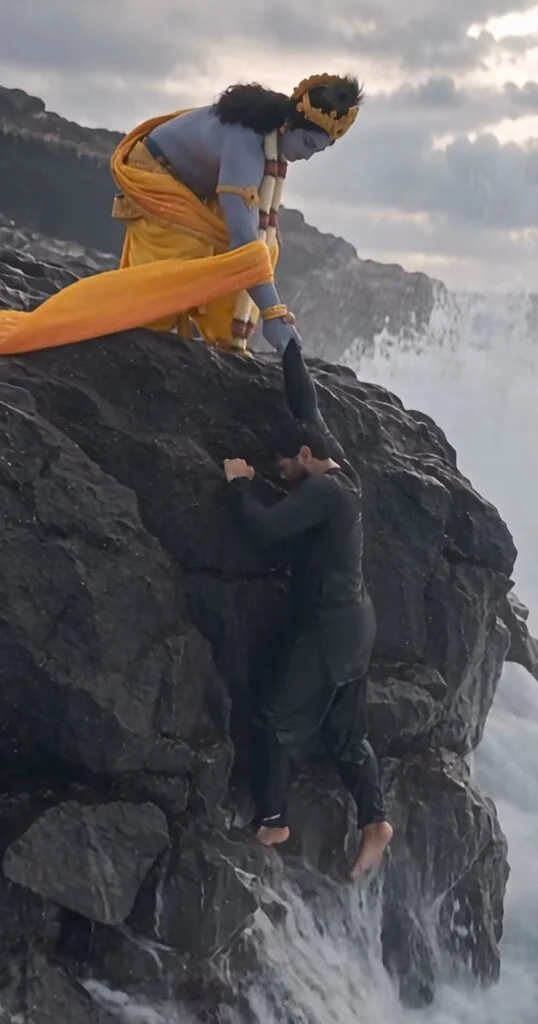
Create an ultra-photorealistic cinematic devotional sequence lasting approximately 25 seconds, featuring the exact adult male from the uploaded identity image and a realistic divine depiction of Lord Krishna.
Use Reference 1 as the strict identity source for the adult male.
Preserve his recognizable face shape, eyes, eyebrows, nose, lips, jawline, beard, hairstyle, complexion, skin texture, age appearance and natural facial proportions throughout every shot.
Do not beautify, redesign, replace or morph his face. The same real person must remain recognizable from the opening close-up through the final embrace.
Dress him consistently in a fitted all-black outfit: black full-sleeve shirt and black pants. Keep his body proportions and hairstyle stable.
Use Reference 2 as the visual reference for Lord Krishna.
Depict Krishna with natural blue skin, long dark curly hair, a detailed traditional golden crown with one prominent peacock feather, rich gold jewellery, a yellow dhoti with golden detailing, a flowing orange-golden dupatta, floral garland and traditional ornaments.
His presence should feel peaceful, compassionate, majestic and divine while remaining visually realistic rather than cartoon-like or synthetic.
Set the sequence on a dramatic rocky ocean coastline during an overcast evening.
Use huge dark volcanic rocks, crashing ocean waves, atmospheric mist, wet stone surfaces and a cinematic grey-blue sky.
The coastline should feel immense, spiritual and slightly mysterious. Maintain realistic water physics, believable wet clothing and skin, and natural movement from strong ocean wind.
Begin with an extreme close-up of the male character struggling against wet rocks near the ocean.
His face appears exhausted, vulnerable and emotionally overwhelmed. Show small water droplets across his face and hair.
He looks upward with visible desperation and tears in his eyes.
Slowly push the camera toward his face using controlled handheld cinematic movement, shallow depth of field and realistic skin texture.
Cut to a low-angle cinematic view revealing Lord Krishna seated calmly above the man on the dark rocky cliff.
Krishna looks downward with a gentle, compassionate expression and slowly extends one hand toward him.
Let the strong ocean wind move the peacock feather, flowing orange-golden fabric, floral garland and other garments naturally.
Keep the golden crown, jewellery and yellow dhoti visually consistent.
Move to a close cinematic composition centered on Krishna’s blue hand reaching downward.
The struggling man’s wet hand slowly rises toward Krishna until the two hands meet and grip one another naturally.
Make the contact physically believable with correct fingers, palm placement, wrist alignment and believable weight.
Emphasize the emotional meaning of receiving divine help without using exaggerated visual effects.
Cut to a wide cinematic shot as Krishna securely holds the man’s hand and pulls him upward from the dangerous rocky edge.
The man struggles naturally against gravity and the wet terrain while ocean water crashes against the rocks below.
Krishna remains physically strong yet gentle.
Allow the orange-golden cloth to move dramatically in the wind while the camera slowly travels backward and upward to reveal the vast ocean and cliffs.
Krishna brings the man safely onto the rocky surface.
Overcome with emotion and relief, the man immediately embraces Krishna tightly.
Krishna responds by wrapping both arms around him in a calm, protective and compassionate embrace.
The man’s eyes close while natural tears remain visible. Keep Krishna’s expression peaceful and reassuring.
Finish with a wide cinematic view from behind and slightly above both characters.
Keep Krishna and the man together on the dark rocks as large waves crash in the background.
Let wind move Krishna’s yellow and orange garments naturally.
Allow a subtle soft divine light to appear through the cloudy sky without turning the scene into artificial fantasy CGI.
Use premium Indian cinematic-film realism with photorealistic human skin, accurate facial expressions, correct hands and fingers, believable cloth simulation, realistic ocean waves and natural atmospheric mist.
Use subtle film grain, shallow depth of field, physically appropriate motion blur and realistic anamorphic-style cinematic characteristics.
Use the visual language of a professional cinema camera with 35mm and 50mm-style perspectives.
Combine controlled dolly movement, low-angle compositions, intimate close-ups, wide establishing views and restrained handheld motion during the opening struggle.
Keep the coastline dark and moody with grey-blue tones while maintaining natural skin color.
Krishna’s blue skin, gold jewellery and yellow-orange clothing should remain rich and clearly visible without excessive saturation.
The emotional progression should communicate devotion, surrender, desperation, divine protection, relief and unconditional compassion.
Avoid facial morphing, identity drift, duplicate people, extra fingers, missing fingers, deformed hands, broken anatomy, unnatural movement, floating objects, plastic skin, CGI-looking surfaces, costume changes, flickering faces or inconsistent Krishna features.
The hand-grab, rescue movement and final embrace must look physically connected and emotionally authentic.
Do not generate text, subtitles, logos or watermarks.
Reference 1 controls the adult male’s exact identity.
Reference 2 controls Lord Krishna’s appearance, costume, crown, jewellery and divine visual identity.
Prompt 2 — Ganesh Ji & Cute Mushak Aarti Video
The second source prompt is a completely separate concept: a premium 3D devotional animation containing exactly two characters — Lord Ganesha and one cute Mushak — inside a warm, golden temple.
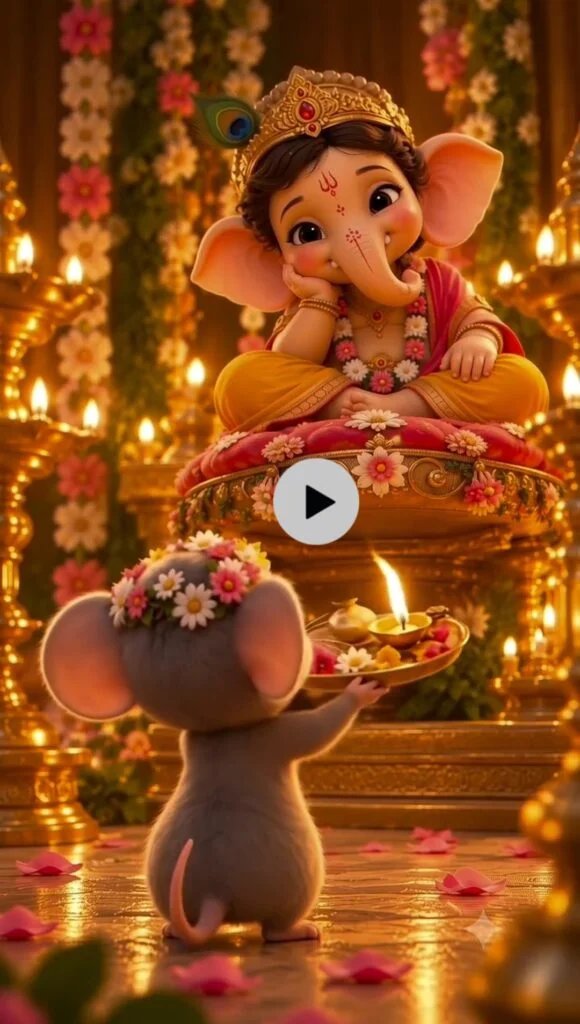
Create an approximately 10-second premium cinematic 3D devotional animation inspired by the uploaded visual reference.
Preserve the reference’s warm temple atmosphere, camera progression, character placement, devotional emotion, lighting and pacing.
Create a gentle child-like 3D animated depiction of Lord Ganesha seated peacefully on an ornate golden throne.
Give him a detailed golden crown, traditional orange-yellow clothing, rich gold jewellery, flower garlands, expressive eyes and a calm loving divine expression.
Keep Ganesha’s face, body proportions, crown, clothing, ornaments and colors exactly consistent from the first frame to the final frame.
Create one very cute small 3D animated Mushak with soft warm gray-brown fur, large rounded ears, expressive innocent eyes, a tiny pink nose and small paws.
Place a delicate pink-and-white flower crown on its head.
Keep the Mushak’s face, fur color, body shape, ear proportions, flower crown and overall design unchanged throughout the sequence.
Build a luxurious Hindu temple interior dominated by warm golden-orange light.
Fill the setting with glowing diyas, golden brass lamps, marigold garlands, pink-and-white flower decorations, decorative temple pillars and rose petals scattered across a polished reflective floor.
Use warm amber highlights, deep soft shadows, glowing reflections, shallow depth of field and cinematic bokeh.
Keep the dominant palette golden, orange, red and soft pink. Do not introduce cold blue lighting or bright daylight.
Begin with a cinematic medium close-up of the Mushak standing inside the temple and holding a traditional golden aarti thali carefully with both paws.
Position the camera near the Mushak’s eye level from a front or front-three-quarter angle so its face, ears, flower crown and thali are clearly readable.
The glowing diya on the thali should flicker naturally.
The Mushak looks lovingly toward Lord Ganesha, who is visible deeper in the softly blurred temple background.
Let the Mushak slowly walk toward Lord Ganesha while carrying the aarti thali securely with both paws.
Keep the walk cute, smooth and physically natural.
The Mushak remains focused on Ganesha Ji as the camera follows gently and reveals more of the ornate golden throne.
Show warm temple lights reflecting softly across the polished floor.
As the Mushak reaches the devotional area, transition into a composition with the camera directly behind the Mushak.
Keep the Mushak centered in the foreground, seen from behind, with its rounded ears and flower crown clearly visible.
Position Lord Ganesha directly ahead and centered in the background on the golden throne.
The Mushak gently lifts the golden aarti thali toward Lord Ganesha and begins a slow devotional aarti.
Move the thali in small, smooth circular motions with physically believable paw and arm movement.
Let the diya flame flicker naturally and cast warm light on both the Mushak and Ganesha Ji.
Lord Ganesha remains seated peacefully, looking toward the Mushak with a gentle smile and calm expressive eyes.
Keep the camera directly behind the Mushak with Ganesha centered ahead. Do not rotate around them or introduce a side angle during the aarti.
Continue the gentle aarti briefly.
Lord Ganesha softly closes his eyes for a peaceful devotional moment and then looks lovingly toward the Mushak.
Keep the Mushak performing the aarti with a happy, sincere and devotional expression.
Finish with the Mushak centered in the foreground, Lord Ganesha centered on the throne behind it and the glowing diya visually connecting the two characters.
Surround them with golden lamps, flowers and warm temple illumination.
Use premium animated-film camera language.
Start with the front or front-three-quarter Mushak composition, smoothly follow it toward Ganesha Ji, then settle directly behind the Mushak during the aarti.
Avoid random camera movement, excessive zoom, fisheye distortion, unnecessary cuts and shaky motion.
Use high-end cinematic 3D animation with soft detailed Mushak fur, natural blinking, subtle expressions, gentle head movement and smooth walking.
Animate the paws, thali and aarti circles naturally. Keep the diya flame physically believable and add only subtle movement to garlands and flower petals.
The overall mood should feel cute, soft, emotional and devotional rather than photorealistic live action.
Maintain rich golden-orange temple illumination, amber highlights, deep warm shadows and glowing brass lamps.
Use pink, red, orange, yellow and white flowers together with subtle volumetric light and warm cinematic bokeh.
Do not make the image cold, blue, flat, washed out or daylight-colored.
Do not change either character’s face, body design, clothing, crown, colors or proportions.
Avoid extra limbs, malformed paws, character duplication, morphing, environment changes or sudden color shifts.
Keep Ganesha visually dominant during the aarti and maintain the same scale relationship between both characters.
Output format: vertical 9:16. Approximate duration: 10 seconds. No text, subtitles, logos or watermarks.
How to Create Ganesh Ji and Krishna AI Videos
The two prompts use different reference setups, so they should not be treated as the same workflow.
For the Krishna rescue video, prepare a clear face image of the adult male and a separate visual reference for Lord Krishna. Upload both where your chosen AI video tool supports multiple references, then paste Prompt 1.
Check that the man’s identity remains unchanged in every shot and that Krishna’s crown, peacock feather, jewellery, and clothing stay stable.
For the Ganesh Ji and Mushak animation, use the relevant reference video or image to guide the animated composition. Paste Prompt 2 and select 9:16 vertical where the generator provides aspect-ratio controls.
The source workflow describes creating a devotional scene first and then animating details such as the Mushak’s movement, aarti thali, diya flame,e and camera progression. Pasted text
After generation, watch the complete clip carefully. AI-generated devotional scenes can look convincing in a single frame but still develop continuity problems during motion.
Tips for Better Results
Use Clear Reference Images
For Prompt 1, choose a sharp male portrait with visible facial details. A weak source image makes identity consistency harder when the character becomes wet, emotional, al or partially obscured.
Keep Krishna Consistent
Do not allow the crown, peacock feather, skin tone, dhoti,oti or jewellery to redesign themselves between shots. Krishna’s appearance should remain visually stable throughout the rescue.
Check the Hand-Grab Carefully
The hand connection is the most technically demanding moment in Prompt 1. Inspect fingers, wrist angles, contact between palms,s and the direction of pulling force.
Preserve the Two-Character Rule
Prompt 2 requires exactly one Lord Ganesha and one Mushak. Background devotees, humans, or duplicate characters change the intended composition.
Protect the Aarti Composition
During the aarti scene, the camera should remain behind the Mushak with Lord Ganesha centered directly ahead. A random side angle changes the key visual relationship.
Keep the Temple Warm
The second video depends heavily on golden-orange lighting. Cold white or blue lighting will create a noticeably different visual style.
What Is Google Flow AI?
Google Flow can be used as an AI filmmaking environment for generating scenes from written instructions and visual references where those options are available.
For these devotional workflows, the most important settings are the ones that let you supply appropriate reference images, control the requested aspect ratio, and generate enough duration for the sequence.
Exact generation models, credits, available durations,s and account features can vary, so use the options currently shown in your account rather than assuming every setting is universally available. The source article similarly notes that availability can depend on account, region, and current Flow options. Pasted text
FAQs
Why are there two prompts in this article?
Because the reference article contains two genuinely different devotional video concepts. The first is a live-action Krishna rescue sequence, while the second is a 3D animated Ganesh Ji and Mushak aarti scene.
How long is the Krishna rescue video?
The prompt is structured for approximately 25 seconds, divided into six consecutive scenes from the struggling man on the rocks through the final wide shot.
What references are needed for the Krishna prompt?
Use one clear image for the adult male’s exact identity and a separate Krishna reference for Krishna’s appearance, costume, crown and ornaments.
How many characters should appear in the Ganesh Ji and Mushak video?
Exactly two: one Lord Ganesha and one Mushak. The prompt specifically avoids extra people, duplicate characters or additional animals.
What aspect ratio should I use for the Mushak aarti video?
Use 9:16 vertical, because that is the intended format for the second prompt.
Why is realistic physical interaction important in the Krishna scene?
Several key shots involve direct contact: reaching hands, pulling the man upward, and the final embrace. If the anatomy or contact points are incorrect, the emotional rescue scene can look artificial.
Conclusion
These two devotional prompts serve very different visual goals.
The Krishna sequence uses realistic human identity, dramatic ocean scenery, and emotional physical interaction to tell a story about struggle, divine support, and relief.
The Ganesh Ji–Mushak sequence uses premium 3D animation, warm temple lighting, and a simple aarti action to create a softer devotional atmosphere.
For both, consistency matters more than adding extra effects. Keep the characters stable, preserve the intended camera progression,n and avoid introducing actions or objects that are not part of the original concept.
