


An 80s vintage retro AI video can turn a modern portrait into a scene that feels inspired by an old Indian action film. Instead of relying only on a color filter, this style recreates the clothing, motorcycle, market streets, dusty golden light, period shop details, and camera language associated with retro cinema.
The edit in this tutorial follows one male character through a complete cinematic sequence. It begins with close-up motorcycle details, moves into a vintage bazaar, pauses at an old-fashioned shop counter, and finishes with the rider disappearing into a golden rural sunset.
The result is designed for a 9:16 vertical reel, making it suitable for short-form social video when your AI generator supports the required sequence length.
What Makes This 80s Retro AI Video Look Cinematic?
The retro feeling comes from several details working together rather than one simple vintage effect.
The character wears an off-white or cream traditional shirt or kurta with a deep-red scarf. Later hero shots introduce dark aviator sunglasses. The motorcycle uses classic styling with a round headlamp, chrome parts,s and visible mechanical details.
The environment also matters. Weathered shopfronts, faded Hindi signs, pedestrians, dusty streets, colorful glass bottles, and warm sunlight help establish the period-inspired Indian bazaar atmosphere.
Visually, the sequence uses:
- Warm amber and earthy brown tones
- Slightly faded film colors
- Subtle 35mm-style grain
- Dust and atmospheric haze
- Golden-hour backlighting
- Shallow depth of field
- Low-angle motorcycle shots
- Macro mechanical close-ups
- Smooth tracking and dolly movements
- Natural motion blur
The source prompt builds the sequence across ten timed shots, ending at approximately 25 seconds. Pasted text
What You Need to Create the Retro Video
Before generating the video, prepare a clear photo of yourself.
Your face should be visible enough for the AI model to understand your identity. A sharp front-facing or slightly angled portrait usually gives the generator more useful facial information than a heavily filtered or blurred selfie.
You will need:
- A clear male portrait or selfie
- The complete AI video prompt below
- An AI video generator that accepts image references
- Access or generation credits for your chosen tool
- A vertical 9:16 video setting
- Enough generation duration for the full sequence, or the ability to create it in sections
The reference article similarly requires a selfie, a detailed prompt, and an AI video-generation tool. Pasted text
80s Vintage Retro Cinematic AI Video Prompt
Prompt 1: Retro Motorcycle Hero in an Old Indian Bazaar
Use your portrait as the main identity reference. If your generator also allows a reference video, you can use it for shot rhythm and choreography while instructing the model to replace the original actor with your identity.
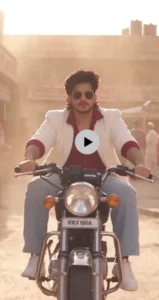
Create a premium cinematic commercial in vertical 9:16 format using my uploaded portrait as the strict identity reference for the main male character.
Preserve my exact recognizable face, eyes, nose, jawline, facial proportions, natural skin tone, hairstyle characteristics, body proportions and overall appearance in every shot. I must remain the same person throughout the complete video.
If a reference video is provided, follow its general shot progression, camera choreography and cinematic rhythm while replacing the original actor with me. Do not copy logos, text, watermarks or branded graphics from the reference.
Use a nostalgic late-1970s to 1980s-inspired Indian action-film aesthetic with premium commercial cinematography.
Create a warm dusty palette using golden sunlight, earthy browns, cream tones and restrained deep reds. Add subtle 35mm-style film grain, slightly faded analog color, realistic skin texture, atmospheric dust, practical lighting, shallow depth of field, natural motion blur and restrained anamorphic-style highlights.
The footage should feel like a real high-budget film shoot rather than an artificial AI animation.
Dress me in an authentic retro Indian hero outfit consisting of an off-white or cream traditional shirt or kurta with a slightly loose vintage silhouette and a strong deep-red scarf or stole.
Introduce dark aviator sunglasses only in the later hero shots where specified. Keep the base wardrobe consistent throughout the sequence.
Use one physically realistic classic Indian vintage-style motorcycle with a round headlamp, chrome details, black mechanical components, analog styling and period-appropriate proportions.
Keep exactly the same motorcycle design, scale, color and mechanical appearance across all shots.
Begin with an extreme macro low-angle close-up of the motorcycle. Show my cream or white sneaker resting naturally on the footrest beside detailed chrome and black mechanical parts.
Let warm sunlight reflect softly from the metal while the running motorcycle produces subtle realistic vibration. Use very shallow depth of field and a slow deliberate camera move.
Cut to an extreme close-up of my right hand holding and operating the throttle and handlebar.
Show realistic finger placement, wrist movement, mechanical vibration and chrome details. Track gently beside the hand with warm highlights, deep shadows and extremely shallow focus.
Switch to a frontal road-level low-angle shot as I ride directly toward the camera.
Let the circular headlamp dominate the foreground while the handlebars and my upper body remain visible behind it. The motorcycle must move toward the lens with believable speed, suspension and wheel motion.
Continue the frontal hero approach and gradually reveal my face and upper body.
I ride confidently through an old Indian market street filled with weathered shopfronts, faded Hindi signage, worn walls, pedestrians and authentic period-inspired street details.
Dust particles float naturally through the sunlight. The camera moves backward smoothly while keeping me centered and recognizable.
Use a wider tracking shot as I ride through a lively old bazaar.
Move the camera laterally and slightly backward with the motorcycle. Pedestrians in traditional clothing react naturally while colorful shops, dusty street textures and period Indian architecture pass behind me.
Keep my face recognizable and comparatively sharp while the environment receives realistic cinematic motion blur.
Cut to a rustic street-side Indian shop or counter.
I arrive on the motorcycle and stop naturally near the counter, leaning slightly forward. Behind the counter are rows of colorful glass bottles and period-inspired product packaging.
Several background characters look toward me naturally without exaggerated reactions.
Create a medium close-up hero shot while I lean toward the counter with a calm, confident and charismatic expression.
Slowly push the camera toward me. Golden sunlight travels through dusty air behind my shoulders while the background characters remain softly out of focus.
Preserve my exact facial identity.
Move into a tighter dramatic close-up as I pick up one glass bottle from the counter and bring it smoothly toward my mouth.
Use warm golden rim light around my hair and shoulders with a restrained retro cinematic lens flare.
Create the main hero drinking shot. I now wear dark aviator sunglasses and drink naturally from the glass bottle.
Slowly push from a medium close-up toward a tighter portrait.
Transition the visual environment from the bazaar into an open golden-hour setting while maintaining believable continuity. Use a warm sunset, orange-gold backlight, light atmospheric haze and subtle lens flare.
Keep my expression relaxed, confident and effortless.
Finish with a wide cinematic rural landscape at sunset.
Position the camera far behind me and slightly low while I ride the same vintage motorcycle away into the distance.
Place the low sun near the horizon ahead of me, creating long shadows, strong golden backlight and a heroic silhouette. A realistic dust trail follows the motorcycle as I gradually become smaller in frame and continue toward the glowing horizon.
Use professional cinematic camera movement throughout: macro detail photography, low-angle tracking, smooth backward tracking, controlled dolly push-ins, lateral movement, shallow depth of field and wide environmental establishing shots.
Every movement must feel intentional and physically achievable. Do not use random shaking or impossible camera motion.
Use fast but refined commercial pacing with clean cinematic cuts between motorcycle details, riding shots and hero portraits.
Preserve motion continuity, direction of travel, wardrobe, motorcycle appearance and character identity across every cut.
Avoid flashy transitions, artificial visual effects and excessive slow motion.
Use warm late-afternoon and golden-hour sunlight with realistic backlight, rim light, dusty atmospheric haze, practical shop lighting and natural shadows.
Grade the video with warm amber, cream, muted red and earthy brown tones. Add slightly faded analog color and subtle 35mm-style grain while preserving realistic skin tones.
My uploaded photo is the primary identity reference. Preserve my exact face, eyes, nose, jawline, facial proportions, complexion and recognizable features in every camera angle and lighting condition.
Do not beautify, reshape, age, de-age, replace or morph my face.
Use photorealistic live-action movement, believable motorcycle physics, anatomically correct hands and fingers, natural cloth movement, realistic human expressions, believable pedestrians, proper reflections and physically accurate shadows.
Avoid warped hands, extra fingers, duplicate people, deformed faces, distorted motorcycle components, floating objects, plastic skin, flickering clothing, changing motorcycle design, cartoon styling, subtitles, text, logos and watermarks.
Final result: a premium vertical cinematic advertisement with an authentic retro Indian action-film atmosphere, starring the same person from my uploaded photo.
How to Create the 80s Vintage Retro AI Video
The creation process is straightforward, but the long shot list makes consistency important.
Step 1: Prepare Your Reference Photo
Choose a portrait where your face is clearly visible.
Avoid extreme filters, sunglasses in the reference image, motion blur, or heavy shadows across the face. The prompt adds aviator sunglasses later, so the initial identity reference should ideally show your facial structure clearly.
Step 2: Open an Image-to-Video Generator
Use an AI video tool that supports reference images and detailed text prompts.
Upload your portrait as the main identity reference.
Step 3: Copy the Complete Prompt
Copy the full prompt above without removing the identity-consistency section.
The facial preservation instructions are especially important because this sequence includes extreme close-ups, medium portraits, low-angle riding shots,s and a distant final shot.
Step 4: Choose a Vertical Format
Select 9:16 vertical when your tool provides aspect-ratio controls.
The reference workflow also specifies 9:16 for this video. Pasted text
Step 5: Generate the Video
Submit the prompt and reference image.
If your AI generator cannot create the full approximately 25-second sequence in one generation, divide the sequence into compatible groups of shots and generate them separately.
For example:
- Shots 1–3: motorcycle details and approach
- Shots 4–5: market riding sequence
- Shots 6–8: shop interaction
- Shot 9: hero bottle shot
- Shot 10: sunset departure
When splitting the sequence, repeat the same identity, wardrobe, motorcycle, lens, and color-grading instructions in every generation.
Step 6: Check Continuity Before Exporting
Review the clips for:
- Same face in every shot
- Same cream outfit and red scarf
- Same motorcycle
- Correct hand anatomy
- Stable round headlamp and chrome parts
- Consistent market environment
- Natural bottle interaction
- Correct sunglasses timing
- Continuous warm retro color palette
Fix inconsistent clips before combining them.
Tips for Better 80s Retro AI Video Results
Keep the Motorcycle Design Consistent
Vehicle details can change between generations. The headlamp, fuel tank, handlebars, chrome parts, and proportions should remain visually consistent throughout.
Protect Facial Identity in the Bazaar
Busy environments introduce many background faces, which can sometimes increase identity drift.
Keep the uploaded portrait as the primary character reference and repeat that only the main rider should use your identity.
Use Period Details Without Overdoing Them
The old storefronts, weathered walls, Hindi signage,e and glass bottles establish the setting.
Avoid adding too many obvious “retro” props. A believable street usually looks stronger than a scene filled with exaggerated vintage objects.
Keep Film Grain Subtle
The video should look like a professionally photographed retro-inspired commercial, not damaged archival footage.
Use restrained grain and slightly faded colors while keeping the face, motorcycle, leg, and clothing detailed.
Watch the Bottle Interaction
Shot 8 and Shot 9 involve the character picking up and drinking from a bottle.
Check the fingers, bottle neck, hand-to-mouth alignment, ent and mouth interaction carefully. AI video models can struggle with object handling in tight close-ups.
Preserve Direction of Travel
When the rider moves forward through the market, the next riding shot should not suddenly reverse direction without a motivated cut.
Consistent screen direction helps the sequence feel like one professionally edited commercial.
What Is Google Flow AI?
Google Flow can be used for AI filmmaking workflows involving prompts, scenes,,enes and visual references where the necessary generation features are available.
For a detailed sequence like this, a tool needs to interpret more than just the character. It also has to manage camera movement, vehicle physics, environment, shot progression, session,n and continuity.
The source article recommends Google Flow for the workflow, although its claim that every feature is completely free or that any duration and aspect ratio are always available should not be treated as permanent. Pasted text
Available models, credits, generation duration, reference-image support, and aspect-ratio options can vary by account, region, and current service configuration. Check the controls available in your account before starting the complete sequence.
FAQs
How many prompts are included in this 80s retro video tutorial?
There is exactly one complete AI video prompt. It contains the full character description, motorcycle styling, ten-shot sequence, camera instructions, lighting, color treatment, and consistency rules.
How long is the retro cinematic video?
The planned shot sequence runs to approximately 25.1 seconds.
What aspect ratio should I use?
Use 9:16 vertical for the intended reel-style composition.
Can I use my own face in the video?
Yes. The prompt is specifically written around an uploaded portrait used as the main identity reference.
Do I need a vintage motorcycle photo?
Not necessarily. The prompt describes a classic Indian motorcycle with a round headlamp, chrome details, and period styling. If your tool supports additional visual references, a compatible motorcycle reference may help with design consistency.
Why does my face change between shots?
Identity drift can happen when the camera angle, lighting, sunglasses, or environment changes significantly. Use a clear reference photo, repeat the facial consistency instructions, and regenerate individual shots that no longer resemble you.
Conclusion
An effective 80s vintage retro AI video needs more than a sepia filter or old-film effect.
The strongest result comes from combining a consistent male identity with period-inspired clothing, a believable vintage motorcycle, old Indian market details, warm dusty lighting, and deliberate cinema-style camera movement.
This sequence moves from tactile motorcycle close-ups to a busy bazaar, a confident shop-counter moment, and finally a wide sunset departure. Keeping the face, motorcycle, wardrobe, and color treatment consistent across all ten shots is what makes the finished edit feel like one continuous retro film scene.
If you enjoy cinematic vehicle-based AI edits, you can also explore our cinematic Mercedes car AI video prompt for a modern luxury-car variation built around a male character and realistic automotive cinematography.
