


Maa Parvati-inspired AI editing combines traditional Indian styling with cinematic devotional environments. A normal portrait can first be transformed into a carefully styled image with a deep-red saree, traditional gold jewellery, long dark hair, and a Himalayan background. That image can then become the visual foundation for a longer devotional video inside an ancient temple.
This particular workflow uses two different prompts. The first creates the Maa Parvati-inspired portrait, while the second turns the character into a 30-second vertical cinematic sequence featuring a golden trishul, Lord Shiva statue, glowing diyas, incense smoke,e and graceful devotional movement.
The reference specifically separates the portrait-generation stage from the video-generation stage, so this article preserves the same two-step workflow. Pasted text
If you are exploring similar spiritual AI video concepts, our Ganesh Ji and Krishna devotional AI video prompts cover another cinematic devotional workflow with controlled character appearance, environments, ts and physical movement.
About This Maa Parvati AI Editing Style
The visual identity of this edit comes from several elements working together.
The character wears a rich deep-red traditional saree with detailed golden borders. Gold jewellery, earrings, bangles, and a maang tikka reinforce the traditional styling, while realistic skin texture and stable facial identity keep the subject recognizable.
The image version places the character against misty Himalayan mountains with soft blue tones and cinematic light.
The video changes the setting to an ancient Hindu temple. Stone pillars, a large Lord Shiva statue, glowing oil lamps, incense smoke, and warm golden illumination create the devotional atmosphere described in the source. Pasted text
Rather than relying on fast editing, the video uses controlled movements: a slow reveal, calm eye contact, graceful hand gestures, a gentle turn, and restrained devotional dance movements.
What You Need Before Starting
Prepare a clear portrait or selfie where your face is easy to recognize.
Avoid excessive beauty filters, heavy blur, or a photo where important facial features are hidden. The image prompt is specifically designed to preserve your recognizable identity while changing the clothing, hairstyle, jewellery, and environment.
For the complete workflow, you will need:
- One clear portrait or selfie
- The Maa Parvati image prompt below
- An AI image-generation tool
- The Maa Parvati video prompt below
- An image-to-video generator
- Available generation access or credits
- A device and internet connection
The source workflow also emphasizes using a clear selfie so the AI can better maintain facial identity.
Prompt 1 — Maa Parvati AI Portrait
Use this first prompt to create the devotional portrait that can later serve as a character reference for the video.
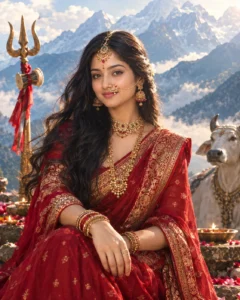
Transform the uploaded portrait into an ultra-photorealistic Maa Parvati-inspired devotional portrait while preserving the person’s exact recognizable facial identity.
Give the character long flowing black hair with a natural and elegant appearance.
Add traditional gold jewellery including an ornate maang tikka, elegant earrings, layered jewellery and a traditional nath connected with a delicate chain.
Dress the character in a luxurious deep-red traditional saree with intricate golden borders and refined fabric details.
Keep the draping elegant and physically realistic.
Place the character against a majestic Himalayan landscape with soft blue mountain ranges, atmospheric mist and subtle heavenly cinematic illumination.
Preserve believable atmospheric depth rather than creating an exaggerated fantasy background.
Use a calm, graceful and spiritually powerful expression.
Maintain natural skin texture, realistic eyes, detailed hair, believable jewellery reflections and realistic fabric texture.
Use balanced cinematic color, realistic shadows and soft depth of field.
Create the final image as a vertical 4:5 cinematic portrait.
Avoid facial changes, artificial skin whitening, plastic-looking skin, distorted jewellery, malformed features, cartoon styling, text, logos and watermarks.
How to Create the Maa Parvati AI Image
Start with the portrait before generating the longer video.
Upload a clear selfie or portrait to your preferred AI image-generation tool.
Copy Prompt 1 above and paste it into the prompt field.
Generate the image and check the face before moving forward. The Maa Parvati-inspired styling should change the clothing, jewellery, hairstyle, and environment, but your recognizable facial identity should remain intact.
The reference workflow similarly creates the image first by uploading a selfie, copying the image prompt, and generating the final portrait. Pasted text
Pay attention to the jewellery and nath chain in particular. Small decorative elements can sometimes merge into the face or hair, so regenerate if the accessories look physically incorrect.
Prompt 2 — Maa Parvati Cinematic Temple Video
The second prompt creates the complete 30-second 9:16 devotional video.
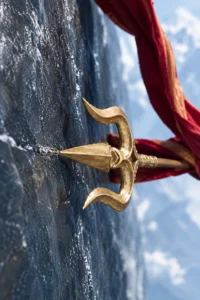
Create an exact 30-second ultra-photorealistic cinematic devotional video in vertical 9:16 format at 1080×1920.
Use a luxurious deep-red traditional saree with an elegant golden border, gold earrings, bangles, layered jewellery and maang tikka.
Maintain the same traditional hairstyle, clothing, jewellery and character identity in every shot.
Build an ancient Hindu temple with detailed stone pillars and architecture, a large Lord Shiva statue, glowing diyas, a golden trishul, incense smoke and warm golden illumination.
Start on a cinematic close-up of a golden trishul as the camera slowly moves forward through soft incense smoke and warm temple light.
Reveal the Maa Parvati-inspired character standing gracefully near the temple entrance while the deep-red saree moves softly and the jewellery catches the warm light.
Use a medium shot as she looks toward the camera with a peaceful and confident expression. Keep the Lord Shiva statue visible in the background.
Begin a slow devotional dance with restrained hand gestures, natural body movement and realistic saree motion.
Use an intimate close-up of the face, eyes, maang tikka, earrings and jewellery while maintaining realistic skin texture and exact facial identity.
Move to a side-angle view as she performs one graceful controlled turn. Let the red saree and golden border react naturally to the movement.
Show an elegant devotional hand gesture surrounded by glowing diyas, restrained incense smoke and subtle warm atmospheric particles.
Pull wider to reveal the complete temple architecture, Lord Shiva statue, glowing lamps and the character dancing gracefully at the center.
Show her standing calmly in a powerful cinematic composition with restrained golden backlight and a peaceful, spiritually confident expression.
Finish with a slow zoom-out revealing the character, golden trishul, Shiva statue, diyas and complete ancient temple environment.
Use realistic anatomy, hands, fingers, blinking, cloth physics, jewellery reflections and natural facial movement.
Avoid facial morphing, identity drift, skin whitening, plastic texture, deformed hands, duplicated limbs, flickering jewellery, outfit changes, cartoon styling, text, captions, logos and watermarks.
How to Create the Maa Parvati Cinematic Video
Once the portrait is ready, use it as the character reference for the video.
Copy Prompt 2 and open an AI image-to-video generator that supports the type of reference workflow you need.
Upload the Maa Parvati-inspired portrait generated in the first step.
Paste the complete video prompt.
Select 9:16 vertical and use the highest appropriate quality setting available in your account.
The source video instructions also specify 9:16 for this stage. Pasted text
Because the requested sequence is 30 seconds long, your tool may handle the duration differently depending on the model and account. If the generator cannot produce 30 seconds as one clip, you may need to generate compatible sections and assemble them in sequence while preserving the same identity, clothing, temple, and lighting.
Tips for Better Results
Generate the Portrait First
The first prompt establishes the red saree, jewellery, and Maa Parvati-inspired visual identity. Using that finished portrait as the video reference can provide a clearer starting point than asking the video model to invent every detail at once.
Keep the Same Face Throughout
Watch the close-up at 12–15 seconds carefully. Face changes often become easier to notice when the camera moves closer.
Check the Hands During the Dance
The devotional dance and hand gesture scenes require realistic fingers, wrists, and arm positions. Regenerate clips with obvious hand deformation.
Protect the Red Saree
The deep-red saree and golden border are core elements of the visual concept. Avoid generations where the saree unexpectedly becomes orange, pink, or a different garment.
Keep the Shiva Statue Stable
The Lord Shiva statue is part of the temple environment. It should not change design, move randomly, or disappear between shots.
Avoid Excessive Divine Effects
Golden light, incense smoke, and subtle particles can support the devotional mood, but overly bright halos, excessive particles, or fantasy CGI can reduce the realistic cinematic appearance.
What Is Google Flow AI?
Google Flow is an AI filmmaking environment that can support workflows involving written scene instructions and visual references.
For a sequence like this, the prompt controls the character performance, temple setting, shot progression, camera behavior, and visual consistency, while the uploaded image can provide the main identity reference.
Available models, generation credits, duration limits, and aspect-ratio options can vary by account, region, and current product configuration. The reference article also notes that these options may depend on the user’s current Flow access. Pasted text
Check the settings currently available in your account rather than assuming that every user has the same limits or generation options.
FAQs
How many prompts are included in this Maa Parvati editing tutorial?
There are exactly two prompts. The first creates the Maa Parvati-inspired portrait, and the second creates the 30-second devotional video.
What aspect ratio should I use for the image?
The portrait prompt is written for a 4:5 vertical image.
What aspect ratio should I use for the video?
Use 9:16 vertical, with 1080×1920 as the requested output resolution, where the generator supports it.
How long is the Maa Parvati video prompt?
The video is structured for exactly 30 seconds, divided into ten three-second shots.
Can I use my own face?
Yes. The workflow is designed around an uploaded portrait. The prompt instructs the AI to preserve the person’s recognizable face and skin tone while changing the styling and environment.
Why should I create the image before the video?
The portrait establishes the intended saree, jewellery, hairstyle, and overall Maa Parvati-inspired appearance. It can then provide the video generator with a more specific character reference.
Conclusion
This Maa Parvati-inspired editing workflow has two clear stages.
First, your portrait is transformed into a cinematic devotional image featuring a deep-red saree, traditional golden jewellery, long dark hair, and a misty Himalayan setting.
The second prompt moves that visual identity into an ancient temple and builds a 30-second sequence around the golden trishul, Lord Shiva statue, glowing diyas, devotional gestures, and controlled cinematic camera movement.
For the strongest result, prioritize facial consistency, realistic hands, stable jewellery, natural saree physics, and continuity across all ten video shots.
