


Trending AI String Art Video Editing Prompt for Reels (2026)
You have probably stopped scrolling on one of these. A plain wooden board. A hand hammers in a row of small nails. Then thread starts moving between them, pass after pass, until a face — or a full dress — is standing there, built entirely out of string.
That is the string art video trend, and most of the versions filling Reels right now are not filmed at all. They are generated. One uploaded photo, one prompt, and the tool shoots the whole “making” video for you. Deity portraits are everywhere in this format, couple photos too, because the reveal at the end works with any strong subject.
This post keeps it simple: one prompt, written to force a slow step-by-step build instead of the finished artwork popping up in the first second (the most common way these generations go wrong). Plus the photo rules and fixes that decide whether your result looks handmade or fake.
What the Finished Reel Looks Like
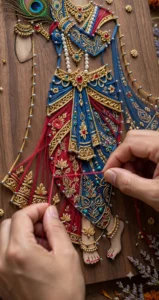
Ten seconds, vertical. It opens close on a pair of hands hammering nails around the outline of your photo’s subject on a wooden board. Blue thread builds the upper body. White and gold threads shape the dress skirt. A round gold detail gets finished, scissors snip the loose ends, and the camera pulls back to reveal the completed string art — matching your photo.
The details that make it work:
- One wooden canvas, the same board from start to finish
- Real hands doing every step — hammer, thread, scissors
- The artwork grows gradually; nothing is complete at the start
- Only natural workshop sounds. No music track
- The final frame lines up with the photo you uploaded
The Photo You Upload Decides Most of This
People blame the prompt when a string art video fails. Most of the time it is the photo.
Use one clear subject, large in the frame. A subject filling most of the photo height gives the threads enough room to form a face and outfit. Keep the background plain or softly blurred — a busy background turns into thread mush, and the weave loses the subject completely.
Sharp photo, no filters, no heavy beauty mode. If your best photo has a cluttered background, clean it first with a background-replacement edit like the ones in my viral background AI photo editing prompts post, then bring the cleaned photo here.
I ran this prompt on two photos of the same person. The close portrait worked on the second attempt. The full-body shot taken from across the room never did — the face shrank into a few confused lines of thread and the dress swallowed the whole board. Crop closer than feels natural. It matters more than any wording change inside the prompt.
How to Create This Video in Flow AI
- Open Flow AI and start a new project.
- Choose the image-to-video option and upload your photo as the reference frame.
- Click Copy Prompt above and paste the full prompt, timestamps included.
- Set the output format to vertical 9:16 in the tool as well. The prompt asks for it, but the setting backs it up.
- Generate, then watch all ten seconds before downloading. Pay attention to the first two seconds: if threads are already sitting on the board in frame one, that take is wasted — regenerate instead.
- Download the clean result. The video is meant to stay music-free, so if you want a trending audio, add it later inside the Reels editor.
This reference-first, generate-second flow is the same one behind my helicopter entry AI video prompt — a clear reference goes in, a detailed prompt does the rest.
Small Habits That Keep It Looking Handmade
Two or three thread colors, maximum. The prompt uses blue, white and gold for a reason. Give the generator five colors and the weave turns into visual noise by the halfway mark.
Check the hands in every generation. Hands swinging a hammer are the first thing AI bends wrong. If the fingers slip or the grip changes between shots, do not try to crop around it — that take is dead, generate again.
The zoom-out is the payoff. A result that cuts off before the full reveal feels unfinished no matter how clean the weaving was. Judge your takes by the last two seconds first, then the rest.
Deity photos follow the same rules. A front-facing Ganpati or Krishna portrait with a clean background builds beautifully in thread — the same way the clean portraits in my Ganpati Bappa AI hug video prompt carry that video. Clean source in, clean threads out.
When the Video Comes Out Wrong
The artwork is already finished in the first second. The generator skipped the build sequence. Regenerate; if it happens twice, start a fresh project, re-upload the photo and paste the prompt again.
Threads float or connect to nothing. Almost always a busy reference photo. Crop tighter on the subject, or swap to a plainer background and retry.
The face does not match my photo. The subject is too small in the frame. Use a closer crop where the face is large and sharp — thread cannot invent detail that is not in the photo.
Extra fingers on the working hands. Common in the hammer shots, and no setting fixes it. A fresh generation usually does.
FAQs
Is Flow AI free for this edit?
Yes, you can make this on a free account — the whole edit is one photo and one prompt. Free usage comes with limits, so pick your best photo first instead of burning attempts on test images.
Can I use a God photo instead of a person’s photo?
Yes. Deity portraits are one of the most common subjects in this trend. Front-facing, detailed, with a clean background works best, same as a human portrait.
Can I change the thread colors in the prompt?
Yes. Edit the color names directly — blue for the upper body, white and gold for the skirt in this version. Just keep the total to two or three colors.
Why does my video show the finished art right away?
The build instructions were ignored. The timestamps inside the prompt are the fix, so keep them intact and regenerate rather than shortening the prompt.
Portrait or full-body photo — which works better?
Portrait or upper-body, and it is not close. In a full-body shot the face becomes too small for the thread to hold, and the whole piece loses its subject.
Should I add music to the video?
The prompt deliberately keeps only workshop sounds, because the hammer taps and thread pulls are the satisfying part of this format. Add audio later in the Reels editor if you want it — keep the generation itself music-free.

2 Comments
Pingback: Viral Mela My First Blog CapCut Template – Trending Mela Video Edit - Vm Editor
Pingback: Instagram Viral AI Hand Name Video Editing Prompt (Letter Edit)