


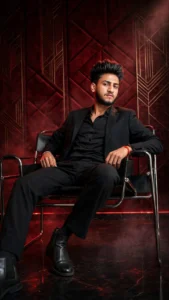
There’s a specific image flooding Instagram right now: a young man seated like he owns the room, dressed head to toe in black, against a deep crimson-red studio background. It looks like a celebrity photoshoot — the kind actors post before a film release. The aura does all the talking.
Here’s the open secret: nobody booked a studio. It’s one selfie plus one prompt, and then those portraits get stitched into a slow-motion CapCut template reel. This post covers the full chain — two photo prompts for the two most viral versions of the look, and then the CapCut steps to turn your portraits into the video.
About This Editing Style
Luxury fashion portraits run on contrast and posture. The all-black outfit against the saturated red background creates instant separation — you can’t miss the subject. The seated pose (leaning back, arm on the armrest) reads as relaxed power, which is why it photographs like wealth even on an ordinary person. Both prompts below lock your real face in place and rebuild everything else: the chair, the clothes, the red studio light.
How to Create This Edit
- Open ChatGPT (app or website) and sign in.
- Tap the + icon and upload a clear selfie — face fully visible, no sunglasses.
- Click Copy Prompt on Prompt 1 or Prompt 2 and paste it into the chat.
- Send it and wait a minute or two.
- Check the result full-screen: face match, hands on the armrest, outfit details, and the red background gradient.
- Regenerate if the face drifted — the second attempt usually locks it in.
- Download your favorite versions. Make 3 to 5 portraits; you’ll need several for the video.
How to Create the Video
- Open CapCut and find the luxury portrait reel template (via the template link on the article page).
- Tap Use Template — it opens directly in the CapCut app.
- Select the template, then tap Next.
- Choose the luxury portraits you generated (3 to 5 work best).
- Let the template process — it applies the slow-motion zoom and transitions automatically.
- Preview the result. If a photo feels out of rhythm, swap it for another portrait.
- Export without watermark and save to your gallery.
Tips for Better Results
Your selfie decides the face. A sharp, front-lit selfie gives the AI a solid identity to preserve. The prompts already forbid beautifying — help them out with a clean input.
Keep the eyes visible. Some versions of this trend blur the eyes, but both prompts here demand clear, visible eyes looking at the camera. That’s what makes the portrait feel premium rather than gimmicky. Don’t add eye coverings.
Check the hands. One arm rests on an armrest, fingers near the thigh — the AI has to draw believable hands in both spots. Zoom in before you export.
Vary your portraits for the video. The reel template looks best with slight variety — mix Prompt 1 and Prompt 2 results, or regenerate the same prompt for different takes. Five near-identical frames feel static.
Mind the red. If the background comes out orange or pink instead of deep crimson, regenerate. The dark red is the whole identity of this trend.
For more dark editorial portrait styles, our SMTG bandage cinematic prompts take the moody studio look in a different direction, and the music aesthetic photo editing prompts build drama from darkness and neon instead of red.
FAQs
Do I need one photo or several?
One clear selfie per prompt is enough for the portraits. For the video, generate 3 to 5 portraits so the CapCut template has material to work with.
Can girls use these prompts too?
Yes. The composition works for anyone — just adjust the outfit lines in the prompt (swap the kurta/blazer description for your preferred outfit) and keep everything else.
Why do the prompts insist on visible eyes?
Because clear eyes are what separate the premium version of this trend from the blurred-eyes variant. Direct eye contact with the camera reads as confidence; covered eyes read as a filter trick.
The CapCut template won’t open. What now?
Make sure CapCut is updated to the latest version, then open the template link again. Template links need the app installed — they won’t work in a browser alone.
My face looks slightly different in the portrait. Fix?
Regenerate with the same selfie. If it persists, upload a sharper, better-lit photo — face drift in these prompts almost always comes from a weak input, since the prompt itself forbids altering your identity.
Final Thoughts
The luxury portrait trend is really a two-step recipe: striking stills first, motion second. Get the portraits right — sharp face, deep red, confident seat — and the CapCut template does the rest. Make a handful of them tonight and your reel is ready to post.
