Close Menu
Vm Editor

    Subscribe to Updates

    Get the latest creative news from FooBar about art, design and business.

    What's Hot

    ChatGPT All Viral Photo Editing Prompts 2026 – Trending AI Photo Editing Prompts

    November 6, 2026

    Viral AI Girl Diwali Video Editing – Stunning Fireworks Video with Google Flow (2026)

    November 6, 2026

    Viral AI Night Walking Text Video Edit Prompt – Google Flow & CapCut (2026)

    November 6, 2026
    Facebook X (Twitter) Instagram
    Vm EditorVm Editor
    • Home
    • AI Video Editing
    • AI Photo Editing
    • About Us
    • Contact Us
    Vm Editor
    Home»AI Photo Editing»Viral beautiful Background Ai Photo Editing Chat Gpt Prompt 2026
    AI Photo Editing

    Viral beautiful Background Ai Photo Editing Chat Gpt Prompt 2026

    Arjun MehtaBy Arjun MehtaOctober 17, 20261 Comment8 Mins Read
    Facebook Twitter Pinterest LinkedIn Tumblr Email
    Share
    Facebook Twitter LinkedIn Pinterest Email

    You’ve seen them all over Instagram: a person standing in a dreamy field of white Kans grass, or in front of a glowing petrol pump at night, or wrapped in cinematic green fog. The person looks completely real. The background looks like a film set. And the whole thing was made in about two minutes.

    This is the viral background edit. The trick is simple: your photo stays yours, and AI drops you into a beautiful background so seamlessly it looks like you were actually there. Below are 7 prompts covering different backgrounds — night scenes, flower fields, fog, and full ready-made scenes. Some need two uploads (your photo + a background), some generate everything from one prompt. Each one is labeled so you know exactly what to upload.

    About This Editing Style

    Background edits work because they split the job in two. Your photo provides the person: face, pose, outfit, all locked in. The background provides the setting: flowers, lights, atmosphere. The prompt’s only real job is to fuse the two with matching light, shadows, and perspective. When that fusion is done right, nobody can tell it wasn’t photographed on location. When it’s done wrong, you get the classic cutout look — floating feet, wrong shadows, mismatched light. The prompts below are written to prevent exactly that.
    Place the person from the first uploaded photo realistically into the second uploaded photo. Adjust their scale, position and lighting so they blend naturally into that scene. Do not change anything else. Keep the background exactly as it is — do not alter it at all. Do not change the person’s face, body size, outfit or pose. Enhance the final image to 8K quality. Aspect ratio: 3:4.

    Best For: Any background swap, travel-style photos, profile pictures

    Recommended Aspect Ratio: 3:4

    Customizable Elements: Background image, person placement, lighting mood

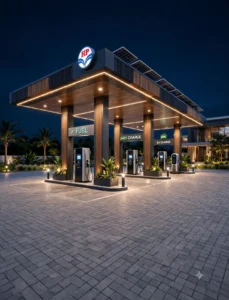
    Use my uploaded person photo as the identity reference and place the person naturally into the uploaded HP petrol pump background at night. Preserve the exact face, skin tone, hairstyle, outfit, pose, body proportions and hand position. Do not redesign the person. Match the nighttime lighting: blue-white canopy glow, realistic shadows, floor reflections, correct perspective and scale. Photorealistic DSLR quality, natural skin texture, high detail.

    Best For: Night aesthetic photos, urban style portraits, Instagram reels covers

    Recommended Aspect Ratio: 9:16 (vertical)

    Customizable Elements: Background location, lighting color tone, pose

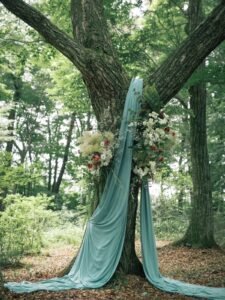
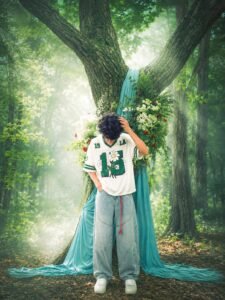
    Keep the person exactly the same — same face, same curly hairstyle, same facial features, same skin tone, same body proportions, same bowed head, same relaxed pose with both arms slightly open, same expression, same perspective. Do not alter the person in any way. Change ONLY the environment: rebuild it as a cinematic night scene filled with green light and drifting fog. Moody, dramatic atmosphere, HDR look, realistic light falloff on the surroundings.

    Best For: Moody cinematic portraits, music video style stills, dark aesthetic feeds

    Recommended Aspect Ratio: 9:16 (vertical)

    Customizable Elements: Fog density, light color, environment mood

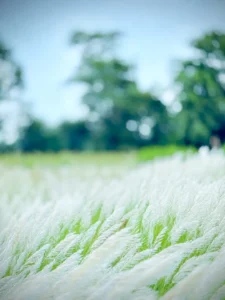
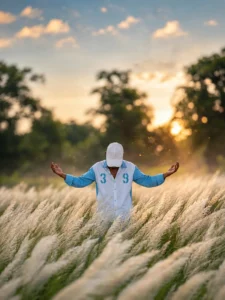
    Create an ultra-realistic cinematic DSLR photograph of a vast lush green field covered in tall, delicate white feathery Kans grass swaying gently in the breeze. Dense soft white grass plumes fill the foreground with layered depth and a dreamy natural atmosphere. Behind, a soft green meadow fades into dense trees blurred with creamy natural bokeh. Cool pale blue-gray sky, soft diffused daylight, light atmospheric haze, muted fresh greens and whites, natural shadows, 85mm lens look, shallow depth of field, photorealistic grass detail, HDR, 8K quality, vertical portrait composition. No people, no buildings, no vehicles, no artificial objects.

    Best For: Creating a custom background to combine with your photo later

    Recommended Aspect Ratio: 9:16 (vertical)

    Customizable Elements: Grass type, sky tone, time of day, field density

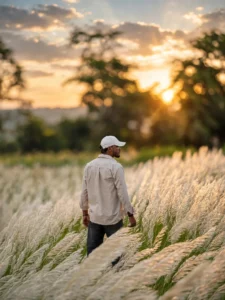
    Use the first uploaded image as the exact background and the second uploaded image as the person. Place the person naturally into the background with realistic proportions, perspective, lighting, shadows and color matching. Do not change anything in the background. Do not modify the person’s face, hairstyle, body or clothes. Keep both images natural and seamless. The final result should look like a real photograph taken at that location — not AI-generated, not edited.

    Best For: Combining any background with your photo, travel illusions, aesthetic feeds

    Recommended Aspect Ratio: Match your background image

    Customizable Elements: Background choice, person size and placement

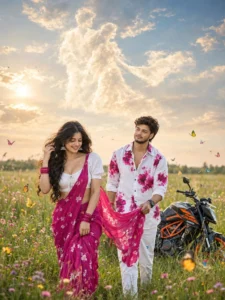
    Create an ultra-realistic cinematic 8K HDR DSLR photograph in vertical 2:3 portrait composition: a romantic young Indian couple walking through a beautiful field of tall white Kans grass. The handsome young man wears a stylish white shirt with vibrant pink floral prints and white trousers. He looks lovingly at the woman while gently holding the flowing end of her saree. The beautiful young woman wears a bright pink floral saree with an elegant white blouse, traditional jhumka earrings and matching pink bangles, her long wavy black hair flowing naturally in the breeze. She smiles softly, one hand gracefully touching her hair. An orange and black sporty KTM Duke motorcycle is parked behind them among the grass. Colorful butterflies flutter around the couple. Above them, dramatic fluffy white clouds form a romantic shape against a deep blue sky. Bright natural daylight, cinematic lighting, realistic skin texture, detailed fabric, natural hair movement, shallow depth of field, foreground bokeh, vibrant natural colors, romantic storytelling, professional photography.

    Best For: Couple photoshoots, anniversary posts, romantic DPs

    Recommended Aspect Ratio: 2:3 (vertical)

    Customizable Elements: Outfits, motorcycle model, flower field type, sky mood

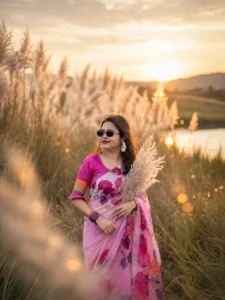
    A realistic portrait of a beautiful Indian woman standing in a field of tall, feathery pampas grass. She wears an elegant pink floral saree with ruffled sleeves and dark stylish sunglasses, holding a stem of fluffy pampas grass near her chest. Behind her, the wild grass field stretches under a soft overcast misty sky in muted pastel pink and purple tones. Dreamy atmospheric lighting, shallow depth of field, soft blur in the foreground, highly detailed, photorealistic 8K.

    Best For: Aesthetic solo portraits, dreamy feed posts, fashion DPs

    Recommended Aspect Ratio: 9:16 (vertical)

    Customizable Elements: Saree color and print, grass type, sky tones, accessories

    How to Create This Edit

    1. Decide which prompt fits your plan: Prompts 1, 2, 3, and 5 need your photo uploaded; Prompt 4 makes a background with no photo; Prompts 6 and 7 build complete scenes.
    2. For background swaps, first save the background you want — or generate one with Prompt 4.
    3. Open ChatGPT and sign in with your Google account.
    4. Tap the + icon and upload your images in the order the prompt expects (person first, background second — or background first for Prompt 5).
    5. Click Copy Prompt on the box you chose, paste it into the chat, and send.
    6. Wait a minute or two, then open the result full-screen.
    7. Check the edges where you meet the background: feet, shadows, and light direction. If anything looks pasted-on, regenerate.
    8. Download the best version.

    Tips for Better Results

    Upload order matters. Prompts 1 and 5 treat the first and second images differently. Mix up the order and the AI may put the background where you should be. Double-check before sending.

    Your photo should be clean and front-lit. The AI matches your lighting to the background’s lighting. A dark, grainy selfie dropped into bright daylight will always look fake. Bright, sharp input gives the most believable blend.

    No background image? Make one. That’s what Prompt 4 is for. Generate the Kans grass field, save it, then feed it back in with Prompt 5 along with your photo. Two steps, same two minutes.

    Watch the feet and shadows. The fastest way to spot a bad composite is floating feet or missing shadows. If the person doesn’t feel grounded, regenerate rather than trying to fix it with edits.

    Match the prompt to your goal. Quick swap into any photo: Prompt 1. Specific night vibe: Prompt 2. Full ready-made scene without uploads: Prompts 6 or 7.

    For more edits built on the same idea, our viral background photo editing prompts cover additional background styles with the same person-preserved technique.

    FAQs

    Do I always need to upload two photos?

    Only for the swap-style prompts (1, 2, and 5). Prompt 4 generates a background alone, and Prompts 6 and 7 create complete scenes without any upload — though you can add your photo to any of them as a face reference.

    Will my face change when I’m placed into a new background?

    It shouldn’t. The composite prompts explicitly preserve your face, hairstyle, outfit, and pose. Use a clear, well-lit photo of yourself; blurry inputs are the main reason faces drift.

    Which background looks the most realistic?

    Night scenes and fog (Prompts 2 and 3) hide blending imperfections best because darkness forgives a lot. Bright daylight fields demand cleaner inputs but look stunning when they work.

    What aspect ratio should I use?

    Follow what each prompt specifies: 3:4 for the general swap, 9:16 for vertical portraits, 2:3 for the couple scene. Vertical ratios suit stories and reels covers.

    Can I use these prompts in Gemini or another AI tool?

    Yes, as long as the tool accepts image uploads. The wording is written for ChatGPT but works anywhere you can attach reference photos.

    Final Thoughts

    Background edits are popular for a simple reason: they give you a photoshoot you never attended. Pick the background that fits your feed, keep your input photo clean, and let the prompt handle the blending. Two minutes, and you’ve got a photo that looks like it took a whole trip to capture.

    Share. Facebook Twitter Pinterest LinkedIn Tumblr Email
    Arjun Mehta
    • Website

    Arjun Mehta is a contributing writer at VM Editor, covering AI video prompts, generative media workflows, and practical creator tools.

    Related Posts

    ChatGPT All Viral Photo Editing Prompts 2026 – Trending AI Photo Editing Prompts

    November 6, 2026

    AI Luxury Fashion Portrait Photo Editing Prompts (2026)

    October 20, 2026

    Trending AI String Art Video Editing Prompt for Reels (2026)

    October 20, 2026
    View 1 Comment

    1 Comment

    1. Pingback: ChatGPT All Viral Photo Editing Prompts 2026 (Trending)

    Leave A Reply Cancel Reply

    Editors Picks

    Viral AI Girl Diwali Video Editing – Stunning Fireworks Video with Google Flow (2026)

    November 6, 2026

    Viral AI Night Walking Text Video Edit Prompt – Google Flow & CapCut (2026)

    November 6, 2026

    Viral Bahubali Funny Comedy AI Reels Edit Prompt – 3 Character Replacement (2026)

    November 6, 2026

    AI Character Replacement in Any Video Editing Prompt Using Google Flow AI (2026)

    November 6, 2026
    Vm Editor
    Facebook X (Twitter) Instagram YouTube
    • Home
    • About Us
    • Privacy Policy
    • Contact Us
    • Disclaimer
    • Terms and Conditions
    • Sitemap
    © 2026 VM Editor. All Rights Reserved

    Type above and press Enter to search. Press Esc to cancel.