


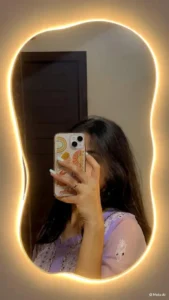
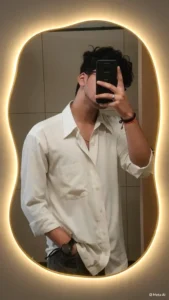
Mirror selfies never really left, but the version all over your feed right now looks different: the mirror itself glows. A warm golden LED outline traces an irregular, organic-shaped mirror, the room bathes in soft yellow light, and the person in the reflection looks completely untouched and realistic.
The best part? You don’t need a separate AI app. Instagram Story has a built-in AI “Restyle” option that applies this exact edit — you paste a prompt, and it rebuilds your mirror and background in seconds while keeping you exactly as you are. Below are the two prompts for it: a quick one and a detailed ultra-realistic one. Pick whichever fits your photo.
About This Editing Style
The yellow lighten mirror edit keeps one rule above everything: the person doesn’t change. Same face, same pose, same outfit, same phone in hand. Only the mirror and its surroundings get rebuilt — the old frame becomes a premium irregular organic-shaped mirror wrapped in a continuous warm golden LED border, and the wall around it picks up a soft realistic glow. Done right, it looks like you stood in front of an expensive LED mirror in a boutique hotel, not like a filter.
How to Create This Edit
- Copy Prompt 1 or Prompt 2 from above.
- Open Instagram and start a new story.
- Upload your mirror selfie from your gallery.
- Tap Restyle (the AI option). If you don’t see it, tap Effects first — it’s in the options below.
- Paste the copied prompt into the text field and send it.
- Wait a few seconds while Instagram rebuilds the image.
- Check the result: the mirror should glow gold, and you should look exactly like yourself.
- Save the image from the story in high quality, or post it directly.
Tips for Better Results
Update Instagram first. The Restyle option only appears on newer app versions. If it’s missing, update from the Play Store and check again.
Use a clean mirror selfie. The clearer your original photo — full mirror visible, decent lighting — the cleaner the LED rebuild looks. Blurry inputs give blurry glow.
Pick the right prompt for your photo. Prompt 1 is fast and works on almost any mirror selfie. Prompt 2 is stricter about keeping you unchanged — use it when the first result alters your face or outfit.
Watch the reflection. The trickiest part of this edit is the mirror reflection. Zoom in: your reflection’s pose and phone position should match the real you. If they drift, regenerate.
Save before posting. Download the finished image from the story editor so you keep the full-quality version even if you don’t post the story.
If you like edits where the person stays the same and the surroundings transform, our viral background photo editing prompts use the same idea with full background swaps.
FAQs
Do I need any AI app besides Instagram?
No. The whole edit happens inside Instagram Story’s Restyle feature. Just make sure your app is updated.
Will my face or clothes change in the edit?
They shouldn’t. Both prompts explicitly lock your face, pose, outfit, and phone position — only the mirror and background are rebuilt. If anything shifts, regenerate.
I can’t find the Restyle option. What now?
Update Instagram from the Play Store (or App Store). The AI features roll out with app updates, so an old version won’t show them.
Can I make this edit in ChatGPT instead?
Yes. Upload your mirror selfie to ChatGPT and paste either prompt. Instagram’s Restyle tends to handle the reflection more cleanly, but ChatGPT works fine too.
What kind of photo works best?
A straight-on mirror selfie with the full mirror in frame and reasonable lighting. Dark, cropped, or tilted shots make the LED border come out uneven.
Final Thoughts
This is one of those rare trends that’s genuinely easy — no editing skills, no extra apps, just a prompt and the Instagram you already have. Take a decent mirror selfie, run it through Restyle, and you’ve got a golden LED portrait that looks straight out of a studio.
