


80s and 90s retro AI photo editing gives a modern selfie the visual character of an old Indian film photograph. Instead of applying a basic vintage filter, these edits recreate period-inspired clothing, hairstyles, cars, streets, analog color, grain, soft highlights, and Bollywood-style compositions.
You can create several versions of the look: standing beside a classic car, leaning against a black vintage automobile, appearing in a warm 1980s street portrait, or creating a retro couple photo with carefully preserved identities.
This guide includes six different AI photo prompts, followed by a practical workflow for generating the images and using them in a CapCut template when you want to turn the finished photos into a reel-style edit.
What Is 80s and 90s Retro AI Photo Editing?
The main goal is to make a newly generated image feel as though it could have been photographed decades ago.
That effect comes from more than simply reducing saturation. A convincing retro portrait usually combines:
- Period-inspired clothing
- Voluminous 80s or 90s hairstyles
- Vintage cars and motorcycles
- Old Indian streets and shopfronts
- Warm golden sunlight
- Muted reds, browns, and cream tones
- Soft analog contrast
- Film grain
- Dust, halation,n or subtle scratches
- Natural skin texture
- Slightly faded blacks
- Older-looking photographic composition
The reference article specifically centers on recreating 1980s and 1990s Indian photo aesthetics using personal reference images rather than replacing the user’s identity with a completely new person. Pasted text
What You Need Before Creating the Retro Photos
Prepare a clear portrait before using any of the prompts below.
For solo images, one good selfie or portrait is enough. For the couple prompt, you will need separate clear reference images for both people, along with the composition reference required by that prompt.
For the best chance of preserving identity, use photos where:
- The face is clearly visible
- Eyes, nose,se and jawline are not heavily obscured
- The image is reasonably sharp
- Heavy beauty filters are avoided
- Skin texture is still visible
- The face is not extremely small in the frame
If you intend to create a full-body portrait, a reference showing more of the body can also help with proportions.
80s & 90s Retro AI Photo Editing Prompts
Prompt 1: 1980s Indian Street Portrait Beside a Vintage Car
This version keeps the subject standing completely upright rather than leaning against the vehicle.
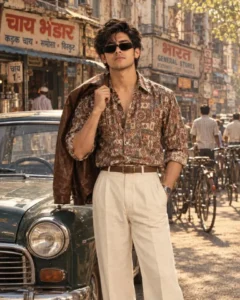
Use my uploaded photo as the only identity reference for the main person. Create an ultra-photorealistic portrait inspired by an Indian street photograph from the 1980s.
Preserve my exact recognizable face, facial structure, eyes, nose, lips, jawline, natural skin tone, age and overall identity. Do not beautify, reshape, whiten, age, de-age or replace my face.
Show me standing completely upright beside a classic vintage car. I must not lean on, sit on or use the car for support. Keep both feet naturally and firmly positioned on the ground.
Place one hand casually inside my trouser pocket while the other hand holds a brown leather jacket naturally over my shoulder.
Dress me in a retro patterned shirt, cream high-waisted trousers, a brown leather belt, vintage wristwatch and period-style sunglasses.
Set the scene on a busy old Indian street with vintage shops, bicycles, period-inspired street details and warm sunlight. Avoid obviously modern vehicles, signs, architecture or accessories.
Use natural skin texture, believable fabric folds, realistic shadows, cinematic film photography, soft analog contrast, restrained grain and slightly faded period color.
Compose the image as a vertical 4:5 Instagram portrait at 1080×1350 when supported by the image generator.
Avoid distorted hands, extra fingers, facial changes, incorrect body proportions, plastic skin, modern objects, text and watermarks.
Prompt 2: Classic 1980s Magazine-Style Portrait
This prompt creates a broader 80s editorial look with aviator sunglasses, vintage hair, analog photography, and period props.
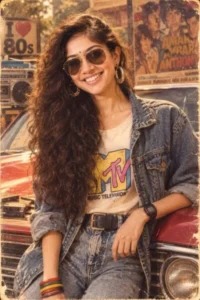
Transform my uploaded portrait into an authentic 1980s-inspired Indian editorial photograph while keeping my identity clearly recognizable.
Preserve my original face, facial structure, eyes, eyebrows, nose, lips, jawline, skin tone and natural likeness. Do not beautify, reshape, age, de-age or replace my face.
Give me a stylish 1980s appearance with period-appropriate retro fashion, a full voluminous vintage hairstyle, classic accessories and dark aviator sunglasses.
Create warm golden cinematic lighting with natural shadows, soft analog contrast, subtle film grain, slightly faded vintage colors and lightly aged photographic texture.
Place me in a believable 1980s environment containing carefully chosen period elements such as a classic car, old storefronts, retro posters, a cassette player or other era-appropriate objects.
The environment must feel naturally photographed rather than digitally pasted around the subject.
Use realistic skin texture, detailed facial features, professional editorial composition, shallow depth of field and an authentic vintage-camera appearance reminiscent of an Indian magazine photograph from the period.
Avoid modern objects, artificial facial smoothing, unrealistic hair, excessive grain, cartoon styling, text, logos and watermarks.
Prompt 3: 1990s Bollywood Black Vintage Car Portrait
This version focuses on a relaxed male pose leaning against a classic black automobile.
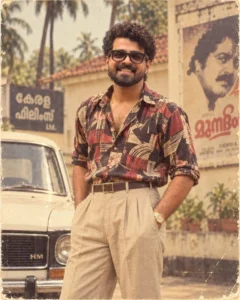
Use my uploaded photo as the only identity reference and create an ultra-realistic 1990s Indian retro cinematic photograph.
Preserve my exact recognizable face, face shape, eyes, eyebrows, nose, lips, jawline, natural skin tone, skin texture, age and distinctive facial features.
Do not beautify, whiten, slim, widen, reshape or replace my face.
Show me casually leaning against a classic black vintage automobile on an old Indian street in an authentic 1990s Bollywood-inspired composition.
Use a relaxed and confident pose: both hands naturally inside the front trouser pockets, shoulders loose, upper body leaning slightly backward against the car and one leg positioned slightly forward.
Keep the environment grounded in a believable 1990s Indian street atmosphere with old architecture, period visual character and no distracting modern styling.
Use realistic analog-film texture, warm period color, natural skin detail, believable car reflections, soft cinematic depth and a genuine photographic appearance.
Avoid facial changes, artificial skin, distorted hands, incorrect body proportions, cartoon effects, modern visual clutter, text and watermarks.
Prompt 4: 1990s Retro Couple Photo
This prompt is different because it uses a composition reference plus separate male and female identity references.
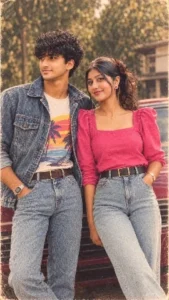
Create an ultra-photorealistic vertical 9:16 cinematic couple portrait with a nostalgic 1990s Indian retro-film appearance.
Use the main composition reference only for the pose, framing, camera angle, male and female placement, clothing style, vehicle placement, background arrangement, lighting and overall visual composition.
Use the separate male portrait only as the identity reference for the man and the separate female portrait only as the identity reference for the woman.
Preserve both people’s exact recognizable faces, facial structures, eyes, eyebrows, noses, lips, jawlines, natural skin tones, hairstyles, ages, body proportions and individual features.
Do not beautify, whiten, slim, reshape, age, de-age or merge either identity.
Keep the male on the left and the female on the right, positioned naturally close together while matching the body posture and composition of the style reference.
Dress the man in a denim jacket, graphic T-shirt, jeans, belt and wristwatch.
Dress the woman in a bright pink puff-sleeve top, high-waisted light denim jeans, belt, earrings, necklace and wristwatch.
Recreate a softly blurred background of green trees, a reddish vintage vehicle and visible building elements illuminated by warm golden sunlight.
Use cinematic bokeh, natural skin texture, correct hands, believable clothing folds, soft realistic shadows, subtle analog film grain, faded warm colors and delicate film scratches.
The final image must resemble a genuine 1990s camera photograph rather than a modern digital image with a vintage filter.
No extra people, duplicated facial features, identity swapping, text, logos or watermarks.
Prompt 5: Full 1990s Denim Look With Black Vintage Car
This version specifies the complete outfit, hairstyle, car placement, and analog-film treatment.
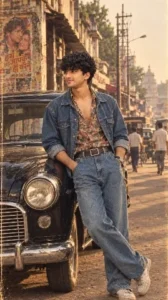
Use my uploaded photo as the only identity reference and create an ultra-realistic cinematic portrait inspired by Indian photography from the 1990s.
Preserve my exact face, facial structure, eyes, nose, lips, jawline, natural skin tone, hairstyle characteristics, age and recognizable personal features.
Do not beautify, whiten, slim, reshape or replace my face.
Show me leaning confidently against a classic black vintage car on an authentic old Indian street. Place both hands naturally inside my trouser pockets, keep my shoulders relaxed and position one leg slightly forward.
Dress me in a faded blue denim jacket with rolled sleeves over an open multicolor retro-patterned shirt. Add high-waisted relaxed faded-blue jeans, a leather belt with a large metallic buckle and a vintage wristwatch.
Give me a thick, voluminous 1990s Bollywood-inspired hairstyle.
Place part of the black car in the lower-left portion of the composition. Give it a rounded vintage body, chrome grille and circular headlamp with realistic metal reflections.
Build the street using weathered buildings, old shops, faded posters and period-appropriate older vehicles. Exclude obvious modern elements.
Use vertical 4:5 near-full-body framing with the subject centered at a natural eye-level camera angle.
Light the scene with warm golden sunlight, soft shadows and slight atmospheric haze. Apply muted warm tones, analog grain, restrained dust, soft halation, mild vignette and gently faded blacks.
The image should resemble a genuine 1990s film-camera photograph rather than a modern digital photograph with an artificial retro preset.
Avoid CGI appearance, plastic skin, malformed hands, extra fingers, additional people, modern objects, text and watermarks.
Prompt 6: Late-1980s Indian Lifestyle Portrait
Use this for a more casual retro portrait in a college, home, or street environment.
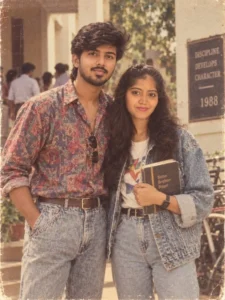
Use my uploaded photograph as the identity reference and recreate the same person as though they were genuinely photographed in India in the late 1980s.
Preserve the same recognizable face, natural skin tone, body shape, smile, age and overall personal identity with high accuracy.
Style the person in fashionable late-1980s clothing such as high-waisted jeans combined with a printed shirt or denim jacket, tasteful retro accessories and a naturally voluminous period hairstyle.
Place the subject in a believable Indian setting appropriate to the era, such as a college area, modest home environment or old street.
Use warm faded film colors, gentle analog grain, slightly soft vintage focus, realistic skin texture and natural photographic lighting.
The finished image should feel like an authentic photograph taken around 1988 rather than a modern digital portrait with a heavy retro filter.
Avoid facial changes, artificial skin smoothing, modern visual elements, extreme color grading, cartoon effects, text, logos and watermarks.
How to Create an 80s or 90s Retro AI Photo
The basic generation process is similar for all six prompts.
Step 1: Choose a Suitable Portrait
Pick an image in which your face is easy to recognize.
For the prompts that generate near-full-body images, it helps if the original image provides enough information about your build and proportions.
Step 2: Open Your AI Image Tool
Open an image-generation or image-editing tool that supports uploaded reference photos.
Upload your selfie or portrait.
For the couple prompt, upload the composition reference and both identity photos in the order described by the prompt.
Step 3: Copy One Prompt
Choose the visual style you want and copy only that prompt.
Avoid pasting multiple retro prompts together. Each prompt has a different pose, outfit, and composition.
Step 4: Generate the Image
Paste the prompt and start generation.
When aspect-ratio controls are available, use the ratio specified by the chosen prompt.
Prompt 1 and Prompt 5 are designed around 4:5 portrait compositions, while Prompt 4 uses a 9:16 vertical couple composition. Pasted text
Step 5: Inspect the Details
Before saving the final version, check:
- Face similarity
- Hands and fingers
- Hairstyle
- Clothing
- Car shape
- Body proportions
- Vintage props
- Modern objects that should not be present
- Skin texture
- Film grain intensity
If the identity has changed noticeably, regenerate before moving on.
How to Use the Retro Photos With a CapCut Template
AI generation creates the retro still image. A CapCut template can then be used to turn one or more finished photos into a short reel with music, transitions, zooms,s or slow-motion-style effects.
The reference article describes a template workflow where users open a template, select their photo or video, allow the edit to process, ss and then export the finished result. Pasted text
A practical workflow is:
- Generate and save your preferred retro AI photo.
- Open the CapCut template you want to use.
- Choose Use Template where that option is available.
- Select the generated retro photo or other required media.
- Check the preview before exporting.
- Make sure the face is not cropped badly by automatic zoom effects.
- Adjust or replace the media if the template does not frame the portrait correctly.
- Export using the resolution and frame rate appropriate for your intended social platform.
Template availability, features, res, and export options can vary by device, region, and current CapCut configuration.
How to Select the Best Photo for Retro AI Editing
The reference recommends using a clear front-camera photo where the face is visible and separate photos of both people when making a couple image. Pasted text
For stronger results, focus on these factors.
Use a Clearly Visible Face
The AI needs enough facial information to preserve your identity.
Avoid:
- Extreme motion blur
- Tiny faces
- Strong beauty filters
- Sunglasses covering the eyes when the final prompt does not require them
- Hands covering major parts of the face
- Very dark underexposed selfies
Use Separate Photos for Couples
For Prompt 4, use one clear identity photo for each person.
Do not use a crowded group photo and expect the model to reliably determine which two identities should be transferred.
Match the Pose Where Possible
The reference does not need to match the final pose exactly, but a similar body angle can reduce the amount of reconstruction required.
For example, a standing portrait is often a more useful starting point for a full-body vintage-car edit than an extreme close-up selfie.
Tips for More Authentic Retro Results
Do Not Make the Image Too Sharp
Real analog-style photography should not look aggressively sharpened.
Detailed facial features are useful, but excessive edge sharpening can make the image feel modern.
Keep Film Grain Controlled
Grain should support the old-film appearance without destroying facial detail.
A light, irregular texture usually looks more convincing than heavy digital noise.
Remove Modern Background Elements
A brand-new SUV, LED billboard, or obviously modern storefront can break the period illusion immediately.
When the goal is an 80s or 90s scene, ask the model to avoid contemporary objects.
Preserve Natural Skin
Retro styling does not require artificial skin smoothing.
Natural pores, slight tonal variation,n and believable highlights usually make the subject look more photographic.
Watch Vintage Cars Carefully
AI models can distort chrome grilles, wheels, doors, headlights, and body panels.
Check the car separately from the person before accepting a generation.
Use the Right Prompt for the Right Result
Prompt 1 is better for an upright 80s street portrait.
Prompt 3 and Prompt 5 are built around a 90s black-car pose.
Prompt 4 is specifically designed for two people.
Prompt 6 is a simpler choice when you want a casual late-1980s lifestyle photograph without a highly specific car composition.
Turn the Retro Photo Into a Cinematic Video
If you want to continue beyond a still image, VM Editor also has an 80s vintage retro AI video editing prompt built around a male rider, classic motorcycle, old Indian bazaar, and golden-hour film styling.
That workflow is a natural next step after creating a retro portrait because it extends the same vintage Indian cinema aesthetic into a multi-shot video sequence.
FAQs
How many retro AI photo prompts are included?
There are exactly six prompts covering different 1980s and 1990s photo concepts.
Can I use my own face in these retro prompts?
Yes. All six prompts are designed around uploaded reference images, with strong emphasis on keeping the person recognizable.
Which prompt should I use for a couple?
Use Prompt 4. It is specifically written for separate male and female identity references while following a third image for composition and styling.
Which prompt creates the most detailed 90s car portrait?
Prompt 5 contains the most specific 1990s styling, including the denim jacket, patterned shirt, high-waisted jeans, vintage wristwatch, Bollywood hairstyle, and black classic car.
Can I create a video from the generated retro photo?
Yes. You can use the completed image in a compatible CapCut template or an image-to-video AI workflow.
Why does my generated face look different?
Identity drift can happen when a prompt changes the hairstyle, clothes, pose, and environment simultaneously. Start with a high-quality reference portrait and regenerate any image where the facial structure changes too much.
Conclusion
A convincing 80s or 90s AI portrait depends on the details that define the period: clothing, hair, vintage vehicles, old Indian streets, warm analog color, film grain, and believable photographic texture.
The six prompts above cover several different directions, from upright 1980s street portraits and magazine-style edits to black-car Bollywood images and a retro couple composition.
Start with a clear reference photo, select the prompt that matches the look you want, and pay close attention to facial identity, hands, clothing, and period accuracy before saving the result. Once the image is ready, you can also use it in a CapCut template or continue into a cinematic retro video workflow.
