


Couple wallpapers have a distinct visual appeal when the image combines realistic facial details, intimate framing, soft lighting, and a phone lock-screen composition. AI image editing makes it possible to recreate several versions of this style from your own reference photos.
This collection includes four original AI couple aesthetic wallpaper prompts covering romantic close-ups, an iPhone lock screen, a playful Android lock-screen pose, and a dreamy late-night selfie. Each prompt is designed to keep the supplied identity and natural appearance as consistent as possible while changing the overall composition.
These edits work especially well as phone wallpapers, profile images, couple posts, or personal photo projects.
What Makes This Couple Wallpaper Style Different?
The main idea is not simply putting two people into the same picture. The prompts use specific photographic instructions to control:
- Facial identity and recognizable features
- Couple positioning and body language
- Close-up or full-body framing
- Warm cinematic or flash lighting
- Background blur and bokeh
- iPhone or Android lock-screen elements
- Natural skin texture and facial proportions
- Vertical 9:16 wallpaper composition
For better identity consistency, use clear reference photos where the face is visible and not heavily covered by sunglasses, shadows, filters, or extreme angles.
AI Couple Aesthetic Wallpaper Prompt for Romantic Close-Up
This first concept focuses on an intimate extreme close-up. The two faces occupy most of the frame, with their eyes becoming the visual focal point. It works especially well for a romantic wallpaper with a soft, cinematic atmosphere.

iPhone Couple Lock-Screen Wallpaper Prompt
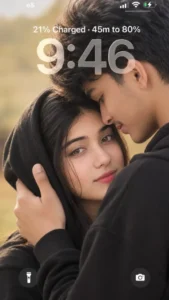
The second concept turns a couple reference photo into a realistic iPhone-style lock-screen wallpaper. The emphasis is on maintaining the two supplied identities, recreating a natural embrace, and adding the visual structure of a phone lock screen.
Android Couple Aesthetic Lock-Screen Prompt
The third edit uses a more playful full-body composition. Instead of a conventional embrace, the couple faces one another with mirrored body language, creating a visually balanced wallpaper.

Dreamy Late-Night Couple-Style iPhone Wallpaper
The fourth concept has a different mood. It is built around a late-night iPhone selfie aesthetic, with direct flash, warm highlights, subtle motion softness, and a darker background. It can also be adapted for a single-person wallpaper when only one reference image is available.

How to Create an AI Couple Aesthetic Wallpaper
The workflow is straightforward, although the exact buttons and available image features can differ between AI tools and accounts.
- Open your preferred AI image-generation or editing tool.
- Start an image-creation or image-editing session.
- Upload the reference photo or photos required by the selected prompt.
- For a two-person edit, clearly identify which reference belongs to each person when the prompt requires separate identities.
- Copy one of the prompts above.
- Paste the complete prompt into the image-generation field.
- Submit the request and wait for the generated image.
- Review the face, hands, clothing, pose, background, and lock-screen details.
- If the result changes important identity details, use a clearer reference image and regenerate.
- Save the final image after checking the 9:16 composition.
How to Reduce Face Changes in AI Couple Edits
Face consistency depends heavily on the quality and suitability of the reference image. A prompt can describe identity preservation, but the reference itself still matters.
For better results:
- Use a sharp, well-lit original photograph.
- Keep the face clearly visible.
- Avoid heavily filtered selfies.
- Avoid reference photos where the face is extremely small.
- Use a consistent front or three-quarter facial angle when possible.
- Avoid uploading several conflicting photos of the same person unless the tool specifically supports multiple references.
- Tell the AI to preserve facial structure and recognizable features rather than asking it to “improve” or beautify the person.
- Check the eyes, nose, jawline, hairstyle, and skin tone after generation.
A stronger reference generally gives the model more useful visual information to work from, but no prompt can guarantee perfect identity preservation in every generation.
Tips for Better Couple Wallpaper Results
Keep the Composition Simple
Wallpaper images have limited visual space, particularly around the upper section where phone notifications and clock elements may appear. A clean composition usually works better than a background filled with unrelated objects.
Use High-Quality Reference Photos
Sharp faces and natural lighting give the model more useful information. Very dark or blurry source images can make facial consistency harder.
Match the Prompt to Your Reference
If the original photo shows one person from the side but the prompt demands a straight-on portrait, the AI may need to reconstruct significant facial and anatomical information. Whenever possible, use references that are reasonably compatible with the requested pose.
Check Hands and Facial Details
Couple compositions involving touching hands, fingers near the lips, or close facial contact can produce anatomical errors. Always inspect these areas before using the final image.
Keep 9:16 for Phone Wallpapers
A 9:16 composition gives the image the vertical proportions expected by most smartphone wallpaper layouts. It also gives the model clearer instructions about how much space should be available above and below the subjects.
Common Problems and Fixes
The Face Looks Different
Try a clearer reference image and reduce unnecessary changes to hairstyle, facial structure, or age. The prompt should explicitly prioritize identity preservation.
The Couple’s Pose Is Incorrect
Pose-heavy prompts require precise spatial instructions. Describe the position of each person, their hands, body direction, and the relationship between them instead of relying only on phrases such as “romantic couple.”
Lock-Screen Text Looks Wrong
AI-generated text and interface elements can be inconsistent. If exact phone UI details are important, treat the generated photograph and the final lock-screen overlay as separate elements during post-production.
The Image Looks Too Artificial
Reduce overly polished language and prioritize realistic photographic characteristics such as natural pores, believable lighting, realistic depth of field, and authentic camera behavior.
The Wallpaper Crops the Couple
Keep important facial and body areas away from the extreme edges of the 9:16 frame. Ask for a vertical smartphone composition from the beginning rather than cropping a landscape image afterward.
FAQs
Can I use these prompts for both boys and girls?
Yes. The concepts can be adapted for different subjects. The identity-preservation instructions are particularly useful when you are working from your own reference photos.
Can these prompts create a couple wallpaper from two separate photos?
Yes. The second and third concepts are specifically structured around separate male and female reference identities. Make sure the editing tool supports multiple image references.
Why does AI sometimes change the face?
AI image generation reconstructs visual information rather than simply copying a face pixel-for-pixel. Poor-quality references, difficult poses, extreme angles, and major changes to the original appearance can all make identity consistency more difficult.
What aspect ratio should I use for a phone wallpaper?
The prompts in this article use 9:16, which is a practical vertical format for smartphone wallpaper compositions. The ideal final resolution can vary depending on the phone and editing workflow.
Can I change the lock-screen time and icons?
Yes. The prompt can describe different times or interface details, but generated text and icons may not always be perfectly accurate. For exact UI reproduction, a final manual overlay can provide more reliable results.
Can I use these prompts for Instagram posts?
Yes. The generated images can be repurposed for social posts, Stories, profile images, or other personal creative uses. You may need to change the aspect ratio if the destination platform requires a different format.
Conclusion
AI couple aesthetic wallpapers work best when the prompt clearly controls identity, composition, lighting, pose, and phone-screen proportions. The four prompts above cover several different looks, from an intimate eye-to-eye portrait to realistic iPhone and Android lock-screen concepts.
For the most consistent result, start with clear reference photos, use the prompt that matches the composition you want, and carefully inspect the generated face, hands, clothing, and background before saving the final wallpaper.
