


AI music aesthetic photo editing combines a personal portrait with a dark cinematic room, dramatic silhouette lighting and a large glowing music-player interface. The result resembles a premium editorial music photograph rather than a basic photo with text placed over it.
The main visual idea is simple: your original appearance remains recognizable while you sit naturally on a chair inside a nearly black room. Behind you, a large illuminated music panel displays album artwork, song and artist information, a progress bar and familiar playback controls. Warm light from the panel then spills realistically onto the room and subject.
This guide includes two AI music aesthetic photo editing prompts for the same core style, along with instructions for using your own photo, customizing the song details and reducing unwanted face changes.
What Is an AI Music Aesthetic Photo Edit?
A music aesthetic portrait combines photography with elements normally associated with a digital music player.
Instead of simply adding a screenshot of a music app over the photo, the prompt asks the AI to make the player look like a physical illuminated panel mounted on the wall.
The visual style generally includes:
- A dark minimalist room
- One person seated on a simple chair
- Side or three-quarter camera framing
- Strong silhouette treatment
- Soft rim lighting around the body and hair
- A large glowing music-player panel
- Album artwork
- Song and artist information
- Music playback controls
- Deep blacks and warm highlights
- Subtle floor reflections
- Cinematic low-key photography
The most convincing results depend on realistic light interaction. The glowing panel should illuminate nearby surfaces instead of appearing like a flat graphic pasted onto the wall.
What You Need Before Creating the Image
Prepare a clear reference photo before using either prompt.
You will need:
- One clear selfie or portrait
- Visible facial features
- Clearly visible hairstyle
- Your preferred original outfit
- The song name you want to display
- The artist name
- Album artwork if you want a specific cover
- One of the two prompts below
If you upload album artwork separately, make it clear which image represents you and which image is the cover artwork.
For example:
- Image 1: identity reference
- Image 2: album artwork
This reduces the chance that the AI will confuse the two images.
Prompt 1: Dark Music Player Aesthetic Portrait
This prompt creates a seated cinematic silhouette with a glowing wall-mounted music interface behind the subject.
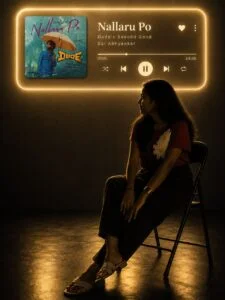
Use my uploaded portrait as the strict identity, hairstyle, clothing and body reference. Preserve the same recognizable person, facial structure, facial features, natural skin tone, hairstyle, body proportions and original outfit.
Do not replace, redesign, beautify or substantially modify the person or clothing.
Create a cinematic vertical 9:16 portrait in a dark minimalist room. Place the person sitting naturally on a simple chair in a relaxed, elegant position.
Photograph the subject primarily from a side or three-quarter profile angle so the body appears mostly as a dramatic silhouette.
Keep the sitting posture anatomically realistic with natural shoulders, arms, hands, legs and body proportions.
Install a large futuristic music-player panel on the wall behind the subject. Give the panel a thin warm-white to soft-golden neon border that produces believable light spill onto the surrounding wall, floor and nearby edges of the subject.
Inside the panel, place the supplied album artwork on the left side.
On the right side, create a clean modern music-player interface displaying:
Song: [SONG NAME]
Artist: [ARTIST NAME]
Include a music progress bar, heart icon, menu icon, shuffle control, previous button, large central play/pause control, next button and repeat control.
Keep the room almost completely dark. Use subtle warm rim light from the music panel to outline the person’s hair, shoulders and body without overexposing the silhouette.
Add restrained reflections and soft shadow detail on the floor. The glowing panel must feel physically present in the room rather than digitally pasted into the scene.
Use premium cinematic low-key photography with deep blacks, warm ambient highlights, realistic skin texture, natural body proportions, subtle film grain, smooth tonal transitions and professional editorial composition.
Maintain photorealistic detail and realistic depth of field.
Avoid facial changes, incorrect anatomy, malformed hands, extra fingers, altered clothing, exaggerated neon, excessive floor reflections, unreadable random text outside the requested player, cartoon styling, unrelated objects, logos and watermarks.
Final composition: cinematic vertical 9:16 music aesthetic portrait.
Prompt 2: Cinematic Music Listening Silhouette
The second source prompt targets essentially the same visual result. This version keeps that concept intact while using independently written instructions and slightly stronger controls for the interface, lighting and subject consistency.
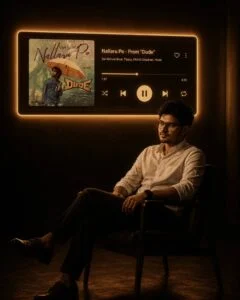
Transform my uploaded photo into an ultra-photorealistic dark music-aesthetic portrait while using the uploaded person as the exact identity reference.
Retain the same recognizable face, facial proportions, hairstyle, natural skin tone, physique, body proportions and original clothing.
Do not replace the subject with a different person or redesign the outfit.
Place the person on a simple chair inside a minimal dark room. Position the chair naturally in front of and slightly offset from the illuminated music display.
Use an elegant three-quarter side profile. Keep most of the subject dark while a narrow warm rim light defines the hair, shoulders, arms and body contour.
Keep the pose calm and realistic rather than exaggerated or fashion-model-like.
Behind the seated subject, create one large rectangular futuristic music interface physically mounted to the wall.
Surround its outer edge with a restrained warm white and soft golden glow. Let this light illuminate the nearby wall and create subtle environmental reflections.
Display the supplied album cover prominently on the left side of the panel.
On the opposite side, show:
[SONG NAME]
[ARTIST NAME]
Add a believable playback timeline or progress bar together with heart, options menu, shuffle, previous, large play/pause, next and repeat controls.
Organize all interface elements cleanly with realistic spacing and visual hierarchy rather than filling the panel with unnecessary graphics.
Keep the surrounding room almost black with only faint visibility in the floor and wall surfaces.
Add soft shadows, subtle floor reflections and realistic light falloff from the display. Maintain deep blacks without crushing all photographic detail.
Use vertical 9:16 framing, professional editorial composition, cinematic low-key exposure, realistic skin where visible, natural fabric detail, subtle optical depth of field and very light film grain.
The final image should look like a professionally photographed music campaign or album-listening editorial rather than an AI illustration.
Avoid facial identity drift, changed hairstyle, changed clothing, distorted chairs, malformed limbs, extra fingers, excessive neon, duplicated player controls, random decorative text, cartoon effects, unrelated logos and watermarks.
Final output: photorealistic vertical 9:16 cinematic music aesthetic portrait.
How to Create the AI Music Aesthetic Photo
ChatGPT Images can create new images and edit existing uploads. OpenAI’s current guidance also recommends being explicit about what should change and what should remain fixed when editing an existing photo. OpenAI Help Center
Step 1: Choose a Clear Reference Photo
Select a photo where your face and hairstyle are clearly visible.
A clean portrait gives the model more information about your identity than an image with:
- Heavy motion blur
- Strong beauty filters
- Very dark facial lighting
- Sunglasses covering the eyes
- A tiny face in the frame
- Hair covering most facial features
Step 2: Upload Your Photo
Upload your portrait as the main identity reference.
If you want a specific album cover behind you, upload that separately.
Be clear about which file has which purpose.
For example:
- Image 1 = my identity and outfit
- Image 2 = album cover only
OpenAI also recommends clearly describing the relationship between multiple uploaded images when using them together. OpenAI
Step 3: Customize the Song Information
Before using the prompt, replace:
[SONG NAME]
with your preferred song title.
Then replace:
[ARTIST NAME]
with the correct artist name.
Do not leave the placeholders unchanged unless you intentionally want those placeholder words to appear.
Step 4: Copy One Prompt
Choose either Prompt 1 or Prompt 2.
Because both target the same core aesthetic, you do not need to combine them. Combining two long versions of the same instructions can make the request unnecessarily repetitive.
Step 5: Generate the Image
Paste the prompt and ask for the final image.
Choose 9:16 vertical if your image interface provides aspect-ratio controls. Current ChatGPT Images documentation says uploaded images can be edited through written instructions and aspect ratio can also be specified or selected. OpenAI Help Center
Step 6: Check the Music Interface
Image models can require additional iterations when generating small interface text.
Check:
- Song spelling
- Artist spelling
- Album artwork
- Progress bar
- Player controls
- Duplicate icons
- Panel proportions
- Face consistency
If only the song title is wrong, request a targeted correction rather than regenerating the entire concept from scratch.
How to Fix the Face Change Problem
Face changes are one of the most common problems in reference-based AI photo editing.
The strongest starting point is a clear portrait with visible facial features.
Use a Better Reference Photo
Avoid beginning with a distant full-body photo if facial accuracy is the main priority.
You can still request a seated full-body composition from a closer reference, while giving the AI better facial information.
Explicitly Protect Identity
Your prompt should clearly state which characteristics must remain unchanged:
- Facial structure
- Eyes
- Nose
- Lips
- Jawline
- Skin tone
- Hairstyle
- Age
- Recognizable likeness
Both prompts above include these identity controls.
Do Not Change Everything at Once
If the first generation already has the correct person but the panel needs improvement, ask the AI to modify only the player panel.
OpenAI’s image prompting guidance recommends small, targeted revisions and explicitly stating which parts should remain unchanged. OpenAI
Avoid Unnecessary Beauty Instructions
Instructions such as “perfect face,” “flawless model,” or “extremely beautiful” can encourage the model to reinterpret the original facial structure.
For identity-based edits, natural skin and recognizable facial proportions are usually more useful instructions.
How to Make the Music Player Look More Realistic
Treat the Panel as a Physical Object
The panel should appear mounted to the wall rather than floating in front of it.
It needs:
- Correct perspective
- Realistic wall contact
- Light spill
- Shadow interaction
- Consistent depth
Keep the Neon Glow Controlled
Too much glow can remove detail from the interface and create an artificial nightclub appearance.
A narrow warm edge light usually gives the composition more contrast.
Leave Most of the Room Dark
The music interface is the visual light source.
If the entire room is brightly illuminated, the silhouette effect becomes much weaker.
Keep Floor Reflections Subtle
The floor can reflect a small amount of warm light, but a mirror-like floor may look unnatural unless the material clearly supports that reflection.
Use Simple Player Text
Short song and artist names are generally easier to fit into the panel than several lines of additional text.
Choosing the Best Photo for This Edit
A seated source photo is not required.
The AI can reconstruct the seated pose, but your reference should still provide a clear view of your identity and clothing.
If keeping the original outfit is important, choose an image where:
- The shirt or top is visible
- Important colors are clear
- Sleeves are not hidden
- Accessories are visible
- Clothing is not heavily covered by another object
If the source image provides incomplete clothing information, the model may need to invent missing details.
Related Background Editing Technique
This music-player edit effectively places your portrait into a completely new dark environment.
If you want to experiment with additional locations after creating this image, the viral background AI photo editing prompts explain how to preserve identity while matching a person to a different background’s lighting, shadows, scale and perspective.
The same principles are useful here, particularly when you want the warm player light to interact naturally with the person.
Tips for Better AI Music Aesthetic Photos
Keep the Original Outfit
If your goal is to make the final image recognizable as your photo, avoid unnecessary wardrobe changes.
Use One Clear Lighting Direction
The glowing panel should be the dominant warm source. Adding unrelated bright lights from several directions can make the scene visually inconsistent.
Protect the Hairstyle
Rim lighting often emphasizes the hair outline. If the AI changes the hairstyle, that difference can become especially noticeable against a dark background.
Check Hands and Chair Geometry
Even in a dark image, unrealistic fingers, arm positions or chair legs can make the edit feel artificial.
Do Not Assume High Detail Means Native 8K
Prompts can request fine photographic detail, but actual export dimensions depend on the image tool and its available settings.
Do Not Expect Guaranteed Social-Media Reach
This style can be used for Instagram posts, stories, reels covers and other social content, but no prompt can guarantee views, followers, engagement or virality.
Frequently Asked Questions
How many AI music aesthetic prompts are included?
There are exactly two prompts. Both target the same dark seated music-player aesthetic because the reference article also contains two prompt entries for that concept.
Can I use my own photo?
Yes. Both prompts are designed around an uploaded personal portrait used as the identity and clothing reference.
What aspect ratio should I use?
Use 9:16 vertical for the intended composition.
Can I add my favorite song and artist?
Yes. Replace [SONG NAME] and [ARTIST NAME] before generating the image.
Can I use a specific album cover?
Yes. Upload the album artwork separately where supported and clearly identify it as the cover reference rather than the person’s identity image. Use artwork you have permission to use where applicable.
Why is the text inside my music player incorrect?
Image generation can sometimes produce mistakes in small text or interface elements. If the overall photo is good, request a targeted edit to correct only the song title, artist name or affected interface section.
Conclusion
AI music aesthetic photo editing works best when the scene stays simple: one recognizable person, one chair, one dark room and one carefully illuminated music-player panel. The cinematic effect comes from realistic light spill, deep blacks, controlled rim lighting, subtle reflections and a believable interface rather than excessive visual effects.
Start with a clear personal photo, customize the song and artist information, use one of the two prompts above, and inspect the final image for facial consistency, interface text, anatomy and realistic lighting before using it on social media.
