
Close Menu
Vm Editor

    Subscribe to Updates

    Get the latest creative news from FooBar about art, design and business.

    What's Hot

    ChatGPT All Viral Photo Editing Prompts 2026 – Trending AI Photo Editing Prompts

    November 6, 2026

    Viral AI Girl Diwali Video Editing – Stunning Fireworks Video with Google Flow (2026)

    November 6, 2026

    Viral AI Night Walking Text Video Edit Prompt – Google Flow & CapCut (2026)

    November 6, 2026
    Facebook X (Twitter) Instagram
    Vm EditorVm Editor
    • Home
    • AI Video Editing
    • AI Photo Editing
    • About Us
    • Contact Us
    Vm Editor
    Home»AI Photo Editing»Radha Rani Getup AI Photo Editing Prompts 2026
    AI Photo Editing

    Radha Rani Getup AI Photo Editing Prompts 2026

    Arjun MehtaBy Arjun MehtaOctober 8, 2026No Comments12 Mins Read
    Facebook Twitter Pinterest LinkedIn Tumblr Email
    Share
    Facebook Twitter LinkedIn Pinterest Email

    Radha-inspired photo edits combine traditional Indian fashion, floral details, peacock feathers, Krishna-inspired elements, and cinematic portrait photography. With a suitable reference photo and a detailed AI prompt, you can transform an ordinary portrait into a devotional-inspired artistic look while retaining the person’s recognizable appearance.

    This collection contains six original Radha Rani getup prompts, each designed around a different visual concept. Some focus on Krishna-inspired symbolism, while others create a traditional lehenga portrait, palace-garden scene, or modern studio composition.

    For the best results, begin with a clear photograph where the face is visible and well lit.

    What You Need for a Radha Rani Photo Edit

    You do not need advanced photo-editing experience for this type of AI transformation. The main requirements are:

    • A clear reference photograph
    • A reasonably visible face
    • An AI image-generation or image-editing tool that accepts reference images
    • One of the prompts below
    • A suitable vertical portrait ratio such as 4:5

    The quality of the original reference matters. A sharp image with natural facial features generally gives the AI more useful information than a heavily filtered or blurry selfie.

    Radha Rani-Inspired Krishna Flute Portrait

    The first concept creates a dramatic portrait with a male subject and strong Krishna-inspired visual symbolism. A divine blue hand, flute, peacock feather, and flowing red fabric create the main visual elements.
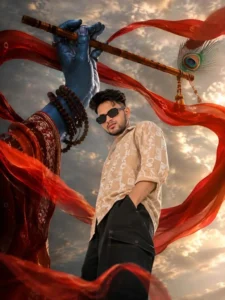
    AI PHOTO PROMPT
    Complete AI Photo Prompt
    Preview shown below
    Create an ultra-realistic cinematic portrait using the uploaded reference photograph to preserve the subject’s recognizable face and natural identity. Show a young man standing confidently with his natural hairstyle and sunglasses, looking slightly upward. One hand rests casually inside his pocket while the other hangs naturally. Dress him in a beige patterned shirt, wide-leg black trousers, and clean white sneakers. Above the subject, introduce a divine blue hand decorated with Rudraksha beads and flowing red cloth, holding a traditional wooden flute crowned with a peacock feather. Long red fabric ribbons should sweep dynamically around the flute and the subject, creating movement without covering the face. Use a dramatic low-angle full-frame DSLR perspective, cinematic golden-and-blue illumination, realistic skin and textile textures, subtle volumetric atmosphere, crisp subject detail, and natural depth. The image should feel devotional, elegant, powerful, and photographic rather than artificial. Preserve believable anatomy, realistic proportions, and natural facial detail. No distorted hands, duplicate limbs, artificial skin, cartoon styling, text, or watermark. Portrait composition, 4:5 aspect ratio, high-detail photographic finish.

    Young Woman With Baby Krishna

    The second concept combines a realistic portrait of a young woman with a cute Krishna-inspired 3D character. The contrast between photographic realism and stylized CGI is intentional.
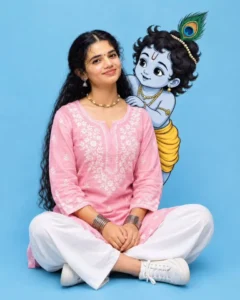
    AI PHOTO PROMPT
    Complete AI Photo Prompt
    Preview shown below
    Create a highly detailed portrait of a beautiful young Indian woman seated cross-legged against a clean light-blue studio background. Preserve the woman’s recognizable facial appearance from the uploaded reference while keeping her natural proportions and features. Dress her in a soft pink embroidered kurta decorated with delicate white floral patterns and lace detailing, paired with white flared trousers and white sneakers. Give her long, naturally wavy dark hair, a small bindi, subtle makeup, and a gentle smile directed toward the camera. Position her right hand naturally beneath her chin. Behind her, include a charming stylized baby Lord Krishna character with large expressive eyes, curly dark hair, a peacock-feather crown, yellow-and-blue traditional clothing, pearl necklace, and delicate golden jewelry. Krishna should playfully place a small peacock feather into the woman’s hair. Keep the woman photographic and realistic while giving the Krishna character a polished, cute 3D animated appearance. Use soft studio illumination, believable shadows, fine fabric detail, warm devotional atmosphere, clean composition, sharp focus, and a high-resolution portrait finish. Avoid distorted anatomy, duplicated characters, unnatural facial changes, excessive skin smoothing, text, and watermarks. Portrait ratio 4:5.

    Minimal Radha-Inspired Studio Portrait

    This version takes a cleaner editorial approach. It uses a light background, flowing hair, a chiffon lehenga, floral jewelry, and peacock-feather symbolism instead of a heavily decorated setting.
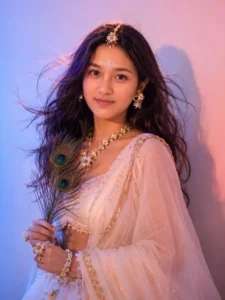
    AI PHOTO PROMPT
    Complete AI Photo Prompt
    Preview shown below
    Create a serene, ultra-realistic portrait of a young Indian woman styled in a graceful Radha-inspired aesthetic. Preserve the person’s natural facial identity and recognizable features from the uploaded reference. Give her long, flowing brown-black wavy hair with a soft natural movement and subtle traditional forehead detailing inspired by Indian mural artistry. Dress her in an elegant chiffon lehenga with delicate golden shimmer, keeping the styling refined rather than overly ornate. Add minimal floral jewelry and place tasteful peacock feathers in one hand as a symbolic Krishna-inspired detail. Use a clean white wall as the primary background with a subtle gradient transition of warm blue and muted red light. Let the colored illumination gently reflect across the subject to create a dreamy cinematic atmosphere. Keep her expression peaceful and graceful, with realistic skin texture, natural makeup, believable hair strands, refined fabric detail, soft shadows, and professional portrait photography. Maintain authentic facial proportions and avoid artificial beautification, distorted hands, excessive jewelry, text, logos, or watermarks. Vertical 4:5 portrait composition with a polished editorial finish.

    Royal Yellow Radha-Krishna Inspired Fashion Portrait

    The fourth prompt is the most elaborate studio-fashion concept in this collection. It combines a mustard-yellow lehenga, gold jewelry, a floral crown, a peacock feather, a flute, and contrasting blue-and-red studio lighting.
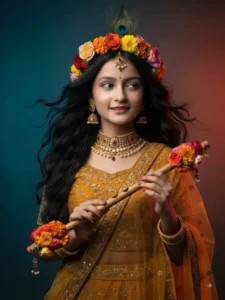
    AI PHOTO PROMPT
    Complete AI Photo Prompt
    Preview shown below
    Create a high-quality ultra-realistic studio portrait of a young Indian woman styled as a modern Radha-Krishna-inspired muse. Preserve her recognizable identity from the uploaded reference while keeping her natural facial structure and proportions. Dress her in a rich mustard-yellow embroidered lehenga featuring intricate golden zari work and an elegant sheer net dupatta. Style her with luxurious traditional jewelry, including a heavy gold choker, layered pearl-and-gem necklace, matching jhumka earrings, multiple gold bangles, and a delicate maang tikka with a red gemstone. Keep her long, voluminous black hair naturally wavy and slightly wind-swept. Add a vibrant floral crown made from fresh roses and marigolds in red, orange, yellow, and pink, with a prominent peacock feather positioned at the top. Add a small black bindi and have her gently hold a decorated wooden bansuri flute with floral arrangements at both ends. Give her a soft, graceful smile while her gaze turns slightly off-camera. Use cinematic dual-tone studio lighting: cool blue illumination from one side and warm red-orange light from the opposite side, with gentle front fill highlighting her face and jewelry and subtle rim lighting separating the hair from the background. Create a smooth studio gradient transitioning from deep teal-blue into warm red-orange. Emphasize realistic skin texture, natural makeup, jewelry detail, shallow depth of field, soft bokeh, and refined Indian editorial fashion photography. Use a full-frame DSLR portrait aesthetic with an 85mm lens and wide-aperture depth. Avoid plastic skin, excessive retouching, distorted hands, malformed jewelry, duplicate accessories, text, and watermarks. Vertical 4:5 portrait composition.

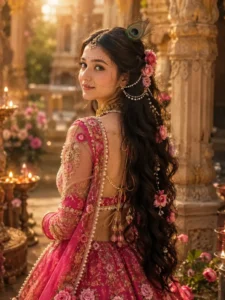
    Pink Radha-Inspired Royal Garden Portrait

    The fifth concept moves away from a studio background and places the subject in a royal garden setting. The three-quarter back pose and over-the-shoulder expression create a softer, more cinematic portrait.
    AI PHOTO PROMPT
    Complete AI Photo Prompt
    Preview shown below
    Create an ultra-realistic dreamy cinematic portrait of a beautiful young Indian woman styled in a royal Radha-inspired aesthetic. Preserve the person’s recognizable facial identity from the uploaded reference and maintain natural facial proportions. Dress her in an elegant royal pink lehenga richly decorated with delicate pearl work, golden floral embroidery, and pink rose accents. Her very long dark wavy hair should flow naturally and be decorated with pink flowers, fine pearl strands, and a tasteful peacock feather. Add traditional Indian jewelry and refined Radha-inspired makeup without changing her natural identity. Position her in a graceful three-quarter back pose, turning her head over one shoulder toward the camera with a soft, gentle smile. Place her inside an ancient royal palace garden featuring carved architectural pillars, flowers, traditional diyas, and warm late-afternoon sunlight. Use dreamy golden-hour illumination, natural atmospheric depth, soft background bokeh, realistic fabric and jewelry textures, and an elegant cinematic color grade. The scene should feel serene, graceful, festive, and photographic rather than artificial. Avoid excessive beauty filters, distorted anatomy, extra jewelry, duplicated flowers, artificial skin, text, and watermarks. Portrait composition, 4:5 aspect ratio.

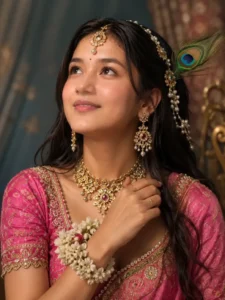
    Serene Radha Portrait With Kundan Jewelry

    The sixth prompt focuses on a traditional portrait rather than an elaborate environment. The upward gaze, Kundan jewelry, pearl hair details, and pink clothing create a graceful Radha-inspired fashion look.
    AI PHOTO PROMPT
    Complete AI Photo Prompt
    Preview shown below
    Create a captivating high-definition portrait of a young South Asian woman inspired by the traditional visual aesthetic associated with Radha. Preserve her recognizable facial identity and natural appearance from the uploaded reference image. Give her a serene, joyful expression as she looks gently upward. Style her with elaborate Kundan gold jewelry, including a detailed necklace, matching earrings, and an elegant maang tikka. Decorate her long dark hair with a single peacock feather and delicate pearl strands. Dress her in a beautifully embroidered pink blouse with refined traditional detailing. Add substantial floral jasmine bracelets around her wrists for a fresh festive touch. Use soft natural portrait lighting with subtle highlights across the face and jewelry, realistic skin texture, detailed embroidery, natural hair strands, and shallow depth of field. Keep the overall atmosphere peaceful, graceful, devotional-inspired, and elegant. The photograph should look like a professionally captured traditional Indian portrait rather than an artificial render. Maintain authentic facial proportions and avoid facial replacement, plastic skin, excessive makeup, distorted jewelry, malformed hands, text, logos, and watermarks. Use a vertical 4:5 portrait composition with a refined cinematic photographic finish.

    How to Create a Radha Rani Getup Photo With AI

    The general process is simple:

    1. Choose a clear portrait that you want to transform.
    2. Open an AI image creation or editing tool that supports reference images.
    3. Upload your photo.
    4. Select one of the six prompts according to the look you want.
    5. Copy the complete prompt.
    6. Paste it into the image-generation or editing field.
    7. Submit the request.
    8. Check whether the face, clothing, pose, jewelry, and background match the requested concept.
    9. If important details are incorrect, regenerate using a clearer reference or adjust the relevant instructions.
    10. Save the final portrait once the result looks natural.

    How to Get Better Face Consistency

    One of the most common problems with AI portrait editing is an unwanted change to the person’s face. The reference image plays an important role in reducing this problem.

    Use these practices:

    • Choose a sharp, high-resolution reference.
    • Make sure the face is clearly visible.
    • Avoid heavily filtered selfies.
    • Avoid photographs where the face is mostly hidden by hair, shadows, or accessories.
    • Use a reference with natural facial proportions.
    • Do not ask the AI to significantly change the person’s age or facial structure.
    • Include explicit identity-preservation instructions in the prompt.
    • Check the generated eyes, nose, lips, jawline, and skin tone before using the final image.

    Perfect identity preservation cannot be guaranteed because different AI models handle reference images differently.

    Tips for More Realistic Radha-Inspired Portraits

    Keep Traditional Details Balanced

    Peacock feathers, floral crowns, jewelry, flute elements, and traditional clothing can quickly make an image visually crowded. Use a prompt where the main subject remains the clear focal point.

    Match the Reference to the Pose

    If your reference shows a straight-on portrait but the prompt requests a three-quarter or over-the-shoulder pose, the AI has to reconstruct more of the face and body. A reference with a compatible angle can produce a more coherent result.

    Use Natural Facial Retouching

    Avoid excessive beauty instructions. Natural pores, realistic skin texture, and believable lighting usually make the generated portrait feel more photographic.

    Check Jewelry and Hands

    Detailed jewelry and hand-held objects such as a flute can sometimes create inconsistencies. Inspect fingers, bracelets, earrings, necklaces, and the object being held before publishing the image.

    Choose the Right Aspect Ratio

    Most of these concepts use 4:5 portrait framing, which works well for a traditional social-media portrait. If you need a phone wallpaper instead, a 9:16 composition is generally more appropriate.

    FAQs

    What kind of photo should I upload for a Radha Rani edit?

    Use a clear portrait with the face visible, good lighting, and minimal filters. A sharp reference gives the AI more visual information about the person’s natural features.

    Can boys use these Radha-inspired prompts?

    Yes. The collection includes a male Krishna-inspired concept as well as several female Radha-inspired portraits. The appropriate prompt depends on the visual style you want to create.

    Can I change the lehenga color?

    Yes. You can adapt the clothing instructions while keeping the rest of the composition intact. For example, a pink, yellow, or other traditional color can be specified depending on the desired result.

    Why does the generated face sometimes look different?

    AI image tools reconstruct the image rather than simply copying the original photograph. Major pose changes, poor references, unusual angles, and heavy transformations can affect identity consistency.

    Which prompt is best for a traditional Radha look?

    The fourth and fifth prompts provide the most elaborate traditional styling, while the third prompt offers a simpler modern Radha-inspired aesthetic.

    Can I use these images as a profile picture?

    Yes. You can crop or resize the generated portrait for a profile image, although a 1:1 version may work better than the original 4:5 composition, depending on the platform.

    Conclusion

    Radha Rani-inspired AI photo editing can create very different visual results depending on the styling, pose, background, and Krishna-related elements included in the prompt. The six prompts in this article cover dramatic Krishna symbolism, a playful Krishna character, minimalist studio photography, royal traditional fashion, a palace-garden portrait, and a serene Kundan jewelry look.

    For the strongest results, start with a clear reference photo and choose the prompt that closely matches the pose and style you want. Then review the generated face, hands, clothing, jewelry, and other details before using the finished image.

    Share. Facebook Twitter Pinterest LinkedIn Tumblr Email
    Arjun Mehta
    • Website

    Arjun Mehta is a contributing writer at VM Editor, covering AI video prompts, generative media workflows, and practical creator tools.

    Related Posts

    ChatGPT All Viral Photo Editing Prompts 2026 – Trending AI Photo Editing Prompts

    November 6, 2026

    AI Luxury Fashion Portrait Photo Editing Prompts (2026)

    October 20, 2026

    Trending AI String Art Video Editing Prompt for Reels (2026)

    October 20, 2026
    Add A Comment
    Leave A Reply Cancel Reply

    Editors Picks

    Viral AI Girl Diwali Video Editing – Stunning Fireworks Video with Google Flow (2026)

    November 6, 2026

    Viral AI Night Walking Text Video Edit Prompt – Google Flow & CapCut (2026)

    November 6, 2026

    Viral Bahubali Funny Comedy AI Reels Edit Prompt – 3 Character Replacement (2026)

    November 6, 2026

    AI Character Replacement in Any Video Editing Prompt Using Google Flow AI (2026)

    November 6, 2026
    Vm Editor
    Facebook X (Twitter) Instagram YouTube
    • Home
    • About Us
    • Privacy Policy
    • Contact Us
    • Disclaimer
    • Terms and Conditions
    • Sitemap
    © 2026 VM Editor. All Rights Reserved

    Type above and press Enter to search. Press Esc to cancel.