


SMTG bandage photo editing is a distinctive AI portrait style built around cinematic environments, muted colors, dramatic body poses, and, in some versions, a fully wrapped head or face. The result can look more like an editorial film still than a standard social-media portrait when identity, lighting, clothing, and composition are handled carefully.
The three prompts in this guide cover different visual concepts. The first places the subject in a windswept grass field with the entire head wrapped in white gauze. The second creates a natural garden portrait while preserving the person’s original appearance and outfit. The third keeps the subject, motorcycle, and pose intact while adding a complete head bandage and replacing only the environment.
The prompts are independently written so you can paste them into a compatible AI image editor while keeping the intended look of each concept.
What Is an SMTG Bandage Photo Edit?
An SMTG bandage edit usually combines a recognizable person with an unusual cinematic treatment in which part or all of the head is wrapped in cloth or medical-style gauze.
The visual impact comes from contrast. The person’s clothing and body remain familiar, while the wrapped head creates a surreal editorial appearance. Cinematic landscapes, fields, motorcycles, haze, and carefully controlled color grading strengthen that effect.
For realistic results, the AI needs clear instructions about what it may change and what must remain untouched.
Important details include:
- Exact identity preservation
- Original body proportions
- Consistent outfit
- Natural hands and arms
- Correct pose
- Realistic gauze texture
- Proper lighting and shadows
- Believable background perspective
- Natural photographic depth
A good prompt should also prevent the AI from unnecessarily changing the person’s face, clothing, motorcycle,e or other important reference details.
What You Need Before Creating the Edit
Prepare a clear reference photo before using the prompts.
For Prompt 1, the reference should clearly show the person’s identity and clothing, especially the blue shirt and white pants described in the concept.
Prompt 2 works best with a clear portrait or full-body photo because the original outfit and natural appearance need to remain recognizable.
Prompt 3 requires an image containing both the person and motorcycle because the prompt is designed to preserve the exact vehicle, pose, and composition while changing the head treatment and background.
For stronger results, use a photo with:
- Good facial visibility
- Clear clothing details
- Natural body proportions
- Visible hands where possible
- Limited motion blur
- Reasonable image resolution
- No extreme beauty filter
SMTG Bandage AI Photo Editing Prompts
Prompt 1: Full Head Bandage in a Windswept Grass Field
This version creates the most recognizable SMTG-style look: a person standing with both arms open in a large field while the entire head is hidden beneath layered white gauze.
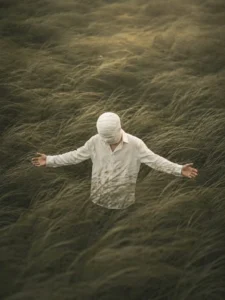
Use my uploaded photo as the strict identity and wardrobe reference. Preserve the same person, natural body proportions, skin tone, blue button-up shirt, white pants and overall physical appearance.
Do not redesign, recolor or replace the clothing. Keep the visible body and outfit consistent with the uploaded reference.
Create a vertical 9:16 cinematic editorial portrait. Place the person standing alone in the center of the frame with both arms stretched naturally outward to the sides and both palms open.
Keep the pose symmetrical, relaxed and emotionally restrained. Maintain realistic shoulders, elbows, wrists, hands and fingers.
Completely cover the entire head and face with continuous layers of clean white cotton gauze or cloth.
The wrapping must cover the forehead, eyes, nose, cheeks, mouth, jaw, ears, hair and complete hairstyle. No hair and no facial features should remain visible.
Keep the natural shape of the human head underneath the wrapping. Use realistic overlapping fabric layers, believable folds, subtle tension and detailed cotton texture.
Place the subject in the middle of an enormous dense field of tall olive-green grass.
The wind pushes the grass strongly in one consistent direction, creating long flowing patterns similar to waves. Let some grass naturally overlap the lower body to create depth without obscuring the main pose.
Use a muted green and earthy-brown cinematic palette with soft diffused natural light, gentle haze, restrained shadows and a quiet atmospheric mood.
Use shallow depth of field, realistic grass movement, natural fabric texture, detailed skin on the visible hands and professional editorial photography.
Keep the outfit, open-arm pose, subject placement and overall composition consistent.
Do not reveal any hair or facial feature through the wrapping. Avoid malformed hands, extra fingers, distorted arms, unrealistic cloth, plastic skin, cartoon styling, text, logos and watermarks.
Final result: ultra-photorealistic cinematic editorial photography with premium high-detail image quality in vertical 9:16 format.
Prompt 2: Cinematic Green Garden Portrait
The second concept is an alternate portrait style rather than a full-head bandage edit. It preserves the person’s exact appearance and clothing while moving them into a lush garden with flowers and warm natural light.
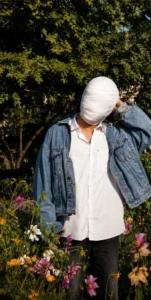
Use my uploaded photo as the only identity and clothing reference for the person.
Preserve the same recognizable face, facial structure, face shape, hairstyle, natural skin tone, body proportions, physique and exact outfit shown in the uploaded reference.
Do not replace, recolor, redesign or restyle any part of the clothing.
Place the person inside a lush cinematic green garden filled with dense trees, layered foliage and colorful natural wildflowers.
Create realistic environmental depth using foreground flowers, middle-ground vegetation and softly separated trees in the background.
Use a relaxed natural standing pose. Raise one hand gently toward the back or side of the head while keeping the other hand lowered naturally near the flowers.
Preserve believable anatomy, realistic fingers, relaxed shoulders and natural body balance.
Create a vertical 9:16 composition with natural eye-level perspective, balanced subject placement and cinematic depth of field.
Use warm natural daylight, authentic sunlight on the subject, realistic shadows, natural hair detail, realistic skin texture and believable clothing texture.
Produce a highly detailed photorealistic DSLR image with clean natural sharpness, subtle background separation and wide tonal range without an artificial HDR appearance.
Keep the photograph modern, natural and cinematic. Do not apply a vintage filter or excessive color grading.
Do not change the person’s identity or outfit. Avoid artificial beauty filters, malformed hands, distorted facial features, unrealistic foliage, excessive blur, text, captions, emojis, stickers, graphics, borders, logos and watermarks.
Prompt 3: Full Face Bandage With Motorcycle and Mountain Background
This prompt is useful when your original photo already contains a motorcycle. The person, vehicle, outfit, and pose remain fixed while the head is wrapped and the environment changes.
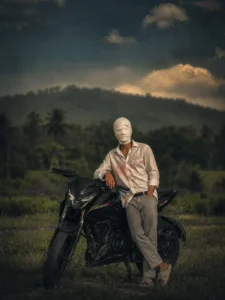
Use my uploaded image as the only reference for the person, motorcycle, outfit, pose, body position and composition.
Preserve the person’s exact body proportions, height, physique, skin tone, posture, hands, arms, legs, shirt, pants, footwear, accessories and every visible clothing detail.
Preserve the exact motorcycle shown in the reference, including its model appearance, overall shape, body panels, color, headlight, wheels, tires, mirrors, handlebars, mechanical details, scale and position.
Do not replace, redesign or modify the motorcycle.
Make only one major change to the person: completely cover the entire face and head with thick, clean, opaque off-white cotton medical-style bandage layers.
Wrap the forehead, eyebrows, eyes, nose, cheeks, mouth, jawline, chin, ears, hair and complete head.
No facial features, facial skin, hair or openings should remain visible.
Use realistic overlapping cloth layers, natural tension, believable folds and detailed cotton fibers while preserving the normal shape of the head beneath the material.
Replace only the original environment with a cinematic outdoor rural landscape.
Include distant mountains, a soft cloudy sky, subtle natural greenery and realistic atmospheric depth.
Match the new environment to the existing subject and motorcycle using physically believable perspective, lighting direction, ground contact and shadows.
Preserve the original camera angle, perspective, framing, person scale, motorcycle scale and overall composition.
Use realistic daylight, natural shadows, shallow depth of field, restrained cinematic color grading, detailed bandage texture, realistic motorcycle materials and a seamless photographic atmosphere.
Do not change the person’s clothing, body, pose, hands, footwear, accessories or motorcycle.
Do not add or remove objects attached to the person or vehicle. Avoid distorted motorcycle components, malformed hands, extra fingers, altered body proportions, artificial skin, cartoon styling, text, logos and watermarks.
Final result: an ultra-photorealistic cinematic DSLR-style image in which the original person and motorcycle remain intact while only the complete head wrapping and outdoor environment are changed.
How to Create an SMTG Bandage Photo With AI
The basic workflow is simple, but choosing the correct reference image matters.
Step 1: Select the Right Photo
Choose the prompt first, then choose a photo that fits that concept.
For the open-arm grass-field image, a standing or full-body reference is useful.
For the motorcycle version, choose a photograph in which the motorcycle, body pose, and clothing are clearly visible.
Step 2: Upload Your Reference Image
Open an AI image editor that supports image references and upload your photo.
If your tool supports multiple reference images and you are trying to reproduce a particular background or composition, upload those references clearly and explain which image controls identity and which controls the environment.
Step 3: Copy the Matching Prompt
Do not combine all three prompts.
Prompt 1, Prompt 2, and Prompt 3 contain different instructions for pose, clothing, environment,nt and subject treatment. Mixing them can create conflicts.
Step 4: Generate the Image
Paste the chosen prompt and start the generation.
For Prompt 1 and Prompt 2, use a 9:16 vertical composition where your image tool provides aspect-ratio controls.
Prompt 3 should preserve the original composition unless you intentionally want to change it.
Step 5: Inspect the Result
Check the generated image carefully before using it.
Look for:
- Correct body proportions
- Natural fingers
- Original outfit
- Correct motorcycle
- Realistic cloth texture
- Complete face coverage where required
- No exposed hair in Prompt 1
- Natural shadows
- Proper foot placement
- Realistic environmental perspective
Regenerate the image if important details have changed.
How to Make the Bandage Look More Realistic
Keep the Wrapping Opaque
If the prompt calls for a completely wrapped face, the AI should not leave visible eyes, lips, or random gaps.
Tell the model clearly that the fabric is opaque and continuous.
Preserve the Shape of the Head
The bandage should follow the natural head shape.
Poor generations sometimes create an oversized spherical head or unusually flat face area. Regenerate these results rather than trying to hide the problem with stronger blur.
Use Fabric Texture Instead of a Smooth Mask
The wrapping should show overlapping layers, slight creases,ases and woven cotton texture.
A perfectly smooth white surface can look more like a digital mask than real cloth.
Check the Ears and Hairline
The first and third prompts require extensive head coverage. Hair or an uncovered ear appearing through the wrapping can break the intended visual effect.
Keep the Hands Natural
Prompt 1 uses both open hands, which gives the model several fingers to generate.
Inspect both palms carefully for duplicated or missing fingers.
Getting Better Background Replacement Results
Two of the concepts rely heavily on changing or controlling the environment.
If you also create other edits where your original person needs to be placed into a completely different location, our viral background AI photo editing prompts explain how to match lighting, perspective, shadows, and subject scale when combining a portrait with a new background.
For the SMTG motorcycle prompt specifically, pay attention to the relationship between the motorcycle and the ground. The new background should not make the wheels appear to float or sink unnaturally.
Does the AI Need to Change the Face?
Not necessarily.
For the grass-field prompt, the face is intentionally hidden beneath the wrapping, but the person’s body, clothing,g and proportions still need to match the reference.
For the garden prompt, the face remains visible and should stay recognizable.
For the motorcycle version, the bandage covers the face, while the body, motorcycle, leg, and original pose remain unchanged.
That is why the prompts use different identity-preservation instructions depending on the intended result.
Tips for Better SMTG Photo Editing Results
Use High-Quality Reference Images
A clearer source image gives the AI more usable information about clothing, pose, hairstyle, hands, and vehicle details.
Do Not Ask for Too Many Changes at Once
If the motorcycle, person, pose, and clothes already look correct, change only the bandage and background.
The more elements the AI must reconstruct, the greater the risk of unwanted differences.
Keep Cinematic Color Grading Controlled
Muted greens, browns, haze,e and soft contrast can create atmosphere without making the image look artificially filtered.
Avoid crushing shadows or turning skin and clothing unnatural colors.
Check the Outfit After Generation
Even when a prompt says to preserve clothing, small details such as buttons, sleeves, pockets, or colors can change.
Compare the result with the reference before accepting it.
Avoid Treating “8K” as a Guaranteed Export Resolution
Terms such as 8K can communicate a high-detail visual target, but the actual image dimensions depend on the generator and its available output settings.
FAQs
What does an SMTG bandage photo edit look like?
It usually features a cinematic portrait with unusual head or face wrapping, atmospheric surroundings, and strong editorial styling. Some versions use grass fields, motorcycles, or dramatic outdoor backgrounds.
How many prompts are included in this article?
There are exactly three AI photo editing prompts.
Which prompt creates the full bandage grass-field photo?
Use Prompt 1. It places the person in a dense, windswept grass field with both arms open and the complete head wrapped in white cloth.
Which prompt should I use with a motorcycle photo?
Use Prompt 3. It preserves the existing person, motorcycle, outfit, pose, and composition while adding a full head bandage and replacing the background.
Why is my hair still visible through the head wrapping?
AI models may interpret a head wrap too loosely. Use explicit instructions that the bandage must cover the entire hairstyle, hairline, forehead, face, ears, and back of the visible head with no hair exposed.
Conclusion
SMTG bandage AI photo editing works best when the prompt clearly separates the details that should change from the details that must stay untouched.
For the grass-field version, the key elements are the open-arm pose, dense moving grass, muted cinematic atmosphere, and complete white head wrapping.
The motorcycle concept requires even stricter preservation because the person, vehicle, clothing, pose, and camera perspective should stay consistent while only the head treatment and environment change.
Start with a clear reference image, choose the prompt that matches your desired composition, and inspect the final result for realistic hands, fabric, lighting, anatomy, and background integration before using the image.
